Free Shipping on Domestic Orders $75+
The Basics
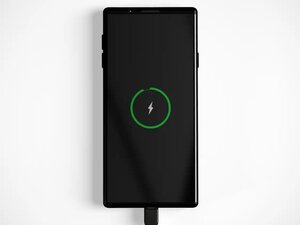
- Restart your phone: A simple restart can resolve temporary issues. Completely turn your phone off for 30 seconds, and try powering it on and see if there is any behavior change.
- Check Battery Settings: If your phone detects a charger, but doesn't charge past a specific percentage, then it is likely that your phone is using a hold charge feature to prevent premature aging of the battery. Try looking in your battery settings for a Hold Charge or Battery Protection setting and turn the setting off.
- Check and try a different charger: A damaged or low-quality charging cable or adapter can prevent the device from receiving the necessary power for fast charging. If your phone supports it, try wirelessly charging your phone. If your phone is charging wirelessly, check the port for any obstructions, or damage. If not, then try checking your phone's software, or replacing the battery.
- Ensure your charging port is clean/lint-free: Lint, dust, or corrosion in the port can block the electrical connection and slow down charging. Try cleaning your charging port.
Causes
Solution: Test with a different power source
All phone chargers are equal, but some phone chargers are more equal than others. Ideally, if your phone's charger has a higher wattage, then it will have the potential to charge faster.
- Avoid using USB ports on laptops or car ports: Often, the power delivered through the USB port on a laptop or from a car's USB port won't deliver the necessary power for fast charging. Try switching to a wall outlet.
- Ensure you are using a verified Fast Charger: Some cheaper chargers might advertise fast charging speed, while not actually providing fast charging wattage. The normal wattage for Fast Charging starts around 18W and normally goes up to 65W, but some can go higher. Check your charger's wattage to ensure it is true fast charging. If the wattage isn't listed on your charger, then you can use this wattage calculator to calculate your charger's wattage.
Solution: Clean your charging port
Consider how frequently you carry your phone in a pocket or bag daily. What else resides in that pocket or bag? If the speaker and microphone grilles at the bottom of your phone are clogged with dust and other debris, your charge port is likely clogged.
- Inspect the port using a flashlight. It is common for bits of lint or rubbish to get caught. They compress into the back of the port with repeated charges.
- If your charge port shows signs of burn or corrosion, skip to the Charging Port Defective section.
- Check the fit of your cable. Does the lightning plug sit flush with the bottom of the phone? If not, it should. If it’s askew or there’s a gap where you can still see the metal of the charger, it’s time for a good cleaning.
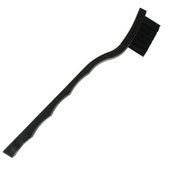
- If there's debris in the port, give it a thorough cleaning: Use a Q-tip or custom swab, a small soft bristle brush, or canned air/eco-friendly alternative to clear stubborn blockages.
Avoid inserting anything metal into the port, as the metal pins inside are easily damaged. Additionally, inadvertently bridging pins together can cause electrical damage.

- 5 - 10 minutesEasy
$2.99
4.9
463 reviews

$109.99
4.6
14 reviews
Solution: Update phone software, or revert to the previous stable release
Poorly optimized or buggy software can drain your battery quickly. If your battery issue started suddenly, it could be due to an app update or a phone patch. The newer version might have resource-intensive features or a bug that unintentionally drains your battery. If your phone consumes a lot of energy, it will appear to be charging slowly, or not charge at all, because the power consumption rate is close to the charge rate. You may also notice that your phone is hot in this case.
- Have any apps been recently updated? Open the Google Play Store app, tap your profile icon in the top right, then select Manage apps & device. Then, select the Manage tab, and from the Sort by dropdown, choose Recently updated to see a list of your updated apps
- Quit any app that seems likely to be an offender and see if it affects battery life. Uninstall any apps in the overlap (recently updated and consuming large amounts of battery) that are negatively impacted. If battery life improves, try reinstalling the app.
- A fresh OS install is a drastic measure to address battery life, but it could still be significantly helpful if some corruption is contributing to the issue.
Solution: Inspect and replace the port
If you notice any burns or damage, or if you’ve thoroughly cleaned out all the gunk from the port, or if everything appeared spotless from the beginning, the port might be faulty.
- If your charging cable seems loose when you connect it or have to hold it in a certain position, the port itself may have some loose connections. Your best bet here is to replace the charge port assembly. Be sure to look up the charge port replacement guide for your specific model of phone.
- To truly assess the port’s integrity, you’ll need some magnification or a USB ammeter. A functioning charge port should allow current to flow through it to charge the battery.
- If your charge port is connected to the main motherboard, you’ll need some soldering skills to replace it. Alternatively, you can find someone with the necessary soldering expertise to remove the existing port and install a new one. Otherwise, you’ll be forced to replace the entire motherboard.

$9.99
4.8
69 reviews
Solution: Replace the battery
Lithium Polymer batteries degrade over time, reducing their capacity to charge quickly. If you have an older Android phone, the issue might be caused by the battery.
- Check battery usage in the battery menu within Settings. In your settings, look for a Battery option and look for Battery Health or Battery Status.
- Alternatively, you can use third-party apps like AccuBattery or Ampere to monitor your phone’s charging rate and overall battery health.
- If you find your phone's maximum capacity is below 80%, then you should look into replacing the battery. Be sure to follow the battery replacement guide for your specific phone.
Solution: Inspect and replace the Logic Board
The main logic board of your phone houses most of its functionality. If any of the small components on the board have failed or become damaged, it’s a safe assumption that this is the cause, assuming nothing else on this page has worked.
- Check for signs of a board issue, such as burned or cracked components, liquid residue, corrosion, or bending. If you notice any liquid, refer to our Electronics Water Damage Wiki. Although initially designed for iPhones, the iPhone Liquid Damage guide provides valuable information that can be helpful for your phone as well.
- Replacing the logic board is often the most practical solution for a DIYer whose board has failed.
- While it may be challenging, the board itself can be repaired. However, this requires specialized tools and micro-soldering expertise. If you’re curious about getting into micro-soldering, here are some excellent resources for reading and watching to help you get started.

- 1 hourModerate
You're seeing solutions for Android Phone. Select your model to find parts for your device.
Related Problems


8 common problems
View allDescribe your problem in your own words
