Click Image To Zoom
Customers also bought
Metal Spudger
$2.95
Replacement Guides
Mac Mini Late 2012
Difficulty: Moderate
Mac Mini Late 2012
Difficulty: Moderate
Mac Mini Mid 2011
Difficulty: Moderate
Product Details
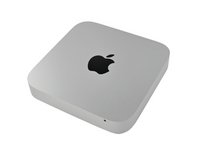
When we took apart the 2011 Mac Mini, we found the optical drive conspicuously absent. While few are bemoaning Apple's efforts to hasten the death of physical media, we were saddened that Apple didn't make better use of the extra space. Fear not, we've got a solution to bring your Mini back to the space-efficiency you'd expect in an Apple product.
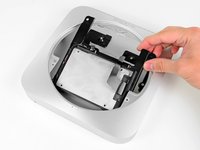
You're free to install whatever combination of SSDs and/or spinning drives suits your fancy. Both drives are recognized as a regular internal drive and performance is identical in either position.
The Chef Recommends:
Don't have the newest Mac Mini? We have a solution to add a second drive to any Mac Mini:
Compatibility
| Mac Mini Late 2012 |
|
|||
| Mac Mini Mid 2011 |
|
Stories
My Problem
I have a 2014 Mac Mini with a 256 PCIe-based flash storage that loads up fast, but has no storage.
My Fix
I added an external 1TB miniStack, but it was a pain to keep moving things around. So I picked up a WD Black 750GB 7200 RPM (WD7500BPKX) and the ifixit dual drive kit & TR6 torx security screwdriver (that I did not need-the T6 in the kit had the security hole cut in to it). I followed the tear down instructions and used the SATA hard drive cable that fit like a glove. Not sure if they changed the kit to have the T6 security bit, or I got an odd ball:)
My Advice
It went very easy, but I had to do a little learning on how to create a fusion drive out of them. I found the instructions online and after setting up a 32GB thumb drive with OSX on it to boot from, in order to use terminal to combine the two dives. I was up and running in a few hours (after restoring my back up from Time Machine) with both drives working as one. It now shows a 1TB fusion drive. Very happy with it.
My Problem
Had an extra 1TB SSHD laying around.
My Fix
Switched the 1TB as my main Hard Disk and added the original as the secondary. Since I use my mac mini as a server, it works great for backing up all my Macs at home
My Advice
Follow the guides carefully. Everything is explained throughly
My Problem
I've already replaced the factory HDD for a SDD but the space was still limited for all the photos that I take to my clinical cases (I´m a dental implantologist btw) so I needed more space to save all photos.
My Fix
Great!
My Advice
Don´t be afraid ! Try!
My Problem
I wanted to install a second SSD in my MacMini (late 2012) Just because I could!!!!!
My Fix
The instructions are easy to follow. With patience and attention to detail, the upgrade went flawlessly.
My Advice
Don't be afraid to tackle this one. Just keep track of the screws and where they came from. Also, watch the rubber grommet around the power cord connection. It tends to come off when you slide out the board but if you put it right back on the way it came off there is no problem.
My Problem
I wanted to speed up the Mac Mini by installing an SSD for the operating system and use the existing 1 TB disk for storage.
My Fix
The repair went well as described in the stepwise installation guide at Ifixit. The folding of the cable had to be modified to mount the SSD in the upper hard disk position. This was done by not folding it to go around the lower hard disk but in between the two disks. Unfortunately this configuration did not work properly. For some reason you must exchange the positions, or at least the connections for the SSD to work properly. It may be dependent on the type of SSD or the Ifixit cable, but I had to change the Ifixit cable to the standard hard drive and the Apple cable to the SSD for it to work properly.
My Advice
Ifixt might note that you might need to change the position or the cabling if you are installing an SSD. I put the SSD in the lower berth with the original Apple cable and the standard HD in the upper berth with the Ifixit cable and it seems to be working as it should.
My Problem
Installed a SSD to run OS off of, faster boot/load times.
My Fix
The tear down was a lot easier than I thought it would be. I did have to do all the steps because the SSD was becoming the boot drive and the old Hard drive (1TB) is just for storage. The mini is mostly used as a server storage for my wife and I. Tho my son has started to play some games on it(Roblox, team fortress).
My Advice
Read threw the tear down directions step by step before you start. Will make it all easier.
My Problem
Increased performance and capacity
My Fix
Very well. The instructions and user comments were very helpful
My Advice
Just take your time. Have another cup of Java and be patient.
My Problem
The computer was just really slow - I was also installing a new 1TB SSD in my macbook pro so it made sense to use the parts that I had in the mac mini.
My Fix
It took a little longer than I thought - stripping down every single part from the inside of the computer was not what I had in mind when I took the decision to make the change. Apple really does not want this done by someone at home and they make it really difficult. I could not have achieved it without the tool kit - there are so many speciality screws I would have not even got into the casing. That said, the repair was very successful and we are really enjoying the speed improvement at home!
My Advice
be very careful about knowing which screws go where. When I put everything back together I had a few parts left over. Nothing rattles and I thought I successfully put everything back where it belongs. Photograph each section just before you take it apart for extra info.
My Problem
Order received before the arrival date. I ordered just the kit with no tools. All parts fit perfectly. Installation went with no glitches. I installed a Samsung SSD as the main boot drive and kept the original HDD to increase computer performance. The only thing I noticed was the threads and thickness of the 4 screws to be installed on the side of the SSD did not match perfectly. they seemed to be smaller compared to the holes on SSD. I considered it a very minor issue. At the end the SSD end up firmly in place.
My Fix
With no problems
My Advice
Followed instructions and clear pictures on your website.
My Problem
I installed the dual drive kit in my mac mini. Everything went great and the instructions were so thorough! thankfully... there are so many steps.
My Fix
It went well other than the simplest part at the end... my ram! one of the plastic spring holsters on the bottom slot snapped off. I don't know if I was just not being careful or it had been replaced one too many times, as I had bought the machine used, but luckily the ram is maxed out and I was able to get it in seemingly very secure. I don't think I'll ever be taking this apart again.
My Advice
just be careful every step of the way. when things dont feel like they are going to budge, sometimes they just need extra force. i.e. the battery, the logic board, etc. but of course feel it out with care.
Related Questions
|
2 Answers 1 Score |
Instaling an SSD (which formats work with the new mac mini) |
|
|
6 Answers 2 Score |
Does anyone know if two 15mm tall drives will fit into the Mac mini? |
|
3 Answers 0 Score |
How to make your SSD bootable? |
|
|
3 Answers 2 Score |
Where do I obtain/purchase this item |
|
2 Answers 0 Score |
Is the dual hard drive kit compatible with any hard drive |
|