Buckle Lock
|
13 Answers 29 Score |
My right joy-con is not being recognized as connected into the switch. |
|
1 Answer 6 Score |
Loose Joy-con’s |
|
3 Answers 8 Score |
Why won’t my left joy con charge? |
|
4 Answers 4 Score |
buttons are Non responsive. Joystick works fine. |
Joy-Con, Nintendo Switch Joy-Con
Something wrong with your Joy-Con? Diagnose the problem at our troubleshooting page.
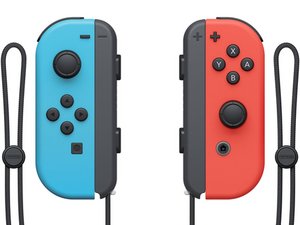
Joy-Con are the primary controller(s) of the Nintendo Switch video game console. They can be used while attached to the main Nintendo Switch console unit, or detached and used wirelessly; when detached, a pair of Joy-Con can be used by a single player, or divided between two as individual controllers.
The most often replaced Nintendo Switch Joy-Con parts include the joystick, battery, button covers, and button boards.
A Joy-Con consists of an analog stick and an assortment of buttons (Y, A, X, B, Left, Right, Up, Down, Home Button, Capture Button, - Button, + Button) on the face.
Past 24 Hours: 272
Past 7 Days: 2,067
Past 30 Days: 8,365
All Time: 873,053