Introduction
If you have to use speakerphone to get audio during a phone call, you may need to replace your earpiece speaker. Follow the steps in this guide to replace the earpiece speaker in an iPhone 6s.
What you need
-
-
Remove the two 3.4 mm P2 Pentalobe screws on the bottom edge of the iPhone, on either side of the Lightning connector.
-
-
-
Pull the blue handle backwards to unlock the Anti-Clamp's arms.
-
Slide the arms over either the left or right edge of your iPhone.
-
Position the suction cups near the bottom edge of the iPhone just above the home button—one on the front, and one on the back.
-
Squeeze the cups together to apply suction to the desired area.
-
-
-
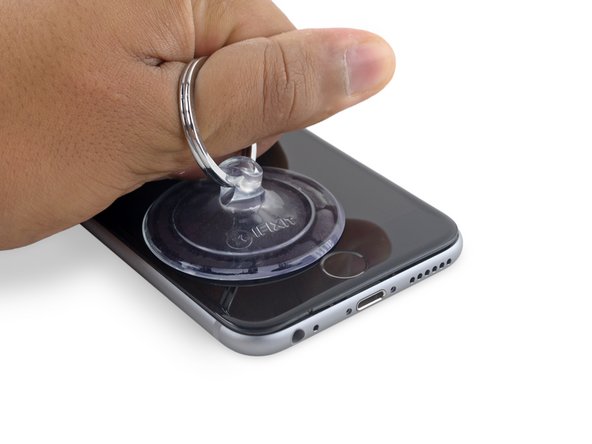
If you don't have an Anti-Clamp, follow the next three steps to use a suction handle.
-
Apply mild heat to the lower edge of the iPhone using an iOpener or hair dryer for about a minute.
-
-
-
-
Gently grasp the display assembly and lift it up to open the phone, using the clips at the top of the front panel as a hinge.
-
Open the display to about a 90º angle, and lean it against something to keep it propped up while you're working on the phone.
-
Add a rubber band to keep the display securely in place while you work. This prevents undue strain on the display cables.
-
-
-
Remove two Phillips screws securing the battery connector bracket, of the following lengths:
-
One 2.9 mm screw
-
One 2.2 mm screw
-
-
-
Remove the following four Phillips screws securing the display cable bracket:
-
Three 1.2 mm screws
-
One 2.8 mm screw
-
-
-
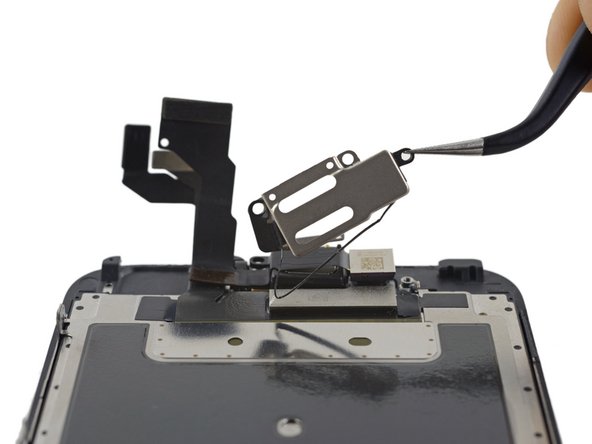
Remove the following three Phillips screws securing the earpiece speaker bracket:
-
Two 2.3 mm screws
-
One 1.9 mm screw
-






To reassemble your device, follow these instructions in reverse order.
To reassemble your device, follow these instructions in reverse order.
Cancel: I did not complete this guide.
139 other people completed this guide.



9 Comments
Very rarely do you have to replace these guys. If your earphone piece ever seems to go quiet on you then most likely it is just dirt that is clogging the grill between the ear piece and your ear. To fix this you need to remove the ear piece and clean out the grill from the ear piece side with a toothbrush and alcohol. Dont attempt this while the screen is on because you can either destroy the ear piece or also just clog it.
i broke the bracket gasket when trying to wrap it back around when putting it back together, is it necessary for the overall function of the phone?
I did the same thing last night and I am also wondering if it is vital to keep intact?
Nice work. Thank you very much.
