Introduction
Use this guide to remove the headphone jack on your Samsung Galaxy S9.
You’ll need replacement adhesive to reattach the fingerprint sensor when reassembling the device.
What you need
-
-
Before you begin, switch off your phone.
-
Apply a heated iOpener to a long edge of the phone to loosen the adhesive beneath the rear glass. Apply the iOpener for at least two minutes.
-
-
-
Press a suction cup onto the back cover.
-
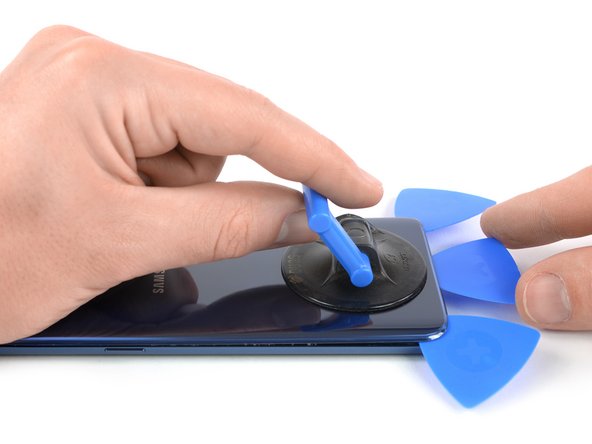
Lift the back cover's bottom edge with your suction cup, opening a slight gap between the back cover and the frame.
-
Insert an opening pick in the gap you created and slide it to the bottom right corner.
-
Insert a second opening pick and slide it to the bottom left corner.
-
Insert a third opening pick to prevent the adhesive from resealing during the rest of the removal procedure.
-
-
-
-
Use the flat end of a spudger to pry up and disconnect the battery flex cable.
-
-
-
Remove the two 4 mm Phillips #00 screws holding the plastic cover in place.
-
-
-
Use the flat end of a spudger to pry up and disconnect the headphone jack flex cable.
-
-




To reassemble your device, follow these instructions in reverse order. Apply new adhesive where necessary after cleaning the relevant areas with isopropyl alcohol (>90%).
After you've completed the repair, follow this guide to test your repair.
Secure the fingerprint sensor with pre-cut adhesive or double-sided adhesive tape during reassembly.
Take your e-waste to an R2 or e-Stewards certified recycler.
Removal didn’t go as planned? Try some basic troubleshooting, or ask our Answers community for help.
To reassemble your device, follow these instructions in reverse order. Apply new adhesive where necessary after cleaning the relevant areas with isopropyl alcohol (>90%).
After you've completed the repair, follow this guide to test your repair.
Secure the fingerprint sensor with pre-cut adhesive or double-sided adhesive tape during reassembly.
Take your e-waste to an R2 or e-Stewards certified recycler.
Removal didn’t go as planned? Try some basic troubleshooting, or ask our Answers community for help.
Cancel: I did not complete this guide.
5 other people completed this guide.



