
Battery
|
4 Answers 4 Score |
Why does my fan make a high pitched noise? |
|
1 Answer 2 Score |
Why I can't connect to Wifi |
|
4 Answers 0 Score |
How to Reset Bios Password? |
|
1 Answer 4 Score |
My laptop is not turning on yet it is charging |
These are some common tools used to work on this device. You might not need every tool for every procedure.
4289, 4291, 4292, 4293, i3, i5, i7
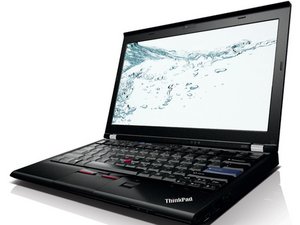
The Thinkpad X220 was released in April 2011. The X220 replaces the ThinkPad X201. The X220 has since been replaced by the X230.
Main improvements are : 1366x768 IPS screen available, 2nd generation Intel Core CPUs, new Trackpoint, new Ultrabase, SATA III with configurations from low-end Intel Core i3-2310M up to the Core i7-2640M.
While the CPU options for this system were very good, it is soldered to the motherboard. Because of this, you need to find one with the processor you want from the beginning.
Most X220's do not support USB 3.0. The only version of the X220 released that supports this is models with a Core i7 processors.
It uses integrated graphics, usually shipped with 8GB of DDR3 RAM and if modded or older BIOS you can run it at 1866MHz or 1600MHz but officially and on stock new BIOS only 1333MHz support, uses 2,5" drive for HDD and SSD 7mm and thinner, and also it has a mSATA slot for micro SSD.
You can find the model type and serial number printed on the bottom of the Lenovo Thinkpad X220 or under the battery. From afar, you can identify it by the old school looking IBM keyboard, small compact design and having written "Thinkpad" on top of the lid and "X220" by the right hinge.

Windows 7 Home 32-bit, home premium 32-bit, home premium 64-bit or professional 64-bit.


Depending on the model the turbo frequency may change, but all are Intel HD graphics 3000 with the base clock being 650MHz and turbo ranging from 1100MHz to 1300MHz.


The default memory that comes with the system will depend on if the version purchased is ready to ship or Configure to Order, but the average for most systems from this period is 4GB of RAM installed from the factory.
The system supports up to 8GB of DDR3 RAM 1333MHz but older BIOS versions or modded support up to 16GB of DDR3 RAM 1600MHz or 1860MHz.

This system supports 2 drive options:


Thinkpad X220 service maintenance manual:
EWU-ANDERSEN-W16S2G4
5 Members
60 Guides authored
Past 24 Hours: 10
Past 7 Days: 42
Past 30 Days: 266
All Time: 26,807


