Clutch Cover
|
1 Answer 0 Score |
What buttons to get to boot config screen? |
|
1 Answer 0 Score |
How to remove the battery? |
|
1 Answer 2 Score |
How to restore factory Mac OS 8.6 on Lombard without a DVD-ROM drive? |
|
1 Answer 1 Score |
Inverter Boards and their different blinking habits |
These are some common tools used to work on this device. You might not need every tool for every procedure.
333 MHz, 400 MHz
Track down a number of hardware problems using the PowerBook G3 Lombard troubleshooting guide.
There are a number of components in the PowerBook G3 Lombard that can be cost effectively upgraded.
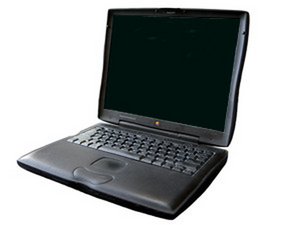
It was much thinner and lighter than its predecessor. It had longer battery life, and the user could double the duration to 10 hours by substituting a second battery for the optical drive in the expansion bay. The keyboard was also improved and now featured translucent bronze-tinted plastics.
The Lombard was the second PowerBook (the Wallstreet being the first) to use industry-standard ATA optical drives. A DVD drive was optional on the 333 MHz model and standard on the 400 MHz version. This model introduced USB ports to the PowerBook line while retaining SCSI support.
Use the laptop identification system to help you identify your machine. PowerBooks tend to look very similar, and it's important to know which machine you have before ordering any replacement parts.
Past 24 Hours: 0
Past 7 Days: 13
Past 30 Days: 106
All Time: 38,635