Causes
Solution:
Plug your soldering iron into a computer and head to https://www.ifixit.com/fixhub/console on a compatible browser (most Chromium-based browsers work).
- Ensure that your computer is being allowed to access the soldering iron and select your soldering iron from the dropdown menu that appears in your browser.
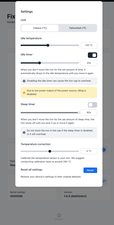
- Click the gear icon in the bottom right corner of the web interface. It should be labeled “Settings”.
- Use the “Temperature correction” slider to adjust the temperature offset. It’s recommended to calibrate the iron while set to 350°C.
Related Problems


FixHub Smart Soldering Iron
Find free step-by-step repair instructions, manuals, schematics, community support, and other DIY resources. You can do it! We show you how.
5 common problems
View allHaven't found the solution to your problem?Browse our forum
