
Huawei P10 Battery Replacement

Dominik Schnabelrauch and 9 other contributors
Last updated on May 7, 2024
Views: 72K
View statistics:
- Past 24 Hours:
- 4
- Past 7 Days:
- 46
- Past 30 Days:
- 209
- All Time:
- 72,348
Comments: 28
12 comments on steps, 16 guide comments.
Go to guide commentsCompleted: 83 84
83 people have marked this guide "completed." Will you be next?
84 people have marked this guide "completed." Including you — great job!
Favorites: 4 5
4 people have favorited (and subscribed to) this guide. Will you be next?
5 people have favorited (and subscribed to) this guide — including you!
Featured Guide
This guide has been found to be exceptionally cool by the iFixit staff.
Introduction
Go to step 1 ↓Use this guide to replace the battery in your Huawei P10 smartphone.
What you need
Fix Kit
This kit contains all the parts and tools needed to complete this guide.

Parts

Tools
-
-
Spudger4.9
-
-


-
-
-
Switch off your phone.
-
Remove the two Pentalobe P2 screws at the bottom.
-
Remove the SIM card tray.
 Ask FixBot
-
-
-
Insert a plastic opening tool between the display and the case starting at the bottom area of your phone.
-
Carefully pry the display with its parts out of the case.
-
After you pried out the bottom end, use the opening tool to open the clamps on both sides.
-
-
-
Swing open the phone backwards.
-
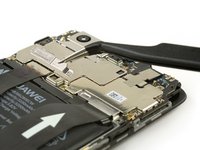
Use a spudger to disconnect the power- and volume button flex cable.
-
-
-
-
Tool used on this step:Tweezers$4.99
-
Use tweezers to remove the two cable brackets.
-
-
-
Use a spudger to disconnect the battery, the interconnect and the display flex cable.
-
-
-
-
Peel out the adhesive strip which is placed beneath the battery by steadily pulling at the tab in a flat angle.
-
Use an iOpener to loosen the remaining adhesive.
-
-
Tool used on this step:Tesa 61395 Tape$8.95
-
Insert an opening pick or spudger beneath the battery and carefully pry it out.
-
Remove the battery.
-




To reassemble your device, follow these instructions in reverse order. When reassembling your phone apply new adhesive where it is necessary.
Cancel: I did not complete this guide.
83 other people completed this guide.


16 Guide Comments
Thanks for posting this this give me new ideas.
Facile comme bonjour. Les outils que j'avais reçu avec la batterie étaient de piètre qualité, j'ai donc utilisé des mini-spatules utilisées pour lisser les joints en silicone, c'est pile la consistance voulue pour décoller le dos et la batterie, ni trop ferme ni trop souple.
Easy fix, thanks a lot.
Eccellente guida peccato che una volta montata la nuova batteria in cellulare si sente che si accende la il display rimane buio, controllato connessioni ma sono tutte ok e display sempre spento, cosa può essere?
Adriano
