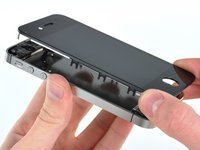
Click Image To Zoom
Share this Product
Stories
My Problem
My Wife dropped her iPhone for the 100th time, and this was the time it shattered the screen.
My Fix
The first time I tried, everything went smooth; till I was plugging some of the cables in; One cable seemed to come up short; I soon discovered that something I had done had sheered the thin cable and it was ruined. I ordered a second screen and this time everything went perfect!
My Advice
Take your time when putting it back together; make sure you have a good way to keep track of your screws.
My Problem
I recently took a friend to the emergency room at a local hospital. This hospital now makes you go through a metal detector. I placed my phone and other items on the counter for him to go through. WhenI wI went through detector the buckle on my shoes made it go off. This startled the guard so he moved my purse to see what was up and promptly dropped my phone on the floor and smashed it. This huge fellow turned instantly white and just about crapped his pants. Me being a softy didn't report it as I didn't want him to get in trouble. I order the part from a place where it was cheaper only to find that part didn't work. Someone suggested I get my part from you so here I am. :-)
My Fix
It went great as I had a friend who repairs phones do the work for me.
My Advice
Cheaper doesn't always mean better!
My Problem
My wife broke her screen, and I bought a new one from ebay. The quality was really bad, and it was just not good enough.
My Fix
I bought a new one from ifixit, and the screen turned out to be just the quality we wanted. We even think the screen is better than the original one. The only bad thing is that the screw driver to remove the two bottom screws, did not fit. Not a problem for me, because I had one from the first replacement screen.
My Advice
make sure you have a good system for the screws. They are different and easy to mix up. mixing them up would give you a mess, and possibly a failed repair.
My Problem
Droped my iphone and cracked display iphone 4s white.
My Fix
It was really simple and ifixit guide made is simple to understand .
My Advice
Buy from ifixit really good original product.
My Problem
I drop my iPhone 4S manny times but nothing never really broken nothing in it. A couple of weeks ago I drop the phone at work (I'm a professional barber) and when I picked it up I was relieve until I turn the phone and the LCD screen was blanked. I didn't want to take it no were because I know it was going to cost a lot of money. I talk to one of my customer and he told me about ifixit. So I decide to take the challenge and go for it.
My Fix
It was really frustrating at first and to make it worst on me the screen that I had order didn't slide but it turn on and off and the home button work but not the touch screen. I Call ifixit and and there customer service was really cool and with no questions ask sent me another one. I got it after 4 days and before I took the phone a part I check it and it work I was really happy and after taking the phone apart 4 times this was a pice of cake. Know my phone is black and white is really cool know.
My Advice
Make sure you have patience and have experience on taking things apart and have the right tools. DO YOUR HOMEWORK and see at lease 2 or 3 different videos on how to take the phone apart
My Problem
Good product! Worked like a charmed. Don't buy screen from ebay or amazon. I bought one and it's trash. Although it costs $99 at ifixit I still think it's worth ur money and ur time.
My Fix
Great!
My Advice
Buy ur parts at ifixit
My Problem
My wife dropped her iPhone 4S for the 2nd time in 6 months. First time, the glass only cracked in the corner. Second time round the whole display fractured. Called the local telco Starhub for a quote to replace the display assembly; worked out to some USD 300. A quick check on iFixit.com learned I could do this a lot cheaper myself. And so I did; ordered the parts @ ifixit.com and followed the guide. Easy peasy.
My Fix
The first step in the repair involved removing the Apple-specific 5-lobe screws. The iFixit Pro Tech Toolkit comes with the tool for the job. Problem was that the quality of the tool was less than expected: it didn't fit so had to file it down quite a bit. After that I managed to remove the 5-lobe-screws and the rest of the steps where straight forward. Took me about 2 hours to complete the whole guide and the phone looks and works like brand new now
My Advice
Start with a clean desk, allow for plenty of time and make sure you write down which part goes with which step.
My Problem
When our oldest turned 14 we decided he deserved his own phone. He'd taken care of the hand-me-downs he'd had through the years without issue, an iPhone 3Gs and 4 survived without issue. Within a month of us getting him an iPhone 4S for his birthday he was the "victim" of some horseplay while waiting for the bus at school and the phone fell to the rough pavement face-down. It shattered the screen pretty good but still worked good enough so that he was able to use it until Santa could get him a new display. Santa did leave it for me to install though!
My Fix
The repair went well, I've followed quite a few online guides from replacing complicated suspension systems in a Mercedes-Benz to Nissan timing belts and this guide was far and away the easiest to follow... the screws where A LOT smaller though! There weren't any deviations from the guide other than the way his screen was shattered quite a bit of the remnants were left behind stuck to the adhesive around the button and speakers so I had to make sure to scrape those away.
My Advice
I had a piece of tape that I stuck the screws on and it worked fine but I think those magnetic mats that you can write where they came from would be very handy for future repairs.
I can't figure out why it was recommended that I buy the phillips #00 and flathead 3/32" tools with this repair, I did not need them, they are much too large to use on any screw in the iPhone. Luckily I purchased the liberation kit and the tools in there along with a smaller flathead I already had were all that I needed.
My Problem
My wife dropped her phone face down and SHATERED the screen.
My Fix
The repair took about 2 hours being that it was my first time. Reassembly was difficult but I took my time and didn't rush and all was well.
My Advice
My brother shared his insight AFTER I replaced the screen... Basically lay down some tape and stick the screws onto the tape as you go. Remove the screws in the exact order as listed in the instructions and you shouldn't have an issue confusing screws during reassembly.
My Problem
The diplay broke....
My Fix
Wery well, no problems.
My Advice
The phone an I phone 4s white, the replacement panel i ordered had a slightly different white color then the original. Its easy to see it's been replaced.
Related Questions
| 1 Answer 0 Score | Digitizer problem, one area not working | |
| 3 Answers 0 Score | How good is the quality on the replacement screen from iFixit? | |
| 2 Answers 0 Score | screen appears as if there is no back lighting. Why? | |
| 1 Answer 0 Score | Which ribbon is this? |
| 2 Answers 0 Score | Can an iPhone 4 back be combined with an iPhone 4s front? | |