
3
Score
Chad Gordy
37
Asked
No backlight and LCD replacement didn't fix it.
Ipad2 was dropped. Worked fine, despite digitizer glass being shattered. Carefully disassembled and installed new Digitizer. Before sealing the digitizer in place, I tested unit. Discovered LCD backlight was not working. Reseated all cables. No change. Inspected for any visible damage, found none. Replaced LCD with known working unit and still no backlight on iPad.
What else could be wrong?
Update
I have a third broken iPad coming to my department for repair. This time, I am going to let the battery drain 100% before anything is disassembled.
Update
folks, I appreciate your time posting 1) disconnect the battery 2) reset iOS.
These things have been discussed here at length and have not resolved the problem.
my iPad issue is still not resolved.
Update
as I reflect on my disassembly, I have considered I did something different the second time around on repair. The first time, I used a plastic scribe to release the LCD cable from the system board. Second time around, I used the mini-screw driver from the kit to pop up the retainer. Reflecting on my actions, and knowing better, that probably created a short across contacts and damaged the system board, despite being careful. Course, I am just guessing, but that was a difference between the two repairs I did...the first ipad repair being successful, the second, not so successful.
Edited by: iRobot ( ) , Chad Gordy ( )
3
Score
mark
73
Answered
Have just fixed an ipad with no backlight. After much work I tracked the fault to a short circuit capacitor on the logic board this held one of the gate inputs to a mosfet low and hence turned off the backlight driver circuit. I also have figured out most of the circuit for driving the LED backlight.
Wow. Your knowledge is far beyond mine since simple solutions fix simple problems and Chads problem is not simple. Mark, can you compare this to the R8 chip fix on the iPhone 3GS? Did you just replace the capacitor and backlight works again? Is it a challenging soldering job? And please post a picture if you have of the area with the capacitor!
asle,
Hi good morning, Please could put a picture or tell you where this capacitor? It is very important for me to repair this iPad, so if you can help me.
Jose,
3
Score
mark
73
Answered
Ok here's an overview of what was wrong with my ipad...
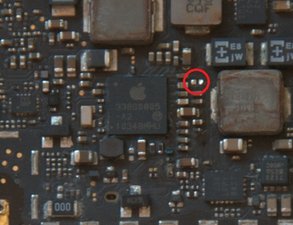
This image is of a scrap board I had which I've removed the metal screening from. The red circle indicates the position of the short circuit capacitor (It's already been removed from the board in the pciture). Note this is the underside of the circuit board (i.e. that the side that's face down).
Its easy to check with a meter, if its short circuit then this is you problem.
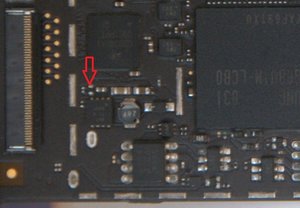
This second picture shows the output from the LED drive circuit, the arrow indicates the point to test with a volt meter to confirm that the fault isn't with the voltage part of the circuit (The voltage should be around 18volts). You should be able to test this in place (you don't need to connect either the digitiser or LCD to check it), my tip is to use some pins soldered to your probes to make it easier to test.
This is the topside of the circuit board, you should be able to access this whilst the circuit board is installed in the ipad.
Hi, mark, do you have the value of the capasitator? Is there any risk of damage any thing else, when you test the 18V . is it nessesary to put a new capasitator, or just leave it out?
Sorry no value, as its connected to gound I just assumed it was for decoupling, so therefore you maybe able to remove it (but I didn't try that). When testing the 18v just take care not to short to ground, it probably wouldn't do the circuit any good!!
mark,
1
Score
AARON
13
Answered
Ok i just had the same problem about 30 minutes ago with a cracked digitizer and had to replace it on the ipad 2. After the replacement i closed everything back up and realized the backlight wasnt working when it was before i did the replacement. so i had to open it back up and reseat everything this did not solve my problem.
LET ME NO IF THIS WORKS I HAD TO RESET THE IPAD BY HOLDING THE STANDBY BUTTON AND HOLDING THE DIGITIZER UP TO THE LCD AND TURNED IT OFF THEN ON AGAIN IT WAS THAT SIMPLE FOR ME IDK WHY I DIDNT DO THAT IN THE BEGINNING IT MAY NOT BE THE SAME FOR YOU BUT LET ME NO.
I had the back light problem today. I think it occurred because the ipad was still on when I disconnected the digitizer. I always fit the digitizer in place without removing the sticker covers to test it. When I switched it on there was no back light. I could just about make out what was being displayed with the aid of a torch. I pressed the On/Off button and when the switch off screen appeared I slid my finger across the digitizer to switch it off. When it had switched off I switched it on again and the back light was restored. If you cant make out whats on the screen then disconnect the battery, leave for a few mins to allow any capacitors to discharge then re-connect the battery and the back light should then work.
Thanks Pete. I took your post - removed my logic board and kept it off battery power for about 15 minutes. Re-assembled, powered ipad on and still no backlight for me.
Thanks SOO MUCH for the Power Off suggestion!! Don't know why I didn't think of that first?? Guess it must have been the panic setting in. First screen replacement for our shop. My guys had a laugh at my expense, "Hey boss, don't you tell everyone else when they have a problem, reboot first!"
I had the same issue after replacing the digitiser screen. The problem I found was that when I removed the LCD screen the IPad was still on and I think this confused the system so when I replaced the screen there was no back light. My solution as mentioned by one of the users above was to direct a bright torch directly at the LCD screen and you will see that the iPad is actually on. So click on the power button for a few seconds until you get the slide bar for full power off. Then slide the bar using the digitaliser screen. Once the iPad has powered off completely wait a few seconds then power back on and backlight should be back on. One good suggestion to all those who want to replace their own screen is to test the IPad before sticking back the digitiser screen. Hope this helps
1
Score
Answered
To resolve this issue you must restart your device by pressing the hold button and the home button at the same time, keeping them depressed for a few seconds. You will need to have a very strong light source directed at the screen when you are doing this. The LCD is still working, but it is nearly impossible to see without the backlight. Once you press home and hold together, a red slide bar will appear at the top of the screen. The reset will not initiate unless you slide the bar. A few short moments later, you should see the the white Apple logo on your display, backlight hopefully.
June's answer solved my problem - make sure you hold the keys for up to 10 seconds - both at the same time. June said "To resolve this issue you must restart your device by pressing the hold button and the home button at the same time, keeping them depressed for a few seconds. You will need to have a very strong light source directed at the screen when you are doing this. The LCD is still working, but it is nearly impossible to see without the backlight. Once you press home and hold together, a red slide bar will appear at the top of the screen. The reset will not initiate unless you slide the bar. A few short moments later, you should see the the white Apple logo on your display, backlight hopefully."
1
Score
maccinir
13
Answered
0
Score
Ash
131
Answered
Dont have too much experience with iPads but have worked with LCD displays for over 10 years.
The backlight would be driven / powered by an LED driver board.
I would find out if the LED driver is integrated inside the panel.
As you now have 2 panels with the same fault I would guess not.
I would try and locate the LED driver and try replacing that or maybe even the LED driver cable.
Hope I helped.
0
Score
brandon
1
Answered
I had this EXACT problem. replaced digitizer, screen worked fine, and then backlight went out. I had disconected the logic board while power was on, I had no choice because I had powered up without the digitizer connected to test it and as I found out, there is no way to turn power off without the digitizer connected. Above peopel suggested they created a short with the screwdriver, but I was meticulous, only using plastic.
Its a software issue, the logic board does indeed get "confused", and think the backlight is on when its not. Soft/hard resets didn't work, UPDATE THE FIRMWARE. for me it was rfom 3.2 to 5.01, as soon as I updated it the backlight came back on. If you dont need an update, try a factery restore and then an update.
0
Score
asle
1.7k
Answered
0
Score
keith
13
Answered
just remove and reinstall main battery connector to reset the system then it will come the backlight on your lcd
I changed the digitizer and the lcd went dull. Thanks guys for posting the part of unplugging the battery for a little while and finally the lcd starting working again. If you see the grayish apple logo, the lcd is back. http://www.youtube.com/watch?v=qAAi80b8w.... This should help. Thanks again!
Ben,
0
Score
iDope
1
Answered
0
Score
Answered
0
Score
Answered
Issue solved. Had the same problem when I replaced the home button cable and digitizer. I had no light on the display.
Solution for me: hold the power and home button for a while. When the reset was starting, the apple logo popped up.
Grtz Tim
Edited by: ABCellars ( ) , linda van der laak ( )
0
Score
Answered
0
Score
dev dev
1
Answered
0
Score
Answered
I too had the same problem I unplugged the cable with an incorrectly spudger metal contact even seen it sparks thought to have created a short circuit and then the surprise of the backlight is not working.
I was provided with light and restored to like new after I turned it ipad.
rekindled the light has begun to function. I highly recommend everyone to leave the download ipad before removing the digitizer.
Andrea
Update
Now you can see if your monitor is functioning under a light?
Update
Hi fred,
The last possibility that remains is to do this test:
Put under a lamp and display at least the screen in a poor return ipad off from that state.
At the restart should be able to meet again the backlight.
If the problem persists, I suggest you take a look at this boat ebay, I read that you can repair the backlight of the chip with only $ 7! might be a good solution if the answers that I provided you can not come by chance.
http://www.ebay.com/itm/iPad-2-and-1-LCD...
Hope that helps.
Andrea
Update
Sorry , is soldered! remove this and re- solder new 4R7 !!! ;)
cheers
Andrea
Edited by: AndreaBaglione ( )
4R7 is magnetic type components, you should not have major problems in replacing just a little bit of forethought to remove it. If you have a micro soldering or otherwise you can find it and have good manual you can do it without problems, unsoldering the base component and only after removing it. I could let you but from what I see are very far from you. I live in Italy even though I live in the us and make this work: ((
0
Score
Fred Del
1
Answered
"I too had the same problem I unplugged the cable with an incorrectly spudger metal contact even seen it sparks thought to have created a short circuit and then the surprise of the backlight is not working."
Hi Andrea,
I had exactly the same issue but I've tried your suggestion and I didn't work for me. Do you think it's possible that I have damaged the logic board??!
Thanks for you answer
@fred del 1) Re-open iPad. disconnect the battery connector form logic board. 2) re-conneted the battery connector 3) push I/O button Andrea
''If the problem persists, I suggest you take a look at this boat ebay, I read that you can repair the backlight of the chip with only $ 7! might be a good solution if the answers that I provided you can not come by chance. http://www.ebay.com/itm/iPad-2-and-1-LCD... '' Thanks for your tips but I can't find a repair guide for the coil 4R7... Do you know if it's an easy job? As well do i need specific tools? Or is it just a plug? Cheers
0
Score
Answered
replacing 4R7 is not an easy job. It's not a job with soldering iron and removing chit out and in. I repair iphones professionally and I even get nervous when I have to remove such and 6R8 on 3Gs.
If you want to get an experience with a chance of sacrificing your board, try it, otherwise look for a professional.
0
Score
Nick
1
Answered
0
Score
Answered
HELLO PPL,
when i changed screen i cut through the vol button ribbon but i cut it after the vol buttons and before the power switch (so volumes were working power button was not)
power down ipad via removing the logic board of the battery DONT PULL THE BLACK SILVER BLOCK ABOVE BATTERY with the single screw in (you pull the logic board up off the battery connecters)
you will need to remove the 2 screws in the corners of the end of the logic board in plain sight not were the digitalizer plugs.
now put a plastic pry tool the lift the logic board there is a bit of tape underneath.
with the logicboard in the air one end you will see how the board connects to the battery.
simply hold off battery for few mins (press some buttons only to drain the bit of power on the board then simply put back together and re try the screen.)
if not working try and plug usb in to ipad as this will power it up then you will know if the button ribbon is damaged.
0
Score
Answered
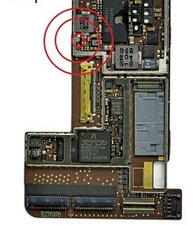
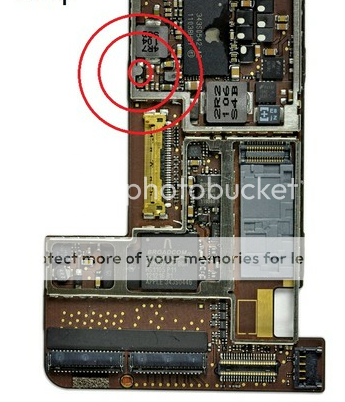
iPad2 Backlight chip is located here. This is the one you need to replace to get it working. I tried replacing the chips on the pix in this thread above, but didn't work.
Edited by: ifixsmartphone ( )
0
Score
Answered
0
Score
Answered
0
Score
Answered
0
Score
Answered
check the back light voltage on the back light power diode aprox 16 volt.
this is missing in set. ...get only 3.7v .. as per battery
steps
1 disconnect battery..
2 check voltage on back light power diode if charge remains
3 discharge with ground
4 reconnect battery
5 connect power adapter
and check back light
0
Score
Answered
0
Score
K K
1
Answered
I made a youtube video on the ipad 2 backlight solution
if your ipad 2 was short because you forgot to turn off the ipad when changing the screen.
you want to change and replace
the backlight chip
and the backlight filter
and then if you ipad had water damage change the backlight 4R7 coil as well.
for more detailed picture showing where the ipad 1, 2, 3 backlight circuits is located please visit http://www.cyberdocllc.com/ipad-2/
I have fixed more than 20 ipad 2 logicboards with backlight issues so far. I havent have one fail with this solution just by changing these three surface mount components.
0
Score
Mickger
1
Answered
0
Score
william
1
Answered
0
Score
Answered
i just faced same challenge and it was a result of using a metal to detach d screen connector from the board, but when i logged in here , i found out that we still haven't gotten a solution so i just prayed and repeated the process of detaching and attaching both the screen and battery connector, powered it on and the display light was back.
0
Score
ebullock
1
Answered
0
Score
usmlelol
1
Answered
Video solution How I fix the backlight problem in ipad 2
the backlight solution is out for ipad 1, 2 and 3
0
Score
Answered
http://www.youtube.com/watch?v=MkEznEwMd...
I fixed one using this method, it was pretty easy.
Edited by: john speegle ( )
0
Score
Answered
Hi Guys, Happy New Year
Ok so here is what happen. The IPAD Suffered Short Term Memory Illness. Well thats what we call it, lol.
If the LCD wont turn on, you probably was working on while it was running, still powered on or something similar, perfect example have you ever pulled ram from a computer while its on and see how it reacts?
Here a fix: Disconnect the device if its plugged in or connected to a PC
1. Take off the Digitizer
2. Remove the LCD
3. Disconnect the Audio Ribbon on the top left from the motherboard
4. Remove the control board cable (its the cable that runs in between the battery)
5. Disconnect the loud speaker cable or (charging dock ribbon)
6. Now if you have the WiFi Version, flip over the Motherboard and disconnect the cable.
Let these stay disconnected for about 3 minutes, Coffee Break!!
7. Now put everything back together, Make sure you don't turn on the device or have it connected to the computer while your reassembling the components.
Many Thanks
Edited by: oldturkey03 ( )
0
Score
Daniel
1
Answered
Just finished putting an iPad 2 back together after replacing the digitizer and the lcd would not turn on. Plugged headphones in and pressed play button and music came on...CRAP the iPad has battery the lcd isn't working and customer will be here soon to pick it up. Not looking good. Carefully took digitizer back off, reseated lcd, still nothing. found this forum, updated iOS. LCD light turns on, put everything back together and now it's good. ALHUMDULILLAH!
I have repaired several iPad 2 and 3 digitizers and never had this happen. I have been in the habit of leaving the device on so that I could check the lcd to make sure I don't burn it when melting the digitizer glue... Looks like I'll just turn it off from the start next time.
Thanks for the help people. :)
0
Score
rusty
1
Answered
OMG! I thought it was a short circuit.. IT wasnt. LISTEN PEOPLE. your screen does actually turn on but you can't see it. under a specific amount of light you will be able. TURN IT OFF THEN BACK ON! I thought this wouldnt work BUT it WORKED! PRESS THE POWERBUTTON FOR 5secs THEN SLIDE YOUR FINGER TO TURN IT OFF EVEN IF YOU CANT SEE NOTHING SLIDE IT MULTIPLE TIMES THEN WAIT A MINUTE THEN TURN ON. (AND IT WILL WORK) ITES NOT A SHORT CIRCUIT.
0
Score
Rany
1
Answered
I changed the broken digitizer of an iPad 2, and used what turned out to be a poor kind of adhesive to glue it back.
10 days later the digitizer became loose and I needed to re-glue it.
So I disconnected the LCD and digitizer, and cleaned the old adhesive using rubbing alcohol.
Before gluing the digitizer back, I tested the iPad and found that the LCD remained black.
I plugged the iPad to the charger and heard the charging sound, so the iPad was working fine.
I tested the LCD on a another iPad, and there it worked.
So I tried rebooting the iPad by pressing HOME BUTTON + ON/OFF BUTTON at the same time for 10-15 seconds, but nothing happened. The iPad wouldn't restart/turn off (I could still hear the charging sound when I plug it in).
So I shorted the 2 golden pins of the Home Button while pressing the ON/OFF Button for 10 seconds. This time the restart was successful, and the LCD came back to life. JUST MAKE SURE YOU DON'T SHORT ANYTHING ELSE AT THE SAME TIME!!
Turns out the home button was not seated well enough (especially that the digitizer was not tightly back in place).
So I recommend the following:
-Try the LCD and everything else before disassembly to make sure nothing was defective to start with!
-TURN OFF THE DEVICE,
-Do the repair/change the digitizer or whatever...,
-Connect the LCD, and digitizer but don't glue it back in,
-Turn on the device and test the LCD and everything else,
-Turn it off and finish the re-assembly and glueing.
0
Score
YoloRepair ca
571
Answered
First restart the ipad if it still doesn't work
here is a better pic of how to fix - IF it's a hardware problem.
Edited by: YoloRepair ca ( )
Is there a solution for this? i have the same problem, after changing the volum/power button cable, the backlight wont`t work, i changed the lcd and the touch panel. no luck == Update == Hi, I can see what`s on the screen(torch.) , but no help in switching on and off. no luck updating to IOS 5 ;-( I have not disconnected the battery yet, do you thing that will help? Jan O.
Jan Ove Knudsen,
no. no solution. I fully suspect it is board related and that is the only solution. As it stand now, I have a good parts device for the next iPad broken in our environment.
Chad Gordy,
i have the same problem ...i reset and restored with no help any one know how to fix ..i took lcd out of one ipad and work great on an other ipad ...
imez2nv,
Nobody succeed to fix the no backlight problem ?
saynijb,
I am still having this problem. I have tried a new LCD screen and a new LCD board. I have also tried everything on this page with no luck. I really need to figure this out so any help would be awesome! Thanks!!
Jeremy Lane,
hey Chad Gordy... any luck with yours yet? or has everyone had success by removing the logic board from the battery connector?
alister,
Hey Chad, Did you get it sorted? I have exactly the same issue, ipad came in working except for cracked screen. Disassembled and replaced digitizer and no Backlight. Also seems to have a power on /off issue now. I shall try the reset and restore route and let you know how i get on.
Dave,
Can anyone help me out with finding the right capacitor on the ipad2 an image would be really helpful == Update == would it be ok if i just short that chip?
Joey Yossi Tibi,
Show 3 more comments