1
Score
Christi
23
Asked
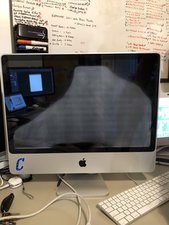
My display is slowly fading to white. Why?
The display on this mac will either fire up fine then slowly fade to white. Or if you move the display around it will distort (lines) and fade to white. I have over 50 machines that are this model and it has happened on quite a few of them. I am tired of sending them to the Mac stores and would like to repair this myself. I have done a bit of other research and some indicate that it could be the lcd flex cable ribbon. What are your thoughts? Have you seen this before? Do you sell this part?
Thank you in advance for your help!
2
Score
Chris Green
17.2k
Answered
3
Score
marcel
37
Answered
1
Score
iceman
25
Answered
I had an end user have the exact same video problem that you are having. She found that if she flexed the top-left of the display housing, the problem would go away. Eventually it got worse and she had to hold that flex position to be able to use the laptop. I thought it had to be a bad connection. Possible the flex cable or just reseating the cable into the connector at the bottom of the display. I opened up the display assembly and with it powered up determined that it was not the flex cable but somewhere on the circuit board that is attached to the display panel. Pretty small components on there. Replacing the LCD panel solved the problem.
1
Score
raynman
25
Answered
I had a similar problem, and contacted someone who had repaired the same problem - they suggested that the LCD itself was the culprit, and, indeed, in my case, replacing the LCD was the solution. It WAS NOT the LVDS cable, though it can cause similar problems in some cases, as I understand it. Used to be the LVDS cables were hard to find (but not so bad anymore) so I was glad the LCD fixed it.
0
Score
Ed
1
Answered
I have the same problem. I've found that pushing on various parts of the display housing fix it temporarily (like flexing the top left corner). It's gotten worse and worse and now is nearly unusable.
I'll probably order a new LCD but I'm in Northern Mozambique in Africa where both shipping and on-site repairs are very challenging.
Sad that it may be a widespread defect :(
It's the LCD. It's not the LVDS cable. My screen was freezing and fading to white. Pressure on the upper left would fix it temporarily. It got worse and worse. I replaced the LCD, easy enough. It works great. A bit of advice. Heat the cover glass very until it's very hot. The glue is in strips and doesn't melt easily. Take it slow and don't pry too much. The cover glass is very brittle, it will crack (mine did the first try). Cheers! Ed
Ed ,
0
Score
joshmay
1
Answered
I'm repairing a friend's macbook (A1342) and it has the exact same problem - the display goes glitchy and slowly fads to white, works if you pinch the upper-left corner, used to be occasional but now it's constant. Since where you pinch is no where near the LVDS cable I figure it can't be that, as other people have said it's not. I'm going to try replacing just the LCD (if they decide to spring for it), I'll report back to this thread when I do.
0
Score
Answered
0
Score
Manuel
1
Answered
It helped for me to just loose two screws.
the two screws on the bottom left at step 6.
Installing MacBook Unibody Model A1342 LCD
its not completely fixed, but works for me much better.