1
Score
John
13
Asked
CPU upgrade 2.0GHz to 2.8Ghz ( C2D Extreme X7900 )
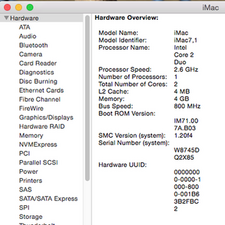
Well, I have an iMac 20'' ( ver. 7,1 - Late 2007 ). My CPU is a T7300 @ 2.0GHz.
Can I upgrade the processor to C2D Extreme X7900 @ 2.8GHz ?
Update
It's all ok! :-)
I work with iMac 8 hours per day and don't have any problem!
It's totally recomended to change the CPU ! I install Lion and works perfectly.
4
Score
John Mares
49
Answered
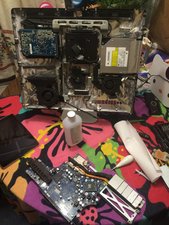
Yes! I was able to swap out the processor on my T7300 20" mid 2007 imac to an X7900 by following the instructions for replacing the heatsink here:
Installing iMac Intel 20" EMC 2133 and 2210 Heat Sink
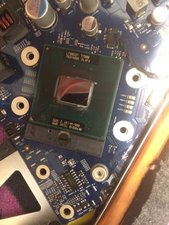
When the heatsink is removed, the CPU is exposed. Turn the slotted screw on the socket 180 degrees to release the CPU and install the X7900.
I do have a caveat: The connectors on the wifi and bluetooth antennas are extremely delicate and hard to get off/on. I just unscrewed the daughter boards, there is enough slack to leave them attached to the antennas.
After the install and reassembly, the computer booted up fine, there were no settings to make, firmware flashes or any other special procedures, just turn it on and bask in the glory that is the Core 2 Duo extreme.
Update
Yeah, it runs just great. No heat issues or any glitches. The 64-bit geekbench score when from 2749 to 4239, an improvement of 54%. I also put a 4GB in one slot and a 2GB in the other for 6GB total RAM.
Edited by: John Mares ( )
to John Mares: I'm going to do the same thing one of these days (I've already bought the x7900 and I have you same iMac). Is your Mac still working well? Have you noticed improvement in speed? Do you have any other suggestions for me? Thank you! == Update == I've done it! I've bought the X7900 on eBay for 120 US Dollars and I've followed the guide for replacing the heat sink, the one linked by John Mares. According to Geekbench I've gone from a score of 3133 before the upgrade to 4242 after the upgrade. I've only used it for an hour now, but the difference in speed is clear. Everything is snappier. I'm happy! I have 4 Gb of ram and I'm also planning to upgrade to 6 Gb. Next year I'll buy an SSD, so that this iMac can continue to be my work companion!
I know this post is kinda old, but I just ordered my X7900 (100.80 on ebay) for my mid 2007 iMac that I just bought last week for $200.00!!!! on craigslist. perfect condition, not a scratch on it. Anyway, I was just wondering how your guys iMacs are running as of now with the X7900 in. While its opened I also plan on putting a OCZ vertex 2 120GB SSD in. Thanks for any replys.
Still running strong with the X7900. I'm impressed that you found the imac for $200...I'd love to find one of those!
I'm adding a post here to report a similar success. I just upgraded my 20" iMac Mid-2007 (EMC2133) C2D 2.00GHz (that's the T7300) to a spare C2D 2.6GHz I found in a Toshiba laptop I wasn't using much.
If you find this post and you're looking for compatible processors, you need a Socket P processor, that's μFCPGA-478 (the poster nicksmacandpche
jtin,
1
Score
nick
15.7k
Answered
0
Score
Answered
Thanks for the reply. I was kinda worried about something burning up since it pulls about 12 more watts. The lady I bought it from upgraded to a 27" iMac and she had a lot of money. She told me she didn't really care what she got for it so I offered her $200 and she took it.
0
Score
Frank
1
Answered
Also upgraded an 20" iMac 7.1 mid-2007 from a T7700 to a X7900 processor without any problem. Changed the original WD 320GB harddisk to a Samsung 830 SSD (128GB). Did'nt test benchmarks, but the system seems to work remarkable faster & because of the SSD the system becomes extremely quiet !
0
Score
Andrea
1
Answered
0
Score
Frank
1
Answered
0
Score
eROCK
1
Answered
I've been thinking about doing this too, but just not sure if the gains would be worth it. I currently have a 2.4ghz (2133), and this upgrade would bump it up to around 2.8ghz. Has anyone else made the jump from 2.4 to 2.8? If so, was there much of a difference? Was it worth the time and money to even do this?
0
Score
9001034
1
Answered
Has anyone tested the iMac7,1 with any of the following Socket P chips? I selected chips that were "extreme", quad core or had a clock speed higher than 2.6GHz.
-
Montevina platform
2.53 GHz Core 2 Extreme QX9300 1066 MT/s 45 W
2.27 GHz Core 2 Quad Q9100 1066 MT/s 45 W
2.00 GHz Core 2 Quad Q9000 1066 MT/s 45 W
3.07 GHz Core 2 Extreme X9100 1066 MT/s 44 W
3.07 GHz Core 2 Duo T9900 1066 MT/s 35 W
-
Santa Rosa/Santa Rosa Refresh platform
2.80 GHz Core 2 Extreme X9000 800 MT/s 44 W
2.80 GHz Core 2 Extreme X7900 800 MT/s 44 W
2.60 GHz Core 2 Extreme X7800 800 MT/s 44 W
2.60 GHz Core 2 Duo T9500 800 MT/s 35 W
2.00 GHz Core 2 Duo T7300 800 MT/s 35 W
-
The QX9300 will not boot on an iMac8,1.
-
Source: http://www.dslreports.com/forum/r2737176...
-
A Q-Spec (qualification) X9000 will boot on an iMac7,1 but will underclock the processor to 400MHz and benchmark reflects a slower processor. No S-Spec (shipping) processor has been tested as of this writing.
-
Source: http://hexus.net/tech/features/systems/1...
-
A T9500 will boot on an iMac7,1 but "System Report" reports that the processor is 700MHz with a 400MHz FSB. Xbench reflects a part faster than the original T7300 that was installed.
-
Source http://forums.macrumors.com/showthread.p...
-
-
So the confirmed working parts on the iMac7,1 are the following
-
2.80 GHz Core 2 Extreme X7900 800 MT/s 44 W
2.60 GHz Core 2 Duo T9500 800 MT/s 35 W
-
I would love to include the 2.80 GHz Core 2 Extreme X9000 but no one has yet upgraded to a shipping part of this product yet.
While searching for a X7900 on eBay the seller was writing that he will be upgrading to a X9000 for his Dell M6300. I know it isnt an Apple product but they share the same Santa Rosa platform.
I am just doing preventive maintenance research in the event that I have to replace the HDD of my iMac in the future. May as well install a better processor with a faster HDD. May even swap out the MXM if it is feasible.
0
Score
Answered
Hi All,
FYI, I've "upgraded" my iMac 7.1 (Mid 2007 imac 24' 2.4ghz - T7700 intel chip) to an X9000 chip.
Result : iMac working and fully functional but slower than with the original T7700 chip (geekbench results : 1850 with X9000 and 3350 with T7700). Looks like the chip indeed is working at 400ghz, and that it's not only an "about this mac" report bug.
I tend to think that the Apple EFI / BIOS does not properly recognize the chip because it's never been written for it (The X9000 chip has never been officially listed in the iMac range).
=> back to original configuration..
Sorry guys...
Apple iMac "Core 2 Duo" 2.0 20-Inch (Al) Specs Identifiers: Mid-2007 - MA876LL - iMac7,1 - A1224 - 2133
mayer,