
Back Panel
|
1 Answer 0 Score |
Why is asus tf 101 sooo slow!? |
|
1 Answer 5 Score |
Will not turn on after attempting to charge for hours.Battery? |
|
2 Answers 4 Score |
Not charging works great plugged in |
|
1 Answer 0 Score |
How to install GPS/WiFi antenna on ASUS TF101? |
These are some common tools used to work on this device. You might not need every tool for every procedure.
Here is a guide on how to troubleshoot your tablet: ASUS Transformer TF101 Troubleshooting.
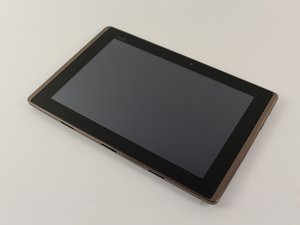
This tablet was released by ASUS in April 2011 and is 10.1 inches long with an NVIDIA processor and Android 3.0 honeycomb operating system. It features a rear webcam with a resolution of 5 MP and can either be purchased with a 16 or 32 GB hard drive. The tablet can be attached to a portable keyboard. When telling apart this tablet from another, the biggest giveaway will be the version of the operating system.
In February 2012, as ASUS attempted to upgrade the TF 101 "Honeycomb" operating system to their new system, Android 4.0 "Ice Cream Sandwich," users experienced a variety of software and hardware issues including graphic problems, random reboots, crashing and battery issues causing ASUS to discontinue the product later that same year.
ASUS TF 101 tablet review and description
ASUS TF101 tablet teardown guide
ASUS TF101 tablet screen malfunction repair guide
ASUS Eee Pad TF101/TF101G Manual de Usuario
ASUS Eee Pad TF101/TF101G Podręcznik użytkownika komputera
Eee Pad TF101/TF101G – Manuale Utente
Eee Pad TF101/TF101G — Manual do Usuário
ASUS Manuel de l'utilisateur Eee Pad TF101/TF101G
Manuel de l'utilisateur Eee Pad TF101
Past 24 Hours: 2
Past 7 Days: 34
Past 30 Days: 98
All Time: 11,457


