Shop the Holiday Gift Guide
Free Shipping on Domestic Orders $75+

iPad Pro 9.7" Battery Disconnect

Views: 474

View statistics:

Past 24 Hours:
1
Past 7 Days:
5
Past 30 Days:
20
All Time:
474
Comments: 4

4 comments on steps.

Completed: 0

No one has marked this guide "completed." Will you be the first?

Favorites: 0

No one has favorited (and subscribed to) this guide. Will you be the first?

Time Required: No estimate
Difficulty: Moderate
Prerequisite Only

This is a prerequisite-only guide! This guide is part of another procedure and isn’t meant to be used alone.

iPad Pro 9.7" Battery Disconnect

Introduction

Go to step 1 ↓

Prerequisite only guide. Shows how to disconnect the battery for the iPad Pro 9.7".

What you need

Tools

    1. iPad Pro 9.7" Battery Disconnect, Disconnect the battery: step 1, image 1 of 1
      • Use a Phillips screwdriver to remove the eleven 1.3 mm screws securing the EMI shield.

      Ask FixBot

      Add Comment

    2. iPad Pro 9.7" Battery Disconnect: step 2, image 1 of 1
      • Apply a heated iOpener to the EMI shield on the logic board for one minute.

      Ask FixBot

      Add Comment

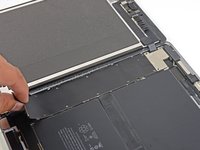
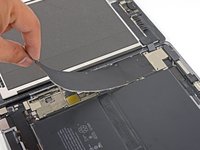
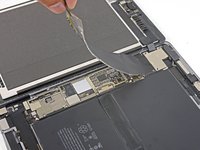
    3. iPad Pro 9.7" Battery Disconnect: step 3, image 1 of 3 iPad Pro 9.7" Battery Disconnect: step 3, image 2 of 3 iPad Pro 9.7" Battery Disconnect: step 3, image 3 of 3
      • Lift the logic board EMI shield, starting at the edge nearest the top of the iPad.

      • Slowly peel the EMI shield up from the logic board.

      • This takes a bit of force due to the many tiny clips securing the shield, and the shield may deform slightly. That's okay—try to keep the deformation to a minimum, and it will lay flat when reinstalled and screwed down.

      • Remove the logic board EMI shield.

      Ask FixBot

      Add Comment

    4. iPad Pro 9.7" Battery Disconnect: step 4, image 1 of 1
      • Use a Phillips driver to remove the 1.7 mm-long screw securing the battery connector.

      Ask FixBot

      Add Comment

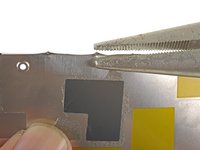
    5. iPad Pro 9.7" Battery Disconnect: step 5, image 1 of 3 iPad Pro 9.7" Battery Disconnect: step 5, image 2 of 3 iPad Pro 9.7" Battery Disconnect: step 5, image 3 of 3
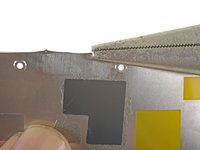
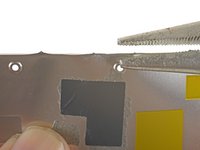
      • If the EMI shield has any sharp protrusions after removal, you should flatten them before reinstalling the shield.

      • Squeeze the sharp protrusion with a pair of pliers to flatten it.

      • Repeat the process for all sharp protrusions along the edges of the EMI shield.

      Ask FixBot

      Add Comment

Conclusion

To reassemble your device, follow these instructions in reverse order.

Cancel: I did not complete this guide.

Author

with

Arthur Shi

Member since: 01/03/18

353,987 Reputation

938 Guides authored

Team

iFixit Member of iFixit

Staff

119 Members

72,954 Guides authored

0 Guide Comments

Add Comment

View Statistics:

Past 24 Hours: 1

Past 7 Days: 5

Past 30 Days: 20

All Time: 474