Free Shipping on Domestic Orders $75+

Replacing Philips FC 6148 handheld vacuum cleaner batteries

What you need

  1. Replacing Philips FC 6148 handheld vacuum cleaner batteries, Replacing Philips FC 6148 handheld vacuum cleaner batteries: step 1, image 1 of 2 Replacing Philips FC 6148 handheld vacuum cleaner batteries, Replacing Philips FC 6148 handheld vacuum cleaner batteries: step 1, image 2 of 2
    • Remove all attachments, leaving only the base unit.

    • Unscrew the five Phillips screws.

  2. Replacing Philips FC 6148 handheld vacuum cleaner batteries: step 2, image 1 of 1
    • You have to disassemble the device into two halves. To do this, cut the sticker at the seam with a sharp tool.

  3. Replacing Philips FC 6148 handheld vacuum cleaner batteries: step 3, image 1 of 1
    • Take a plastic lever tool and carefully split the device into two halves. It probably is stuck a little.

    • Now is a good time to give the inside of the appliance a good clean, especially all the foam filters.

  4. Replacing Philips FC 6148 handheld vacuum cleaner batteries: step 4, image 1 of 2 Replacing Philips FC 6148 handheld vacuum cleaner batteries: step 4, image 2 of 2
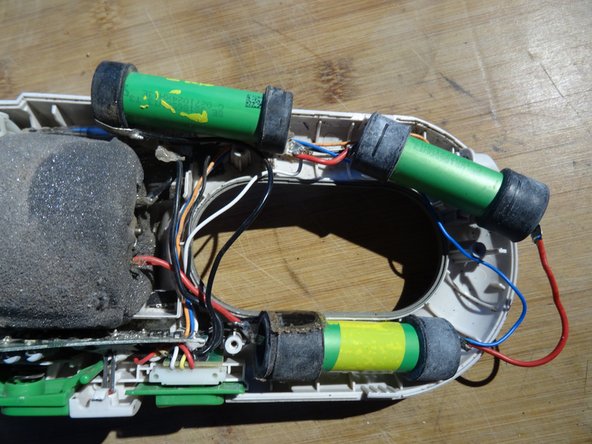
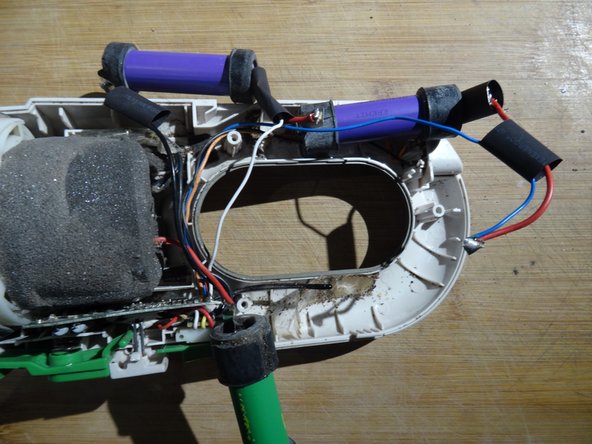
    • The batteries - shown here in green - are easy to see. They are held in the device by rubber buffers.

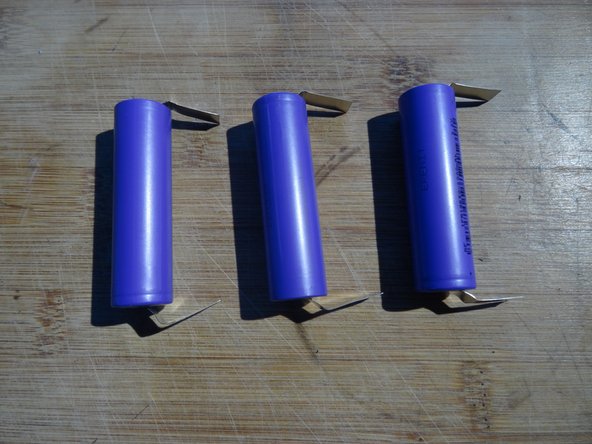
    • You need three 18650 batteries with U-shaped solder tabs. The higher the capacity, the longer you can vacuum. Use types with a nominal voltage of 3.7 V and a charging voltage of 4.1 V.

    • To be on the safe side, measure the voltage of each cell. They should all be the same.

  5. Replacing Philips FC 6148 handheld vacuum cleaner batteries: step 5, image 1 of 3 Replacing Philips FC 6148 handheld vacuum cleaner batteries: step 5, image 2 of 3 Replacing Philips FC 6148 handheld vacuum cleaner batteries: step 5, image 3 of 3
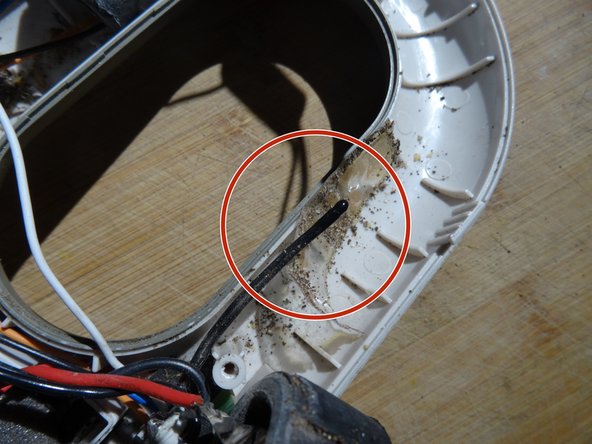
    • Carefully lift out the batteries. A fuse and a thermal sensor are glued to the first and third battery.

    • Remove the adhesive tapes and carefully push the fuse and the thermal sensor to the side.

    • In the third picture you can see the thermal sensor. Note how it is guided through a groove in the rubber buffer and rests against the battery.

  6. Replacing Philips FC 6148 handheld vacuum cleaner batteries: step 6, image 1 of 2 Replacing Philips FC 6148 handheld vacuum cleaner batteries: step 6, image 2 of 2
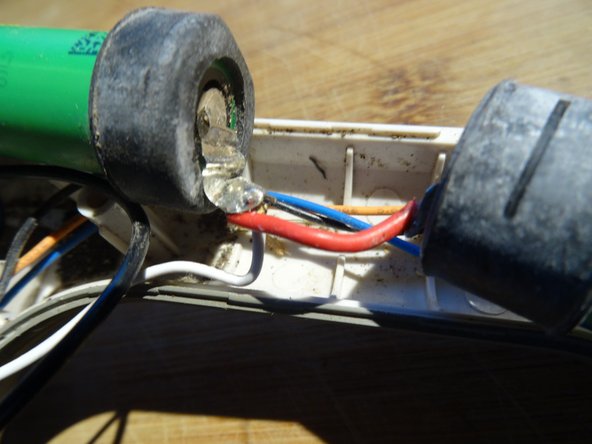
    • All solder joints are secured with heat-shrink tubing. Cut all heat-shrink tubing with a sharp tool and remove it.

  7. Replacing Philips FC 6148 handheld vacuum cleaner batteries: step 7, image 1 of 2 Replacing Philips FC 6148 handheld vacuum cleaner batteries: step 7, image 2 of 2
    • Now comes the main work: soldering. Get some wide heat-shrink tubing that fits over the soldering tabs.

    • Desolder the old batteries piece by piece - you can also pinch off the cables - and solder them to the new batteries in the same way:

    • Slide on suitable pieces of heat-shrink tubing before soldering.

    • Pay very close attention to the polarity of the batteries. If you make a mistake here, nothing will work!

    • Heat the heat-shrink tubing until it tightens against the soldering tabs.

  8. Replacing Philips FC 6148 handheld vacuum cleaner batteries: step 8, image 1 of 1
    • Tape the fuse and the heat sensor in place with insulating tape.

    • Insert the batteries.

    • Check the polarity of the batteries once more.

    • Minus

    • Plus

    • Switch on the device for testing.

Conclusion

Work through the steps in reverse order to reassemble your device.

9 other people completed this guide.

Special thanks to these translators:

de en

100%

oldturkey03 is helping us fix the world! Want to contribute?
Start translating ›

VauWeh

Member since: 10/19/15

325,550 Reputation

309 Guides authored

Team

Repair is War on Entropy Member of Repair is War on Entropy

Community

36 Members

1,615 Guides authored

7 Guide Comments

1.000 Dank für diese Anleitung!

Das hier [Link] sind passende Akkus oder? Die Ladeschlussspannung liegt bei 4.2V...

Michael - Reply Share

Ich glaube, die passen.

VauWeh - Share

Auch von mir nochmal 1000 Dank - die Anleitung hat mir sehr geholfen - habe drei von den Handstaubsaugern und einen jetzt mit neuen Batterien ausgestattet. Die Kabel sind allerdings echt blöd verlegt in dem Gerät - überlege bei den anderen Saugern dann Kabelschuhe an die Akkus zu lösen und die Gegenstücke auf die Kabel -> wenn ich dann nochmal Akkus tauschen muss, kann ich die einfach anstecken - Schrumpfschlauch drüber und fertig

Sascha

Sascha Fabian - Reply Share

@michael21879 @saschafabian Danke für eure Rückmeldungen. Dann haben wir schon mehrere Quellen für die Akkus, sind recht unproblematisch.

VauWeh - Share

Vielen herzlichen Dank für die detaillierte Anleitung! Hat mir außerordnentlich geholfen.

Die 3 Akkus haben ich für 15,67 € inkl. Versand übrigens hier bestellt:

https://www.akkuteile.de/lithium-ionen-a...

Thomas Kingston - Reply Share

Add Comment

View Statistics:

Past 24 Hours: 13

Past 7 Days: 81

Past 30 Days: 358

All Time: 10,767