Free Shipping on Domestic Orders $75+

Microsoft Surface Pro 4 Kickstand Replacement

Archived Guide
This guide is retained solely for historical purposes. Use the updated version of the guide to perform your repair.

What you need

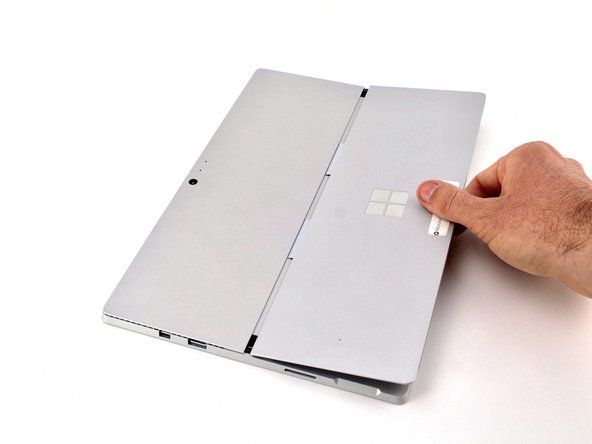
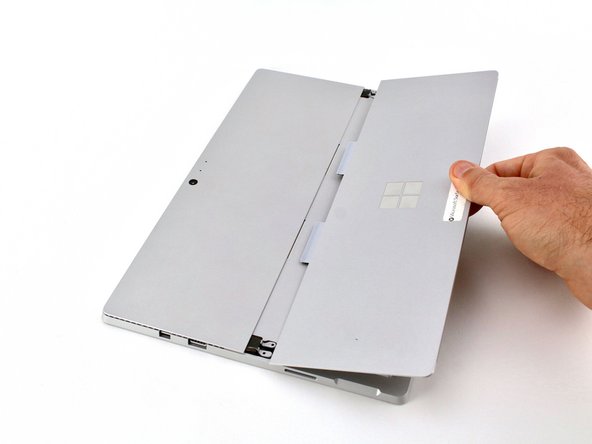
    1. Microsoft Surface Pro 4 Kickstand Replacement, Kickstand: step 1, image 1 of 2 Microsoft Surface Pro 4 Kickstand Replacement, Kickstand: step 1, image 2 of 2
      • Lift the kickstand to a 90º angle to expose the hinge screws.

      Ask FixBot

      Add Comment

    2. Microsoft Surface Pro 4 Kickstand Replacement: step 2, image 1 of 2 Microsoft Surface Pro 4 Kickstand Replacement: step 2, image 2 of 2
      • Remove the four 3.3 mm T5 screws—two on each side of the kickstand.

      Ask FixBot

      Add Comment

    3. Microsoft Surface Pro 4 Kickstand Replacement: step 3, image 1 of 2 Microsoft Surface Pro 4 Kickstand Replacement: step 3, image 2 of 2
      • Remove the kickstand from the back cover.

      Ask FixBot

      Add Comment

Conclusion

To reassemble your device, follow these instructions in reverse order.

Cancel: I did not complete this guide.

Sarah Westberg

Member since: 03/11/19

43,047 Reputation

72 Guides authored

Team

iFixit Member of iFixit

Staff

122 Members

72,401 Guides authored

0 Guide Comments

Add Comment

View Statistics:

Past 24 Hours: 0

Past 7 Days: 4

Past 30 Days: 7

All Time: 90