Introduction
Follow this guide to replace the earpiece speaker (at the top of your phone) in your Samsung Galaxy S25 Ultra smartphone.
If you hear static, crackling, or no sound at all during phone calls, you may need to replace the earpiece speaker.
Note: You'll need replacement back cover adhesive to complete this repair.
What you need
-
-
Unplug all cables from your phone.
-
Completely power off your phone by holding the side key and volume down button and selecting Power off.
 Ask FixBot
-
-
-
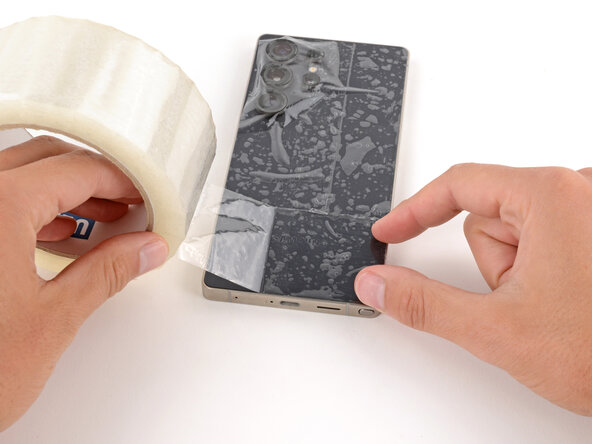
Apply strips of packing tape to the cracked glass until it's completely covered—this will help keep the glass contained and allow the suction cup to stick.
-
Make sure there's a single strip (not overlapping) of tape across the bottom edge, big enough for a suction cup to fit on.
-
-
-
Heat an iOpener and lay it on the bottom edge of the back cover for two minutes.
-
-
-
The cover is secured with adhesive around the perimeter of the frame. Use this picture as a reference while you separate the adhesive.
-
-
-
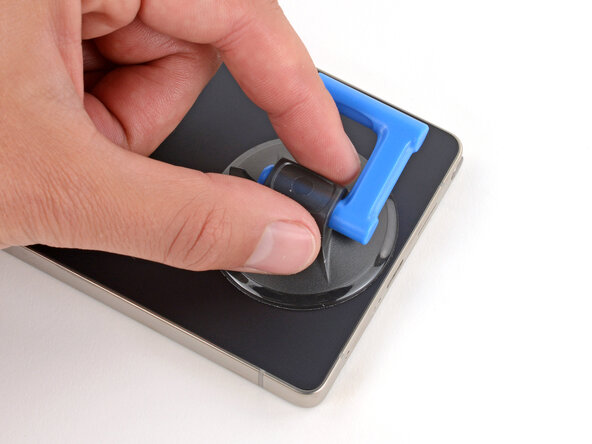
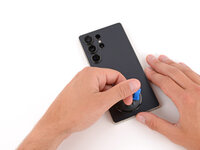
Apply a suction handle to the center of the back cover's bottom edge, as close to the edge as possible.
-
-
-
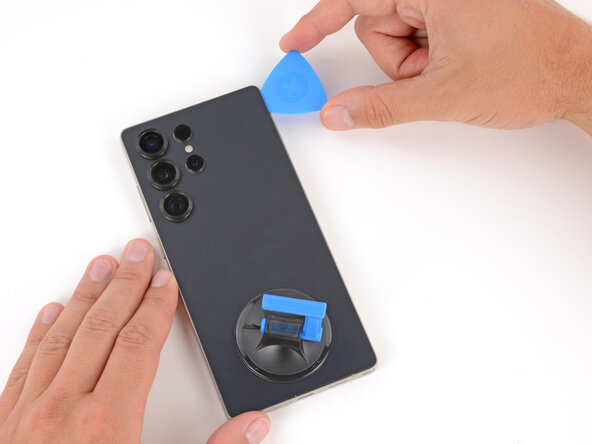
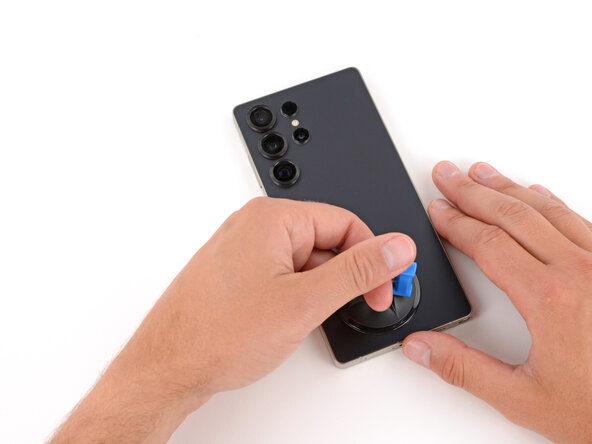
Pull up on the suction handle with strong, steady force until a gap forms between the back glass and frame.
-
Insert the tip of an opening pick into the gap.
-
-
-
Slide the opening pick along the bottom edge to separate the adhesive.
-
-
-
Slide the opening pick around the bottom right corner and up the right edge to separate the adhesive.
-
-
-
-
Slide the opening pick around the top right corner and along the top edge to separate the adhesive.
-
-
-
Slide the opening pick around the top left corner and down the left edge to separate the adhesive.
-
-
-
Use the suction handle to lift and remove the back cover.
-
This is a good point to power on your phone and test all functions before sealing it up. Be sure to power your phone back down completely before you continue working.
-
Check your rear cameras for any smudges and gently wipe them with a clean, lint–free cloth if necessary.
-
Your replacement back cover adhesive will be applied to either the frame or the back cover. Use cutouts and contours to see where it lines up best. If it matches the back cover, follow this guide. If it matches the frame, use this guide.
-
-
-
Use the point of a spudger to pry up and disconnect the wireless charging coil press connector.
-
-
Tool used on this step:Magnetic Project Mat$19.95
-
Use a Phillips screwdriver to remove the ten screws securing the wireless charging and loudspeaker assembly:
-
Four 3.5 mm‑long screws securing the wireless charging coil
-
Six 3.5 mm‑long screws securing the loudspeaker
-
-
-
Two tabs on the right side of the wireless charging coil are secured with mild adhesive.
-
Heat an iOpener and lay it on the tabs for one minute to soften the adhesive.
-
-
-
Gently slide the point of a spudger under the top edge of the upper tab and lift slowly to separate it.
-
-
-
Repeat the previous step to separate the lower tab, starting at the bottom edge.
-
-
-
Use the point of a spudger to pry up the right side of the loudspeaker and unclip it.
-
-
-
Use two hands to remove the wireless charging and loudspeaker assembly.
-
-
-
Use the point of a spudger to pry up and disconnect the battery press connector.
-
-
-
Use the point of a spudger to pry up and disconnect the earpiece speaker press connector (the uppermost, short one) from the top right of the motherboard.
-
-
-
Use a Phillips screwdriver to remove the five 3.5 mm‑long screws securing the earpiece speaker.
-
-
-
Use the point of a spudger to lift the earpiece speaker by its top left corner until it unclips.
-
Remove the speaker.
-












Compare your new replacement part to the original part—you may need to transfer remaining components or remove adhesive backings from the new part before you install it.
To reassemble your device, follow these instructions in reverse order.
Take your e-waste to an R2 or e-Stewards certified recycler.
Repair didn’t go as planned? Try some basic troubleshooting, or ask our Answers Community for troubleshooting help.
Cancel: I did not complete this guide.
One other person completed this guide.

