
Bottom Cover
|
2 Answers 2 Score |
How to upgrade SSD and RAM |
|
6 Answers 3 Score |
How do I replace the display? |
|
1 Answer 0 Score |
How can I change the fan? |
|
2 Answers 3 Score |
I can't adjust the sceen brightness |
These are some common tools used to work on this device. You might not need every tool for every procedure.
If you are having trouble with your Vaio Pro 13, the Troubleshooting Page is a great place to start
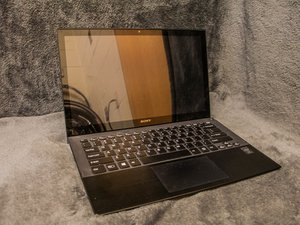
The Sony Vaio Pro 13 is part of Sony’s line of Vaio Ultrabooks. It was released for sale in June 2013. Sony has now discontinued production of PC’s, but they still offer customer support to Vaio owners.
The laptop is portable due to its light weight, weighing a little over two pounds. The battery life is reliable; the battery sustains for almost seven hours before the laptop needs to be charged. The battery is not removable, but an external battery can be used to elongate laptop life. The Vaio uses fourth generation intel core processers (either I5 or I7), which help sustain the long battery life.
Because the laptop is built to be light and portable, some ports and connections are compromised. The laptop comes installed with 4GB of memory. The touch screen is 13.3 inches wide. Windows 8 is the default operating software.
The Vaio Pro 13 distinguishes itself from other Sony Vaio products by embodying elements of both a laptop and a tablet. It is similar in its main components to the Vaio Pro 11, but the screen of the Vaio Pro 13 is slightly wider.
Failed WiFi connectivity has been a common problem for Vaio users in the past. Sony released an update in August, 2013 that corrected WiFi and Bluetooth connection problems. Additionally, users have reported problems with adjusting screen brightness and with the fan making noise when ventilating.
Engadget: Review and Specifications
YouTube: Sony VAIO Pro13, svp132 fan replacement, case removal
Sony VAIO Pro 11/13 Quick Start Guide
Sony VAIO Pro 11/13 SVP112/SVP132 Guía de Inicio Rápido
Sony VAIO Pro 13 SVP13213CXB Carbon Fiber Touchscreen Ultrabook Specifications
Sony VAIO Pro 13 Touchscreen Ultrabook SVP13223CXS Specifications
Sony VAIO Pro 13 Touch Ultrabook SVP13215PXS Specifications
Sony VAIO Pro 13 Ultrabook SVP132190X Touchscreen Specifications
Sony VAIO Pro 13 SVP13227PL con Windows 8.1 Pro y SSD de 128 GB: Especificaciones
Sony VAIO Pro 13 Ultrabook SVP13226PXS Touch, Carbon Silver Specifications
Sony VAIO Pro 13 Touch Ultrabook SVP13215PXB Carbon Black Specifications
Sony VAIO Pro 13 SVP13213CYB Carbon Fiber Ultrabook Specifications
Sony VAIO Pro 13 SVP13225CDB Touchscreen Laptop Specifications
Sony VAIO Pro 13 SVP13215CL Touchscreen Especificaciones
Sony Pro 13 SVP13217PBB/PBS com Tela Touch — Especificações
Sony VAIO Pro 13 SVP1321BPXB Carbon Fiber Ultrabook Specification Sheet
Sony VAIO Pro 13 Ultrabook SVP132290X Specifications
Sony VAIO Pro 13 Ultrabook SVP1321HGXBI Black Core i7 256GB SSD Specifications
Past 24 Hours: 6
Past 7 Days: 36
Past 30 Days: 145
All Time: 39,677


