Battery

This wiki is being worked on by hardworking students.
|
No Answers 0 Score |
3 amber and 6 white light |
If you are experiencing difficulties with your Dell Latitude 5491, visit the troubleshooting page.
Dell Latitude 5491 Audio Sounds Distorted
Dell Latitude 5491 Key Presses Intermittently Not Registering
The Dell Latitude 5491 is a high-performance business laptop, released globally in May 2018 as part of Dell’s Latitude 5000 series. It replaced the earlier Latitude 5480 and was later succeeded by the Latitude 5401 in 2019. With a starting price of $1,069, it was designed to suit the needs of individuals who needed a reliable, portable, everyday laptop with the power and abilities of a business laptop.
While there were no manufacturer recalls for the Dell Latitude 5491, many of its users reported issues with the charging port, failure to wake up after being left idle, and problems with the keyboard backlight. Customers often complained about the loud fan noises, inadequate cooling, and mediocre battery life. However, many praised the laptop's excellent port selection, comfortable keyboard, and its durability.
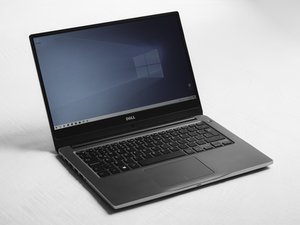
The Dell Latitude 5491 is a carbon-fiber-reinforced polymer chassis laptop and only comes in one color, the classic matte-black. It features rounded corners, a 14-inch display, and a starting weight of 3.63 lbs (1.65 kg). One way to separate the Dell Latitude 5491 from similar models is by the power supply. The Latitude 5491 is known to have higher performance abilities than a typical office laptop, thus it requires a 90W or 130W power adapter for turbo boost, unlike the 5490 that uses a 65W adapter. It is also distinguishable by its ports. With a legacy 15-pin VGA, Type-A USB port, a Noble wedge lock slot, and an HDMI port, it stands out from other generations. For further identification, locate the model number on a sticker placed on the bottom base cover of the Dell Latitude laptop.


Display:
Processor:
Graphics:
Memory:
Storage:
Wireless:
Ports:
Battery:
Dimensions:
For more helpful information, please visit these sites for a deeper look into the Dell Latitude 5491 laptop:
Dell Latitude 5491 Specifications Guide
Dell Latitude 5491 Service Manuals
Support for Latitude 5491 - Helpful Articles
Dell Latitude 5491 Service Manual
Latitude 5491 Guide de configuration et de caractéristiques techniques
Dell Latitude 5491 – Guide de maintenance
Latitude 5491 — Руководство по обслуживанию
Dell Latitude 5491 Setup and Specifications Guide
Dell Latitude 5491 Setup and Specifications Guide
Dell Latitude 5491 Guia de Configuração e Especificações
Past 24 Hours: 2
Past 7 Days: 10
Past 30 Days: 93
All Time: 1,007