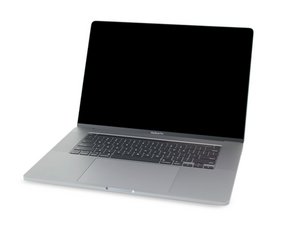

Repair guides and disassembly information for the MacBook Pro 16'' released in November of 2019. Model A2141, EMC 3347.

Why is my computer randomly shuts down with a new battery?

Why is my computer randomly shuts down with a new battery?

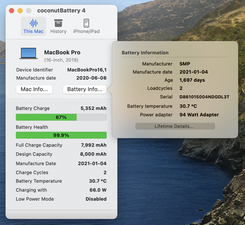
Update (08/27/25)

This might be the reason. The design capacity should be 8700 mAh.
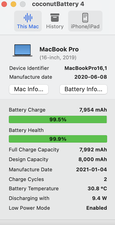
Block Image

Update (08/27/25)

Block Image
Answer this question I have this problem too

Is this a good question?

Score 0

2 Comments:

@ramzenzaren - Yes the capacity is not correct!

But I don't think that explains the random shutdown. Can you take one more snapshot this time after clicking on the Battery Info button so the battery info is seen.

by

Another thing that I failed to mention is that when it restarts it shuts down once I log in.

by

Add a comment

3 Answers

Could be overheating, loose connection, or even a power supply issue. I’d check temps and make sure everything’s seated properly. Sometimes it’s not the battery at all

Was this answer helpful?

Score 0
Add a comment

@ramzenzaren - If the system is able to run a few minutes I would install this gem of an App CoconutBattery it will allow you to see more clearly the health of your systems battery. Take a snapshot of the Apps main window and post it here so we can see it as well.

A helpful tool is a USB-C power meter which you can place inline with your charger to monitor its power delivery.

Here's the guide to replace the battery MacBook Pro 16" 2019 Battery Replacement

Was this answer helpful?

Score 0
Add a comment

Possible Reasons for this-

  1. Overheating
    – Dust buildup, bad cooling fan, or dried thermal paste can cause sudden shutdowns.
    – The system powers off to protect hardware.
  2. Faulty Power Supply (PSU) or Charger
    – Even with a good battery, if the PSU/charger gives unstable power, the system can crash.
  3. RAM or Hardware Issues
    – Loose RAM, a failing hard drive/SSD, or a faulty GPU can trigger random shutdowns.
  4. Motherboard or Power Circuit Problem
    – Damaged power ICs or shorted components may cause unexpected power loss.
  5. Driver/BIOS/Software Issues
    – Corrupted drivers, outdated BIOS, or OS errors can cause shutdown loops.

Was this answer helpful?

Score -1

1 Comment:

@rashmikand95190 - Please review the system details before dropping a generic AI? Generated solution. If this was a desktop then this would have been reasonable. As this is a laptop if fails to even deal with the issues it would likely have and a Mac laptop is different enough to a Windows system, in this case doesn't even have a BIOS chip or built-in power supply.

by

Add a comment

Add your answer

RamZenZaren will be eternally grateful.
View Statistics:

Past 24 Hours: 0

Past 7 Days: 3

Past 30 Days: 14

All Time: 102