A1418 / EMC 3069 / 2017 / 3.0 GHz quad-core i5, 3.4 GHz quad-core i5 or 3.6 GHz quad-core i7 Processor. Released June 8, 2017.

Identify circuits on logic board - bumped while ugrading

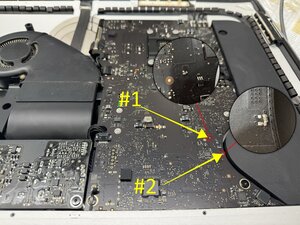
While disassembling my old 2017 iMac for a SSD upgrade I accidentally bumped the logic board and 2 small circuits got damaged. I completed the upgrade and now when I'm trying to boot it up the screen stays black and only the first 3 diagnostic lights on the logic board light up. would these circuits be the reason for that or is there some other problem as well?

heres a picture of the damage

Block Image
Answered! View the answer I have this problem too

Is this a good question?

Score 1
Add a comment

1 Answer

Chosen Solution

@kyler61164 looks like your board is a 820-00629 (if not let us know ASAP) and there are no boardviews available for this. Some sections on the 820-00597 are somewhat similar but not identical for the whole board. In the case of your components and verifying with the schematics at hand, the one marked

Block Image

#1 is a 2.2µF 20% 25V capacitor in a 0402 package

The next one is a 1000 PF 20% 25V Capacitor in a 0402 package.

You do have a torn solder pad which may complicate the repair. Scrape the solder mask a bit more so that you can possibly rebuild the pad. #1 is on the GPUCore rail and #2 is on the VReg 3.3V S5/5V S4 rail

If unsure and since you still have the components, use a capacitance meter and check the two components values. You can then resolder those or replace them if need should be.

Was this answer helpful?

Score 1

1 Comment:

@oldturkey03 Thanks! I believe the board is the 820-00597. Those capacitors will be my problem then. I don't quite trust myself with that delicate soldering, so I'll have to look into getting it repaired.

This will teach me to be more careful when disassembling computers...

by

Add a comment

Add your answer

Kyler will be eternally grateful.
View Statistics:

Past 24 Hours: 0

Past 7 Days: 0

Past 30 Days: 4

All Time: 96