Free Shipping on Domestic Orders $75+

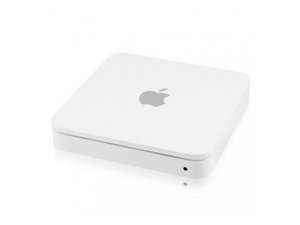
The Airport Time Capsule is a wireless router and network-attached storage (NAS) device manufactured by Apple. Model A1409 is the fourth generation revision of the Time Capsule released in June 2011.

If I can, how do I replace the HDD with a SSD

If i can, how do I replace the HDD with a SSD in my Time Capsule? After all an SSD would be much faster.

Answered! View the answer I have this problem too

Is this a good question?

Score 4
2 Comments

Also, will the SSD even effect the speed of my backups or will it stay the same? I was hoping that it would make my backups faster

by

It won't hasten anything as you're bottlenecked by the connection interface from the logic board.

by

Add a comment

3 Answers

Chosen Solution
  1. Physically connect the SSD. Place the SSD in the enclosure or connect it to the USB-to-SATA adapter, and then connect it to your laptop with the USB cable.
  2. Initialize the SSD. ...
  3. Resize the current drive partition to be the same size or smaller than the SSD.

Hope this is helpful!

Regards,

Lewis

Admin

Apps4rent | o365CloudExperts

Was this answer helpful?

Score 1

2 Comments:

Great thank you!

by

Great but how do I connect an SSD to the HDD connector. No doubt I need a convertor. But what is available and what do I need pls

by

Add a comment
Most Helpful Answer

Replacement HDD larger than 2 TB?

May be this helps. SSD will improve the speeds provided you have SSD on your laptop/desktop so that it can send data QUICK.

also any wireless backup will depend on your wireless router.

Was this answer helpful?

Score 1

2 Comments:

Thanks for the info!

by

that is not my question. I am looking for advise about the connection.

The SSD needs another and smaller connection than the HDD.

I could not find this connector and therefore I placed the question on the forum. I hope that some person can tell me what I need and where to get.

by

Add a comment

This generation Time Capsule came with SATA magnetic hard drive. Inexpensive SSDs with SATA connectors are widely available in 2.5 inch format (typically used in laptops). Initialize the SSD drive prior to insrall so that it is recognized. After install, the Time machine app will ask to format the drive.

Block Image
Block Image

Was this answer helpful?

Score 0
Add a comment

Add your answer

Strider will be eternally grateful.
View Statistics:

Past 24 Hours: 3

Past 7 Days: 9

Past 30 Days: 29

All Time: 7,325