
Free Shipping on Domestic Orders $75+

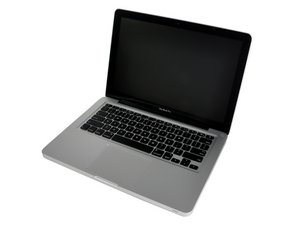
Repair information and guides for MacBook Pro models with 13" displays.

upgrading RAM and Internal modem

I have a late 2008 13" MacBook. Instead of buying a new laptop, I would like to upgrade the RAM as high as possible. Is it possible to upgrade from 2GB to 16GB or is 8GB the highest I can go?

Can I get away with just upgrading the memory or should I upgrade the processor and internal modem as well?

Answer this question I have this problem too

Is this a good question?

Score 0
5 Comments

There is no internal modem in this series, there is WiFi & Bluetooth is that what you're asking about?

Mayer has the memory part of your question answered below.

by

yes, it does, thank you.

by

Take a look here on your systems specs: MacBook Pro 13" 2.26 GHz Core 2 Duo. It only has an Ethernet network connection (RJ45) no telco modem (RJ11).

by

actually it is a 2 GHz intel Core 2 Duo

and I it has Wifi because that is how I've been using the internet.

by

Yes it has WiFi as well.

The point it doesn't have a telco modem built in which is still a different means of connectivity.

by

Add a comment

1 Answer

Most Helpful Answer

RAM Type: PC2-5300 DDR2 Min. RAM Speed: 667 MHz

Details: Supports 667 MHz PC2-5300 DDR2 SDRAM. Also see: How do you upgrade the RAM in the MacBook? How much RAM of what type does it support?

Standard RAM: 1 GB Maximum RAM: 6 GB*

Details: 1 GB of RAM is installed as two 512 MB modules, no slots free.

*Apple officially supports a maximum of 4 GB of RAM but third-parties have been able to upgrade the system to 6 GB of RAM using one 2 GB and one 4 GB memory module.

Leave the processor and upgrade the hard drive to an SSHD.

Here's how: MacBook Core 2 Duo Hard Drive Replacement

[linked product missing or disabled: IF107-098]

Was this answer helpful?

Score 5

7 Comments:

Thank you for this. Do you think it is possible to upgrade to 8 GB? Macsales.com says it is possible or are they just trying to sell me more product. As for the SSHD - again follow those recommendations? As you can see I'm not very commputer illerate. I'm lucky if I can load a printer on my computer :(

by

@rlvarady to be exactly sure please give me the exact specifications on your machine. On the SSHD, I would go with either a 1TB or 500GB Seagate Firecuda according to your storage needs.

by

2 GHz intel Core 2 Duo

2 GB 1067 mHz DDr3

by

Please verify that this is your machine, exact machine indemnification IS CRITICAL!:

Apple MacBook "Core 2 Duo" 2.0 13" (Unibody) Specs

Identifiers: Late 2008 Aluminum - MB466LL/A - MacBook5,1 - A1278 - 2254

https://everymac.com/systems/apple/macbo...

If so it uses this RAM:

RAM Type: PC3-8500 DDR3 Min. RAM Speed: 1066 MHz

Details: Supports 1066 MHz PC3-8500 DDR3 SDRAM. Also see: How do you upgrade the RAM in the "Unibody" MacBook? How much RAM of what type does it support?

Standard RAM: 2 GB Maximum RAM: 8 GB*

Details: 2 GB of RAM is installed as two 1 GB modules, no slots free.

*Apple officially supports a maximum of 4 GB of RAM. Originally, this model was only unofficially capable of stably supporting 6 GB of RAM, but as confirmed by site sponsor OWC, it is capable of supporting 8 GB of RAM if updated to Boot ROM Version MB51.007D.B03 and running MacOS X 10.6 "Snow Leopard" or higher.

by

this will help. I'm also going to check with Apple.

by

Show 2 more comments

Add a comment

Add your answer

Rebecca Lee Varady will be eternally grateful.
View Statistics:

Past 24 Hours: 0

Past 7 Days: 1

Past 30 Days: 1

All Time: 197