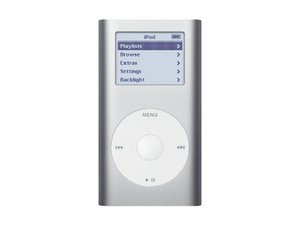

Model A1051 / 4 or 6 GB hard drive

How do I replace the battery?

I am trying to access the music on my deceased 20 year old's mini. I cannot just thow it away without attempting to listen to the music he loved. It looks like it is taking a charge when you plug it in but nothing works while plugged in and it does not have a charge when you unplug. Obviously the battery is dead and I wish to see if I can replace it. Can anyone help me?

Answered! View the answer I have this problem too

Is this a good question?

Score -1
Add a comment

2 Answers

Chosen Solution

Hi, I'm very sorry for your loss, here's what you'll need to do to revive the iPod:

Buy this battery here, and then follow this step-by-step installation guide. You probably already have the screwdrivers you need to do the repair, however, you'll also require a spudger.

A tougher take on a favorite multitool. Safely poke and pry with this tough, firm, and antistatic tool for electronic repair. 5” carbon fiber tool essential for smartphone or tablet disassembly. Image

Product

Spudger

$3.99

iPod mini, 1st and 2nd Generation, A1501 battery replacement. Compatible with all iPod minis. Model #EC007-3, EC007-5. One year guarantee. Image

Product

iPod mini Battery

$13.99

Was this answer helpful?

Score 0

1 Comment:

Sorry for your loss. Please be careful when you use iTunes. Make sure you have the auto sync turned off so as to not lose the music.Just follow the guide like rab777hp pointed out and you will be fine with the player itself. Good luck.

by

Add a comment

i want model A1051 ipod mini battery apple product.

Was this answer helpful?

Score 0
Add a comment

Add your answer

John Cahan will be eternally grateful.
View Statistics:

Past 24 Hours: 0

Past 7 Days: 1

Past 30 Days: 2

All Time: 3,511

