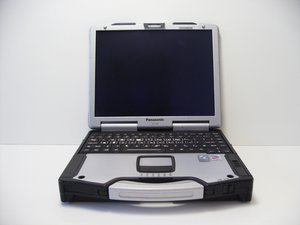
problem with can't power up panasonic toughbook cf-29
i can't power up after battery was charged.
Is this a good question?
Score
5

Rep: 61
 2
2
 2
2
i can't power up after battery was charged.
Is this a good question?

Rep: 79
2
On most toughbooks please follow these instructions in order:
Step 1: Please Un-Plug AC Adapter (External Power Supply).
Step 2: Please Remove Internal Toughbook Battery Pack
(In some cases, you must release the latch located on the underside of the Toughbook).
Step 3: Do not put back the internal battery but plug back in the AC Adapter.
Step 4: Turn on the power (ie. start-up the Toughbook with the power button).
(In most cases the Toughbook will turn back on without the internal battery pack).
Step 5: Once the Toughbook is powered back on, do a complete shutdown of Windows.
Step 6: Put back the internal battery pack.
That is it. Your Toughbook should now work as normal.
Good Luck and Regards from:
Richard, Montreal Based Panasonic Canada Authorized Toughbook Dealer since 1989.
Was this answer helpful?
Perfect! You fixed me, thank you.
it worked for me, you saved my 3 Panasonic CF 54. thanks.
Worked on Panasonic CF-AX2. thanks.
Try already. But Can not ON
Is toughbook On without battery??
Rep: 79
2
The Panasonic "original" charger to the best of my knowledge has no green light.
The original AC adapter or charger usually has a white label and Panasonic Logo
and a barcode on the lower right side of the label. There is a serial no. as well
as a model no. example CF-AA1653A. Otherwise it is a generic "Replacement"
part and in my opinion NOT recommended. Good Luck. Richard
Was this answer helpful?
Past 24 Hours: 0
Past 7 Days: 11
Past 30 Days: 57
All Time: 20,523

2 Comments
Well, not in my case. Now what? Is it just a brick?
by Jim Glynn
toughbook module cf-31, I pulled battery and tried turning on, but didn't come back on.
What next?
by Mike Vaughn