
Back Cover
|
2 Answers 0 Score |
Laptop is Powered On but Screen is Black and Wont Turn On |
|
4 Answers 14 Score |
How do I remove bios password |
|
7 Answers 8 Score |
Touch screen driver install. |
|
13 Answers 5 Score |
I do not know the Phoenix BIOS password |
These are some common tools used to work on this device. You might not need every tool for every procedure.
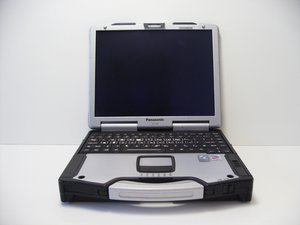
The Toughbook CF-29 is one of the many rugged laptop computers created by Panasonic. The CF-29 resembles a typical laptop except for a few distinctive features. Most notably, it is about two inches thick and has a carrying handle making it resemble a small, hard-sided briefcase. The CF-29 weighs in at slightly under 8 pounds. Its dimensions are: 11.8” (W) X 2.3” (H) X 9.5” (D). This laptop also has a 13.3” touchscreen. Additionally, it has a battery life of approximately 7 hours. As for connections, the Toughbook has one USB port, a gigabit Ethernet port, and a built-in Wi-Fi antenna.
The Toughbook CF-29 model number (CF-29) is printed onto the bottom cover of the computer.
There are not too many upgrades currently offered for the CF-29. However, you may want to consider upgrading the following:
Diagnose any of your hardware problems using the Panasonic Toughbook CF-29 Troubleshooting Guide
CPSU-AMIDO-S10S27G93
4 Members
144 Guides authored
Past 24 Hours: 0
Past 7 Days: 14
Past 30 Days: 90
All Time: 65,724



