Check main power rails for the machine. PPBUS_G3H PP3V3_S5, PP3V3_S3, PP5V_S5, PP5V_S3. These acronyms are very simple, in the schematic it says how much power should be there. And if you don't see it, you can guess. PP3V42.. 3.42v. PP3V3_S5, 3.3v. PP5V_S5, 5v. The S number is when it should be there. S5, be there when it's off. S3, be there when it's sleeping. S0, be there when it's on. If any are missing, you have an idea where to start looking. In terms of posting pictures of schematics, I have no idea what board you have, but you can google the 820 number and find schematics and boardviews available from many sites.
The green light comes from PP3V42_G3H, which is a power rail independent from the rest. PPBUS_G3H is the main power rail that the rest of the system comes from, it is an 8v rail in the case of Macbook Airs. 3.3v rails, 5v rails, CPU vcore rails, memory power all comes from that one rail, so if you don't have it you're kinda screwed. Before we can even go trying to turn it on,Second thing to do
this must be present. A green or amber light with battery plugged in just means you have PP3V42_G3H which isn't that impressive.
Also you will get the light, but no power, even if clock signal is not present. Find out if you have RTC present, I don't know where to tell you to search for SYSCLK_RTC on your board because I don't know your board's 820 model number. You can check it with an oscilloscope. Without RTC present nothing will power on, because nothing knows to start working. You should see a waveform lo
Third thing to ask is if this is an i5/i7 model. All the core i5 and core i7 models will turn themselves on with a charger plugged in, so if it is one of these models we do not even need to try a new keyboard/trackpad/trackpad cable combo to see if your issue is just that of a bad power button. 90% of the time these don't turn on just because of a failed power button.
If this is a core 2 duo machine it will only turn on when you hit the power button on the keyboard, so if that is the case, you are not so lucky. You can short SMC_ONOFF_L pad to ground as well but it is easy on this board to short bad things on the trackpad cable connector so I just suggest finding a keyboard/trackpad/trackpad cable combo and hitting power with a new keyboard. Most of the time it is simple liquid damage the customer lied about because they think if they lie it will magically go away, it is silly human thinking.
There is a good chance this is fixable just from basic spill damage to the keyboard, but no way to know until the measuring gets started.


 6
6  16
16 
 2.3k
2.3k 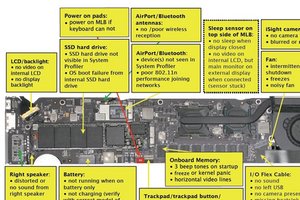


4 Comments
Hello Evan,
Did you ever figure out what was wrong with your Mac? I have the exact same issue. I have not attempted to short it out as I would do a PC but that is my next step. If that does not work what did you come up with?
Thanks a bunch
Phil
by Phillip Flores
For board-level troubleshooting for MacBooks, you need to watch Louis Rossmann's YouTube channel. He has an amazing talent for this work.
I watched this one a few days ago and loved it, seems perfect for this question: https://www.youtube.com/watch?v=FLH2Ns7Z...
jessa
by jessabethany
Thanks Jessa, this really helped a bunch. I had another client walk in today with the exact same Macbook Air Model I was trouble shooting for my other client and found that this video was the answer to my solution for that particular case.
The problem with the other Macbook Air is that the light on the charger turns Green for 5 seconds when first plugged in, then goes Amber. After an hour or so it turns Green again. I already know that the battery has past it's cycle life, but I unplugged the battery and attempted to turn it on that way and by pass the battery power. This did not work, the machine will not respond to any key commands or power up. It will not even allow me to reset the SMC. I believe that either the SMC chip has burnt out or one of the other chips surrounding it has, I have not gotten back to that machine as of yet. If you have any other suggestions feel free to comment back.
Happy New Year!
by Phillip Flores
I will ask Louis to come comment on this himself. He got beat up trying to answer some MacBook questions for his first time in iFixit Answers yesterday, but I will ask him to give it another try. I'm glad to know you found his advice helpful, I know I sure do :)
by jessabethany