3
Score
schizm00
49
Asked
iPhone 4 proximity sensor not working after replacing BLACK GSM
I own an iPhone repair store. I have done 100 or more iPhone 4 front glass assemblies. Those first 100 went on without a hitch. Now suddenly, in the last 3 months or so, 70% of my front assembly (screen, digi, LCD) repairs/replace
I test all of the phones before I begin to make sure that they are working prior to my repair. Here is a senario from today.
1. Test prox in customers iphone 4. Works fine.
2. Put mine in and test it. Does not work.
3. put 3 more glass pieces on they do not work.
4. Put customers broken piece back on to test (not broken in proximity area) and it works just fine.
Now I have had this issue in the past and have examined my glass to no end. The prox area of my after market glass is just as dim as the OEM glass. And what's stranger, is that I can put the glass that didn't work on another phone tomorrow, and there is an 80% chance that it'll work.
I have NO idea what is going on. The ONLY thing that I can think of is to get that little piece that separates the ambient light and the prox on the OEM glass and put it in there?
And is a sharpie gonna fix this issue?
I am TOTALLY lost at this point. What can I be doing wrong?
Edited by: Sterling Hirsh ( )
2
Score
Simon
25
Answered
This is NOT a software issue! The aftermarket screens allow too much light into the proximity sensor.
**THE FIX**
Black electrical tape, cut two small holes with an exacto knife (about the size of a ballpoint pen) exactly large enough to fit over the two sensors. Cut out the holes so you now have a small rectangle with two holes.
Place the rectangle over the proximity sensors and the holes should line up.
Thats it!
Reconnect the "Faulty" screen and... VOILA!
Minimizes the light allowed into the sensors! Oem screens have it separated into two in the glass and a small foam surround! The tape replicates this!
i can confirmed the tape method, works for me on a red full body conversion , thanks a bunch, time to make $$$
Thanks for everyone who tried these. I wanted to make sure this wasn't a scam of some sort to mess up my phone even more. I recently changed my black AT&T iPhone 4 black glass to a white one online. The proximity sensor wasn't working. I kept hitting mute and hold with my ear. I did the black electrical tape thing with a razor blade. Made two separate squares that overlapped each other between the sensors to get it raised more like I read on someone else's comments. It worked! Thank God. I tried six or more different times and even ignored this trick earlier because I was skeptical. Well it made a believer out of me. Thanks again everyone for your experienced input.
2
Score
KSE
25
Answered
I had the same issue.
My replacement glass doesn't have "that little piece that separates the ambient light and the prox". So i used the idea from Simon's method but instead of using electrical tape i used the black marker, painted on the glass similarly as it done on the original Apple glass. Did it several times so no light come through painted area. After that sensor's windows on replacement glass looks almost exactly as on original glass, and proximity sensor began to work.
1
Score
Digit
25
Answered
I have an iphone repair store too.
I am having the same problem.
I have two different aftermarket glass supplier.
70% glass works on replacement. Some of them doesn't work. Then we use other suppliers glass or same suppliers glass. It works. We use Non working glass on another customer. It works most of the time.
It looks like software problem.
Once, none of the glasses didn't work on one of the customers iphone 4. After 4 replacement last try also didn't work. I was hopeless. I put my finger on it many times. No way. I put on my ear no way. I kept on my ear like 20 second. After 20 seconds it shot off. After that it started to working fine all the time.
Software. Software. Software.
What happens (I guess) when we replace the glass software trying to look for background reflections, brightness. Doing some statistics etc. etc.
Software. Software. Software.
Now replacing iphone 4 glass is nightmare nightmare nightmare.
1
Score
Digit
25
Answered
Proximity problem solved.......
I just replaced yesterday one black iphone 4 broken glass. Proximity sensor didn't work. I was going to replace glass again. Before I replace the glass I decided to do a simple restore (4.3.3).
It worked ...............
Soooo it's not a hardware problem. It is software problem.
I guess : When you restore your iphone with a new firmware it measures your glass darkness and backgroud reflections while you restoring the new firmware. It also measures all hardware components. I am sure data kept in some files. When you replace the glass, new glass darkness and reflections are usually different from previous one (sometimes). You think your glass is bad. But your new glass works on other iphones. That explains everything.
If your proximity is not working --> You can simply restore your iphone to 4.3.3 (I just tested once and it worked with custom firmware 4.3.3 created by sn0wbreeze)
I hope it works for everbody.......
I have been working on this weird thing more than 2 months.
Good to know, and it makes sense. Only problem is, I can't restore customers' iPhones firmware everytime I replace glass. However, out of my last 2 batches of glass (12 total) all have worked. So f me. I am one confused dude.
1
Score
johnkustic
199
Answered
I use this fix works 90% of the time.
Also check if your still have tiny piece of foam strip btw the proximity sensors on the frame.
Some people said using black electrical tape works for them as well
1
Score
Answered
0
Score
eTechParts
261
Answered
We have a lot of repair shops that buy from us and I have heard all of these methods working on certain iPhones. I think it really depends on the iPhone. There is another method not mentioned here of the little lens that you put over the sensor before you install the new screen. We have them for less than $5 and they will fix the problem. I would try all of the free fixes first but if that doesnt work you can find the iPhone 4 Sensor repair lens here.
0
Score
spacec0w
21
Answered
0
Score
Answered
hi guys , This is NOT a software issue !!!!!!
Very easy Fix = first open your screen , this link = http://www.youtube.com/watch?v=iNM90pb-X...
then you can use a thin colored plastic layer, cut it to fit the sensor and glue it to the sensor , this image = http://www.iimmgg.com/image/0db8ed363bf3...
then replace your screen , this link = http://www.youtube.com/watch?v=E2r1sOML2...
Well Done .. its working 100 % tested on 3 iphons
0
Score
Answered
I just ried the foam-fix with a DIY foam-frame.
It worked perfect on an iPhone we already assumed to be lost.
My guess:
If the light sensor gets too much light, it doesn't work (o'really :).
But where does it get the light from, when you cover the front?
From the backlight!
The light from the lcd panel diffuses into the light sensor.
So if you take a little bit foam to make a frame around the sensor - just like the thing on eBay linked above
this problem is solved.
Wow.
0
Score
Richey Kerr
43
Answered
see here, the proximity sensor lens might solve it
@Richard Kerr, I have ordered these proximity lens at your place. This is only the solution when the lens is missing on the proximity sensor. But what to do when its already in its place. @Deano193, This is when missing the proximity lens, it's not there from out factory on the sensor flex. You need to take it from the old sensor flex.. I think we need more foam so the sensor wont take the light from the backlight. But where to find the foam? And what does iphonefix.com sells? They don't ship abroad :( So I cannot test it.
0
Score
Deano
301
Answered
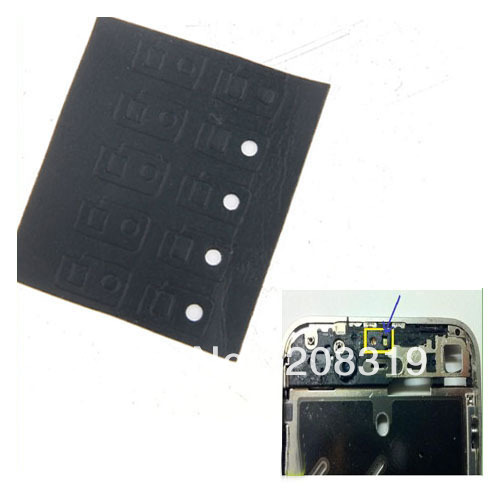
This may seem like an odd solution, but I recently found this image on a Chinese Parts Suppliers Website.
I have re-written message on image as original made little sense.
Personally I have not tested this as a verified fix, but to me it makes sense.
The sensor may be seeing the white surrounding it and is reading the sensor as open all the time.
0
Score
ReekoB
487
Answered
Guys - the only thing you need for a working proximity sensor is a GOOD QUALITY glass, a working proximity sensor flex cable and the UV filter sticker. We sell the original iPhone 4 proximity UV filter sticker with the black foam from our online store
You don't need anything else - just those 3.
The most common fault is to lose the UV sticker during installation. Second most common is to use a cheap copy front with a poor light filter at the top.
I'd recommend fault finding in the order:
1) Check for UV sticker
2) Try new front glass
3) Try new proximity sensor flex
It should definetly be working by the end of step 3.
Also to add - on the inside of the phone (the other side of the proximity sensor) is a little black plastic block. this plastic block holds the proximity sensor towards the front of the phone. If this is not placed properly or is missing it can affect the proximity sensor. We also can supply this spacer block
OMG This is not an answer!!! Your answer is only for people who have problems with the sensor. This topic is only related to the front glasses which were not good manufactured so the proximity won't work. We are searching for a solution for that specific problem..
Where in the original post does it say "we buy really cheap front screens that don't filter the light properly"? The problem doesn't lie purely with the front glass - there are 3 factors to the proximity sensor working not just the glass. This topic is titled: "iPhone 4 proximity sensor not working after replacing BLACK GSM"
No, you don't read the topic start post. It's somebody who bought really cheap front screens that don't filter the light properly. He wants an answer for it. You give these answers: 1) Check for UV sticker 2) Try new front glass 3) Try new proximity sensor flex These answers you only use when you have problem with the sensor.. And your second answer is really stupid: Try new front glass Thats like: I have my finger broken.. 1. Try new finger 2.
No - your question is more comparable to: The 17 inch tyre on my car is bald and needs replacing. I've purchased a 16 inch tyre as a replacement because it was 5% cheaper but it doesn't fit, how can I bodge it to try and make it fit. If you manage to verify that it's the screen that's faulty then send it back to your supplier for refund or replacement. Maybe find a new supplier and pay a couple $$ more for a better quality screen. The electrical tape and pen tricks aren't answers and in my opinion - are not even an option if the repair is for a customer, that's poor. They may work sometimes but you'll waste more time trying these tricks compared to following my 1, 2, 3 above with good quality parts. If you don't agree with my answer please continue to buy cheap screens and try and 'fix' them with electrical tape and a pen.
This has gotten out of hand! If you actually read the comments already in this thread, we have since established that this has NOTHING to do with the screen you are using! As stated above, the light emitted from the LCD is causing the problem. This proven by the fact that all newer iPhone 4, and more importantly iPhone 4S now have a foam insulator around the sensor from factory. On the iPhone 4, the foam is too compressed to work correctly after the original screen is removed. Replacing with a "Genuine" screen doesn't solve the issue of the gap that has now appeared allowing in light. If you remove a 4S screen, you can clearly see this foam. Installing a new screen without it will almost always give the sensor failure. This is solved, as stated time and time again, either by employing the tape trick, or inserting a new foam insulator! This fills the gap, stopping any light from the LCD affecting the sensor.
0
Score
Answered
0
Score
Answered
I would just like to add something as I have spent the best part of three days trying to sort through this one. I have tried all sorts of things from strips of insulating tape cut and placed over the sensor to colouring in the window on the glass. I couldn't work it out, each time I put the phone back together, the proximity sensor still didn't work.
Finally I worked it out and hopefully this will help other people as well.
We repair, refurbish and sell used iPhones http://www.reo-technology.co.uk and had come across this problem a few times in the early days of our business but recently, using better quality digitizers, we hadn't seen this for a while. I did however, as part of a promotional gimmick buy a pretty Blue front and back to customise a phone.
As I said, in the early days I had tried loads of different things, many suggested through this website and many others to try and work out this problem. Some say software issues, some say hardware. OK to clear this up, my logical guess it's a hardware problem that the software can't adjust to. It may well be that the clever software only works in a certain range, I'm not sure. What I do know is it's the sensor that can't cope with the variations on the different glass digitizer fronts. These vary from supplier to supplier, some work and some don't. During the many dismantling procedures in trying to get my customised blue phone to work, I tried one of my standard white digitizers and it worked perfectly so I knew it wasn't the sensor at fault. It's the quality of the window that lets Infrared light pass through it that can determine if it works or not.
Here is a simple diagram of how the sensor works:
The IR emitter sends out the signal and when you cheek or ear gets in the way it reflects back to the receiver and tells the screen to turn off.
I had tried all sorts and then I read an article about putting a little UV filter over the sensor and how it worked 100% so I decided to order one from eBay. When it arrived, it was much smaller than I imagined. When I looked closer, I realised this was already fitted to the iphone I was trying to get working. I had thought that I was buying some little add-on when in fact these are fitted in front of the receiver anyway. Now I really was confused.
Having stripped this phone down for the 6th time (the screws are starting to look a little worn out now), I though I'll stick this new little filter over the top of the old one. If this is what is recommended, I couldn't see that information clearly written down on any of the websites or anywhere on eBay where people are selling these. But as the phone was in bits, I thought I would try it. Below is some images to help understand what I am trying to explain.
As you can see from the pictures, it's quite small and only fits over the right bit of the sensor (which I assume is the receiver).
Top Left - Filter removed (This is standard as it leaves the factory)
Top Right - Filter fitted with extra filter to the right
Bottom Left - Filter
Bottom Right - Sensor with two filters fitted.
Bottom line is, this worked so now my iPhone with pretty blue front and back works as it should.
0
Score
Answered
Okay, so we still get this problem sometimes.
We have like 200 pieces of the filter with the foam on it.
We saw some similar problems between the phones:
There are 5 different versions.
See the IMEI number (the first numbers)
0124, 0125, 0126, 0127, 0128
The strange thing, is that all versions have this UV filter with foam already installed, only the 0127 never has!
So @Chris, you say: Top Left - Filter removed (This is standard as it leaves the factory)
You're IMEI starts with 0127! Because other iPhone 4's always have this filter standard from factory!
Still have sometimes the problem after repair that the sensor is not working, when we just replace the complete flex with a new uv lens filter, it works 9 of the 10 times.
0
Score
Jordy
11
Answered
Wow lots of theories,
What about this problem,
The sensor didnt work anymore after a screen replacement. I replaced the sensor flex. No Result
Checked for the foam, it was still there, put a layer of tape on top of it. No Result
Replaced the OEM front with a original Apple from a working iPhone.
No Result.
Any ideas, this problem is so strange!
0
Score
Bilal
1
Answered
0
Score
Rob
1
Answered
0
Score
Answered
Finally , I had to replace the sensor aswell as use the tapetrick. The one that worked for me was the one with scoth tape and a marker. tried all the other stuff here, but the tape stuff worked, and finally this is not a software issue, i tried the mainboard in an other phone , an the the proxi sensor and rest worked fine , and swapped back again, then it was just as bad. So that proves its not a software issue. Softwaregeeks ! Why i had to change the sensor was probably caused by the cracked screen. Took me all together at least 3 hrs. 2 different screens and a new prxsensor. (and some scoth tape.)
0
Score
eddie
1
Answered
tried all the above,none worked,decided to take screen off, reassemble without screen,after this i connected screen externally,made a phone call and put finger over pair of sensors,still not working so the next step is to replace sensor cable.
UPDATE,
replaced flex cable, uv filter, foam surround used 2 one on top of other,genuine used but in excellent condition screen,
exactly the same useless,
0
Score
Answered
Hello a few days ago I changed a flex cable because of the power button I also transferred the uv filter from the old cable/sensor to the new but it doesn't work the sensor is ok ( when I hold a cam on the phone while it is calling some number I can see the blue shine of the sensor)
The sensor next to the uv sensor has it also any filter??
Would a new filter be a solution to this problem???
I didn't try the tape or marker method , should I?
Would a iPhone 4s filter wok on 4 ???
Thank's to all of you guys!!!
0
Score
Answered
0
Score
Marco
1
Answered
0
Score
Answered