4
Score
Wijnand
59
Asked
Battery not charging or seen by OS
Hi There,
Here's my problem,
The Macbook is functioning fine, but the battery shows a black cross. I can't boot without the power adapter connected but once started, even right in the beginning, i can disconnect the power and it boots up fine. The magsave connector is green.
Ive done the following step,
Reset the pram and smc even disconnected the pram cel for a wile.
Tested the battery and adapter on my other macbook (same model) And finally swapped both battery cable and mac connector with the working macbook. None solved the problem.
So i'm thinking its the logic board. and i would think this is reparable if i know witch component is the most common to fail.
Dos anyone have an suggestion?
Best regards,
Wijnand van der Linden
(i hope its readable english, is not my first language (dutch)
2
Score
mayer
150.7k
Answered
Accepted Answer
Since we are translating, I want to make sure we are talking about the same thing. You have exchanged the battery connectors on the two machines, this part: MacBook Battery Connector/Sleep Sensor (non-Energy Star)
Please download and run Coconut Battery and tell us your results: http://www.coconut-flavour.com/coconutba...
MacBook Battery Connector/Sleep Sensor (non-Energy Star)
Provides battery contacts and sleep sensor for logic boards without Energy Star printed at the second RAM slot. — 36 available at 19.95 each.
0
Score
Wijnand
59
Answered
Okay, the story continuos,
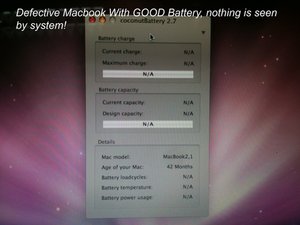
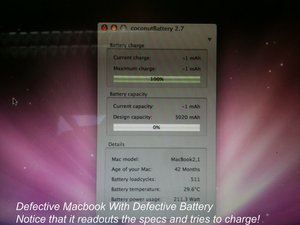
Today i put it back together again so that i could make some screenshots. I wil post the images also to back up my story.
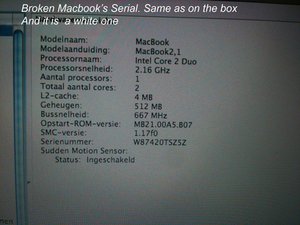
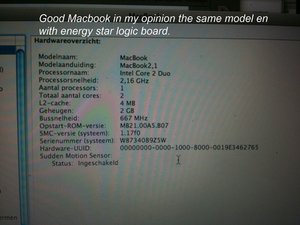
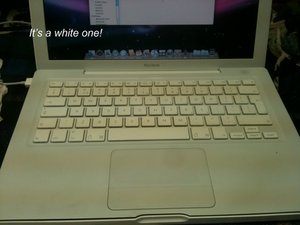
I have two macbook, both with an energy star logic board and both core duo 2.16. The serial of the good one is W8734089Z5W the broken one is W87420TSZ5Z Both are a white model.
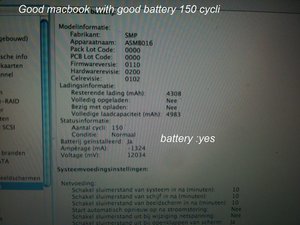
I have 2 battery's one is not good and can not be charged anymore. one is fine only 150 Cycly of charging.
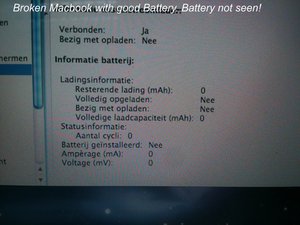
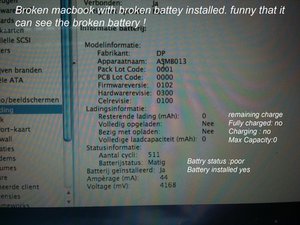
If i put the broken battery in the broken macbook, The Battery's is seen by both system and cocnut. but of course i isn't charging magsafe green light. If i put the good battery in the broken macbook both system and coconut can't see it and again it isn't charging.
0
Score
micher
1
Answered
Wijnand,
Have you made any progress on this issue since your last post? Unfortunately, I am not here to provide ideas, but to share in your frustration.
I have the same problem with my MacBook 2.16 Core 2 Duo system. Will not read the battery, although battery is fully charged, works elsewhere, and is recognized by Coconut Battery. System works fine when plugged in with the power adapter; green mag light is on.
Since it works with the power adapter, it's more of a nuisance than anything.
Thanks to all who have helped!
0
Score
Brian
1
Answered
I had this issue with one of my school's MacBook's, and luckily it was still covered under warranty. I called Apple, described the problem, told them the trouble-shooting steps I took, and they asked me to send them the unit. And I had 10.6.7 running on it. So Apple is looking at it as of today, and hopefully I'll have the computer back next week.
If anyone knows of a solution here, I would love to know what it is.
0
Score
Sanjay
1
Answered
0
Score
cuttinedge
13
Answered
i change the ac plug on mine and worked fine its an easy swap out and should work also is battery the same if its off by a couple of numbers download the battery driver for that model and instal should see it then ifsays not compatable go into driver and take chckcmptbl out of driver also remove memory hold power button down 40 sec put battery in power up with the battery that wont charge in it should see it then
0
Score
Greg
1
Answered
This all sounds quite familiar. I've spent the last couple of months investigating battery 'problems' on my own machine (White macbook, early 2009). My original battery had well over 400 cycles on it and, of course, couldn't hold much of a charge. Checked into a replacement; Apple battery-$129, Chinese battery-$32. I opted for the Chinese battery, after all, a battery is a battery, right? My new Chinese battery worked great, 4+ hours of use on a full charge. Then at about 40 cycles or so it started acting really strange. Like it would charge up, then while using the machine on battery it would shut off and not start back up if you just put it to sleep. There where many different symptons. I of course I read all the forums and tried all the 'fixes'. No luck. Finally one day I got the dreaded 'X' through the battery icon and it would no longer charge. The interesting thing was that the machine was running on battery! Click on the battery icon - 'Power source: Battery---No Batteries installed'!! Your MacBook has what is called a Smart Battery. It has an embedded RISC micro and associated firmware (for a great bit of info on this, google 'charlie miller smart battery' and download the white paper). The bottom line is this: your Mac is constantly 'talking' to the controller in your battery. Even your Apple charger 'talks' to your battery, even when the machine is off. If the firmware in your battery says it thinks something is wrong, it will not let your charger or your mac get to the cells in the battery. In fact you will get a myriad of bizarre symptoms, many of which didn't show up until I installed Lion. So I took both batteries apart. DO NOT DO THIS UNLESS YOU KNOW EXACTLY WHAT YOU ARE DOING>This is for info only! Lipo cells are DANGEROUS! Hence the need for controller in the first place. First thing you will notice is that the board and associated components of the Chinese battery are not quite up to the standard of the Apple battery (I'm being polite here). You will also notice that the lipo cells are exactly the same brand and model # between the two batteries. So I remove the cells from the board in the Chinese battery and place them on a charger/analyze
0
Score
tibz
1
Answered
+ your English is flawless, I wish your problem was the same. What system are you running, this is a hard problem in case you didn't know.
mayer,
Tanks for the quick reply and compliment. I'm running 10.6.6 but also tried previous versions. By hard problem i guess you mean hardware. I'm almost curtain thats the case but simply buying an new logic board seems very expensive. In the netherlands the repair prices are skye high and i've found DT&T whats seem resonable but the cost of sending the part is making it costly unfortunately. So i'm trying to obtain information,Dia grams scheme's so that i can fix it myself!
Wijnand,
I agree, this is a hard problem to solve. There are no known good sources for schematics for Logic Boards. I also agree that it might be a component on your board being at fault here. When you say that both MacBooks are the same exact model, are you sure about this?
Majesty,
Have you tried a fresh install of OS?
Majesty,
yes i've tried a fresh install. someone answered something about if i'm sure its the same macbook and another about a fuse on the logic board but these answers i don't see anymore? The reason i think its the same is because its the same duo core and speed. and both are E star. The battery connectors are the same. the serial nr of the broken logic board is W87420TSZ5Z And the one that's working is W8734089Z5W If there is a difference in the dc board i would like to know this. furthermore tot the person wich said something about the fuse,,, i've made detailed high resolution pictures and posted them online an can be seen here Logic board detail I hope you can tell me in what area i must look the fuse nr you mentioned i did not find Thanks so far for the great input!! PS, the pictures can be downloaded then you can zoom in more!
Wijnand,
Please check the last three letters of the serial number on the non-working machine again. The second machine is a: Apple MacBook "Core 2 Duo" 2.16 13" (White) Specs Identifiers: Mid-2007 - MB062LL/A - MacBook2,1 - A1181 - 2139
mayer,
The non working on the box W87420TSZ5Z i can't start it up now to check but there is a barcode on the second mem bank, this looks like an serial nr W874106FRYCMA does this help?
Wijnand,
The look up site is not working well, I had to try 5 times to finally get it: Apple MacBook "Core 2 Duo" 2.16 13" (Black) Specs So you have a black one and a white one in the same model. And the black one is broken. Identifiers: Mid-2007 - MB063LL/A - MacBook2,1 - A1181 - 2139
mayer,
When you place the black battery in the white machine how does it read?
mayer,
No they are both white. i think i will put it back together again and start it up so i can check all details. But this will be tomorrow, its midnight over here ;-) I'll update the specs soon!
Wijnand,
Thank again for the great input. i' ve done some interesting discovery's and maybe It give's you more intel on where to look. before i go in to this, if i over-bridge the fuse temporally, and if it is the case of bad fuse, then it would go back charging? Please read the rest of my findings below in answer of mayer
Wijnand,
I've measured it with a multimeter, And as far as i can tell i isn't broken that is if it is a fuse. i'd like to think of it as a challenge before i bring it for repair.
Wijnand,
On the scale of 2000K it read's 000 in both way's so that tells me no resistance, Correct? otherwise the fuse is in good shape? Did you read my story below? i find it strange that a defective battery is seen but not charged and when a disconnect the power adapter then it immediately shuts down. And if i put in a good battery it is not seen also not charged but if i disconnect the power then the machine goes on!
Wijnand,
Thank you for your answer. You really want to use the 200 scale to test continuity, fuses. But from what you told me there is a very good chance it is a fuse, unless it is a shorted capacitor. Yes I have read your details. You are very informative and have given many details. A great number of people do not give much information.
ABCellars,
It's in my own interest ;-) there has to be a logic answer for the fact that it can see a broken battery en a can't see a new one and the fact that is can't startup without a power adapter but once kicked in you can immediately disconnect it and it goes on battery power. so somehow the pulse generated by the power on switch is missing power. I call it a night, thanks again!
Wijnand,
okay hang on ill try this
Wijnand,
No , nothing changed. after 30 seconds the moment i connect the magsafe the macbook goes on, gives a long beeeep and then the boing as normal. when i let go, it continuous to boot when i press it again as you mentioned then is goes of Still showing black cross.
Wijnand,
I would try replacing the part mayer has suggested. If that doesn't solve the problem. Take the information I gave you with the motherboard to an electronic repair shop or TV repair shop and have them troubleshoot and repair it for you. That will be cheaper than motherboard replacement. If you lose the information I gave you my email address is in my profile. Good Luck
ABCellars,
The part he describes is the wrong one. i have a energy star logic board. And i did swap these part with the working macbook. So in my opnion this is not the issue. Besides it dos let readout the defective battery for some strange reason.
Wijnand,
Show 14 more comments