3

Score

Avatar
Clay
37

Asked

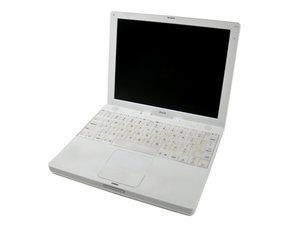
iBook screen switches off/goes black when opened more than 45 degrees

History

Hi,

When I open my dad's 12" G3 iBook more than a few inches (45 degrees) the screen goes black / switches off, yet when I lower the screen again it comes back on. Seems like there might be a loose connection or a cable is jamming. Can anyone help me please?

Also, is this something I can fix myself?

Kind regards

Clayton

Edited by: Chris Cline ( ) , Sterling Hirsh ( ) , Clay ( )

Does the screen go blank, or can you still see the image on the screen if you shine a light at it?

Sterling Hirsh,

I currently have the same problem. Once the screen goes past the 45 degree angle, the backlit goes out. I have found, if I close the lid and go into sleep mode and re-open the lid, the backlit comes back on until I go past the 45 degrees. Any suggestions?

Kevin,

Yes Kevin, I think this is the same problem. If it's not the inverter it's the display.

QEII Student IT,

Thank-you. I will try the procedure under "this guide" below.

Kevin,

Post Answer

1

Score

Avatar
QEII Student IT
3.7k

Answered

PermalinkHistory

I have had this problem

With the iBook I saw, it started at full bent-back then got gradually worse and worse. Eventually we tried to fix the inverter cable. Sadly that repair failed and the computer hasn't been used since. (a point you might want to bear in mind!)

With that iBook, when you shine a light at the screen, the image could still be seen underneath as it was only the backlight that had turned off. I would recommend following this guide in order to make sure the inverter cable is plugged into the motherboard properly. If this doesn't work, you may well need a new display.

1

Score

Avatar
rdklinc
16.6k

Answered

PermalinkHistory

I agree, it sounds like a new display assembly with hinge and cabling is probably in order.

If you DO NOT see a dark non-backlit image when shining the flashlight, you might open up the back of the screen case and take off the shield and verify that the screen ribbon cable is plugged in tightly. Sometimes a replacement screen is not taped back in place properly, and comes loose, causing a blank screen.

Also, it's not likely it, but you'll want to rule out the iBook G3 bad video chip issue, which causes the screen to go dark, usually at fairly random times. To do this, when the screen is on and working, use your left hand like a clamp and from top and bottom press firmly but not too hard on the space just to the left of the trackpad. If it has no effect, you're probably fine, but if the video screws up or the computer freezes, you've go the video issue and it's time for a new laptop.

Anyway, I wanted to mention that because I'd hate to see you invest the time and effort in a new screen assembly only to discover you have the video issue.

1

Score

Avatar
lemerise
17.3k

Answered

PermalinkHistory

This is typically a reed switch cable problem. The reed switch board triggers the ibook sleep fonction via a magnet located in the top case. The reed switch board is located in the LCD display and is powered via two very small wires that are part of the inverter cable and these cables go from the logic board to the inverter board via the ibook right hinge. Most of the time one of these cables will cut in the hinge after a while because of the friction caused by repetitive openings and closures of the display. The cable will cut but if the display is at a certain angle the connection can be restored. Replacing the inverter cable should bring back the electrical flux to the inverter and to the backlight.

To QEII Student IT: if you replaced the inverter cable and you still have the same problem then the inverter board or the backlight is the problem or the inverter cable shorted in the hinge blowing the microfuse that protects the inverter circuitry on the logic board.

0

Score

Avatar
Hans Elfelt Bonnesen
11

Answered

PermalinkHistory

From the immense number of articles found under "iBook, back screen" on Google, I'm under the impression, that the defect is found in bad soldering of the main IC ( one inch square) to the board.

By applying pressure onto this IC with metallic a metallic insert and four plastic grommets on top of the thin metal sheetcover, the problem seems to be solved.

There is a french group which have looked into this problem, and apparently found a solution.

Look at: http://www.PowerBook-fr.com/iBook/bricol...

greetings

Hans Elfelt Bonnesen,

Copenhagen, Denmark

0

Score

Avatar
randy3833
633

Answered

PermalinkHistory

I had this exact same problem with my 12"iBook G3. I purchased a brand new inverter cable from iFixit, went carefully through the 68 steps in the ifixit replacement procedure and now have my display back. Pretty gratifying. Wishing you success.

I'm sorry to hear that. I know how time consuming it is. Did you replace the inverter cable? That is usually the culprit.

randy3833,

0

Score

Avatar
kentschwarz
1

Answered

PermalinkHistory

Replaced screen.

All better! : Thanks

This is the second screen that I've replaced in 2 different A1181 MacBooks.

When removing or reinstalling the optical drive

step 20 Remove the 2 mm Phillips should say remove the 2mm phillips screw and then slide the optical bracket back to the left to release the right side of the drive.

0

Score

Avatar
maxplanar
1

Answered

PermalinkHistory

Ugh. I just went through the &%$* of replacing the inverter only to discover it didn't fix the problem - it still goes black when tilted more than 45 degrees. What a pain.

Add Your Answer


