
9
Score
Gabe
5.2k
Asked
SSD compatibility (Thermal Sensor Connector)
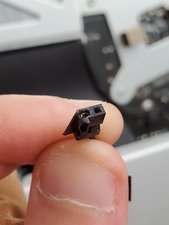
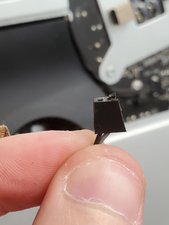
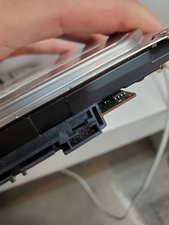
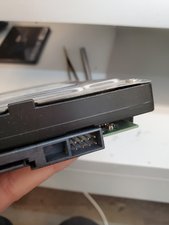
I have a 27" i7 iMac that I bought close to two months ago now, and I would like to replace the internal HDD with a SSD, and I have a 2.5" to 3.5" form factor converter. The only thing I have noticed is that there is nowhere on the SSD to plug in the Termal Sensor Connector.
Do I just ignore it? Can I?
This is the SSD that I ordered: http://www.newegg.com/Product/Product.as...
I am currently booting off that SSD, which is connected via USB 2.0, and I believe that its being bottlenecked by USB 2.0.
Edited by: Walter Galan ( ) , Gabe ( )
4
Score
Gabe
5.2k
Answered
Accepted Answer
I just went ahead and put the SSD in with an icydock 2.5" to 3.5" HDD adapter and I just left the thermal sensor unplugged and it works fine, but my computer thinks that the HDD is 128 degrees Celsius... which may or may not be a problem. http://grab.by/4fcM
4
Score
robert Seith
49
Answered
DON'T MESS WITH GETTING A NEW ADAPTOR TO MATCH YOUR HARD DRIVE!!!
I don't know why someone here hasn't mentioned this software. It's specifically for these iMacs with the hard drive sensor issues:
3
Score
Nick Butler
37
Answered
I purchased https://www.applecomponents.com/items/00...
which is a Optical Drive Temp Sensor, and it works.. tape it to the HDD just to the upper right of the sata plug on the back of the drive.. on the black aluminum; middle of the drive.(accordin
How I came to this conclusion was, I originally took the optical drive thermal sensor from my ODD and put it on the HDD thinking this should work.. well the HDD temp and fans work perfectly.. and the ODD fan is at full blast.. so I tried to contact APPLE for the replacement ODD temp sensor.. Mistake.. and then I found the Link above.. and used it as a replacement.. TADA!!!
Thanks Nick Butler!
I had a same problem. After installing SSD in my imac 27", HHD fan was running at 4200 rpm. The fan noise was just annoying. I ordered the Optical Drive Temp Sensor from Applecomponents
3
Score
Exirion
49
Answered
A free solution: http://exirion.net/ssdfanctrl
2
Score
Jeff Hoffman
25
Answered
There is a huge thread over at MacRumors specifically about the thermal sensor w/SSDs...
http://forums.macrumors.com/showthread.p...
Quick synopsis: Some folks seem to have good luck with a simple shorting of the thermal connector, which appears to just convince the iMac that all temps are good and keeps fans running at a low speed.
I haven't tried this myself, and can't comment directly on any of it... I'm researching it just as you are.
Well I honestly don't mind if the fans run at 100%, I have them running at 3500 RPM either way (I'm used to background noise and I cancel it out easily). Right now my HDD fan is running at 4350 RPM. I just secured the thermal connector and I left it as is.
Gabe,
2
Score
Kira Douji
37
Answered
2
Score
mae
37
Answered
Just my experience.. grain of salt and all...
I just installed OWC's SSD's (very fast, BTW) but now the HDD fan runs @ 5500 rpm since it the temp sensor is no longer connected. However, you can use smcFanControl to control the max speed of your HDD fan to control noise.
Use at your own risk... I feel comfortable doing this since I used istat to monitor my HDD and its fan speed never went above 3000 rpm and SSD's in general don't run hotter than HDD's:
- Download smcFanControl (google it)
- In Terminal:
<path to smcFanControl.a
- <key value>
- F1Mx = iMac 27" HDD Fan (Google for other model's fans key values)
- <fan speed>
- 6200 - 60e0
- 5600 - 5780
- 5000 - 4e20
- 4800 - 4b00
- 4000 - 3e80
- 3600 - 3840
- 3000 - 2ee0
- 2500 - 2710
So for my IMAC 27" with max fan speed of 3000 RPM:
<path to smcFanControl.a
Good luck!
Update
To answer Gabe: yes, the solution I posted will set the max fan speed to whatever you want. I have the 27" iMac at work with Apple's 256GB SSD and fan speed is rarely over 1500 RPM. Even with Handbrake encoding some video it was only 2500 RPM.
Just in case though, I have aliases in my .bash_profile (i.e. fan250, fan300, fan360) that reference commands to set the max speed I want with a simple terminal command.
So:
- alias fan250=<path to smcFanControl.a
pp>/Contents/Re sources/smc -k F1Mx -w 2710" - alias fan300=<path to smcFanControl.a
pp>/Contents/Re sources/smc -k F1Mx -w 2ee0" - alias fan360=<path to smcFanControl.a
pp>/Contents/Re sources/smc -k F1Mx -w 3840"
Also, remember to set the default speed (in my case 2500RPM) as a startup command.
So this will actually limit how fast the fan is going? Even at 100 degrees C it will go as max as I assign it to? Interesting solution...
Gabe,
1
Score
nick
15.3k
Answered
You need a optical drive adaptor to install it internally
just google "SATA HDD adaptor" to find it
The only thing I find are SATA to IDE converters or SATA/IDE to USB converters. I need something that connects to the thing next to the SATA cable (not the power) in a regular 3.5" drive, as seen here: http://c1.neweggimages.com/NeweggImage/p...
Gabe,
1
Score
Answered
Question for mae from answer above:
I just replaced the hard drive in my new 27" iMac (Mid-2010 model) with a 2TB WD HDD that I had previously replaced in my 2007 iMac, which had worked without any problems. I am now having the full fan speed problem that I found out is caused by apples HD firmware settting. The drive works fine (it is a WD Green Caviar Drive, nearly identical to the 1TB I pulled out of the machine when purchased.
I installed smcFanControl and am now attempting to get your max fan speed override to work.
In the Terminal, when you state to type:
<path to smcFanControl.a
What is the <path to smcFanControl.a
I ask because the smcFanControl app is located in my Applications folder, but there is no /Contents/Resou
I attempted to get this string to work, but it does not find the path.
I did try typing it verbatim, but this fails as well...I assume you should not, but I gave it a shot just the same. Am I missing something obvious?
Do I need to use sudo to enter it?
Thank you for the help.
Gavin
Update
Kira and Mae, Thanks for the detailed answers. I had figured it out and got everything to work. In addition to creating the startup script, I made a few scripts with varying fan speed settings and saved them in my Applescript folder. Adding the applescript icon to my menu bar, which sits right next to the smcFanControl readings, allows for a one click adjustment. I just need to get the script to run on wake...
Gavin
Edited by: Gavin McMorrow ( )
1
Score
Kira Douji
37
Answered
1. Right click on the smcFanControl.a
2. Select "Show Package Contents"
3. Realize there are subfolders
4. Profit
Go here for details:
Edited by: Kira Douji ( )
1
Score
mae
37
Answered
Hi Gavin,
As Kira stated, the smcFanControl.a
/Applications/s
and the full path for the example I gave would be:
/Applications/s
which would give you a fan speed of 3000 rpm. Good luck!
1
Score
Answered
I had the iMac Fan issue downloaded HDD Fan Control and it instantly fixed it!
Such simple and good solution!
1
Score
Exirion
49
Answered
Peter Jennings, why don't you quit spamming people with your $30 'simple solution'.
1
Score
xi xia
13
Answered
I am having the same issue and this smc fan control command does not seem to work. What am I missing?
When I put the command into terminal, and set the fan speed to 1200 RPM, the fan actually slows down for 1 second and then revs back up.
Exirion, I downloaded your daemon and installed it, restarted my computer and nothing.
I replaced a dead TB seagate drive with a 2 TB seagate drive. I plugged in all the cables, included the heat sensor when I reinstalled. Should I have taken out the heat sensor cable??? Thank you!
1
Score
onicon
13
Answered
1
Score
Answered
0
Score
patrik
1
Answered
0
Score
Answered
Following these instructions, I simply replaced my HDD with an SSD.
iMac Intel 27" EMC 2309 and 2374 Hard Drive Replacement
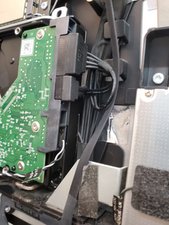
I simply diconnected the cable that normally connects between the HDD temp sensor socket on the main logic board and the HDD from the HDD, but leaving it plugged into the logic board.
I then stripped a CAT5 cable and cut a short wire out of one of the pairs and made a U shape and ran it in and out of the end of the cable that plugs into the HDD temp sensor location. I then put some electrical tape over it and left it coiled up inside.
My iMac now has an SSD in place of the HDD, and the fans are quiet.
Apparently this is how how Apple does it with models that come only with an SSD.
0
Score
Answered
0
Score
Domino
1
Answered
I have the same problem since I switched to SSD , but it´s a MBP............
That commands work just for a second :( and the fan goes on, driving me crazy...
I have 60ºC now and the CPU fan is still on his maximum (SET TO 4000 :)
should I put new thermal paste??????
Where do I have to short in order to shut it UP ?! .....hehe
Thanks
0
Score
Answered
0
Score
teresa
1
Answered
You can use this free alternative to smcFancontrol and the insanely expensive HDD Fan Control.
SDD Fan Control
http://exirion.net/ssdfanctrl/
It works.
+ vote for the sheer effort
mayer,
Won't you get a lot slower bus speeds though, due to using USB over SATA?
rab777hp,