Free Shipping on Domestic Orders $75+

iPhone 5s Front Facing Camera and Sensor Cable Assembly Replacement

Prerequisite Only
This is a prerequisite-only guide! This guide is part of another procedure and isn’t meant to be used alone.

What you need

    1. iPhone 5s Front Facing Camera and Sensor Cable Assembly Replacement, Front Facing Camera and Sensor Cable Assembly: step 1, image 1 of 1
      Tool used on this step:
      iOpener
      $24.95
      Buy
      • This step requires removing the front facing camera and sensor cable from your front panel assembly.

      • The front facing camera and sensor cable is adhered to the display assembly with mild adhesive.

      • Using an iOpener to soften the adhesive will help safely remove it. Follow our iOpener instructions to use it.

      Ask FixBot

      Add Comment

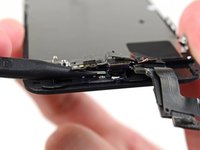
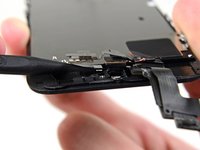
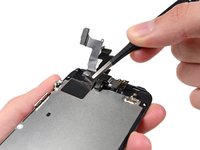
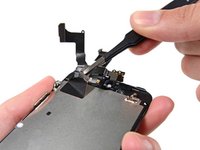
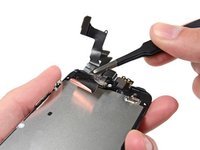
    2. iPhone 5s Front Facing Camera and Sensor Cable Assembly Replacement: step 2, image 1 of 2 iPhone 5s Front Facing Camera and Sensor Cable Assembly Replacement: step 2, image 2 of 2
      Tool used on this step:
      Tweezers
      $4.99
      Buy
      • Using the edge of a set of tweezers or a metal spudger, gently pry the earpiece speaker contact cable up, to separate this portion of the camera and sensor cable from the adhesive below.

      • Only pry directly under the earpiece speaker contacts—there are sensors and microchips that can be damaged by prying elsewhere.

      Ask FixBot

      Add Comment

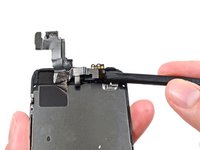
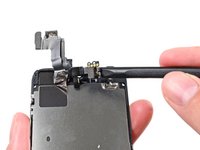
    3. iPhone 5s Front Facing Camera and Sensor Cable Assembly Replacement: step 3, image 1 of 2 iPhone 5s Front Facing Camera and Sensor Cable Assembly Replacement: step 3, image 2 of 2
      • Use the point of a spudger to lift the ambient light sensor and proximity sensor out of their recess in the display assembly.

      • There is a small, square plastic and metal holder for the proximity sensor. This holder is essential for the proximity sensor to function correctly.

      • If replacing the proximity sensor make sure that the holder remains adhered to the back of the display. If it comes off with the old proximity sensor, remove it from the old sensor and use a tiny bit of adhesive to re-attach it to the back of the display.

      Ask FixBot

      Add Comment

    4. iPhone 5s Front Facing Camera and Sensor Cable Assembly Replacement: step 4, image 1 of 2 iPhone 5s Front Facing Camera and Sensor Cable Assembly Replacement: step 4, image 2 of 2
      • Use the flat end of a spudger to gently peel the front-facing camera portion of the cable away from the display assembly.

      Ask FixBot

      Add Comment

    5. iPhone 5s Front Facing Camera and Sensor Cable Assembly Replacement: step 5, image 1 of 3 iPhone 5s Front Facing Camera and Sensor Cable Assembly Replacement: step 5, image 2 of 3 iPhone 5s Front Facing Camera and Sensor Cable Assembly Replacement: step 5, image 3 of 3
      • If you are reattaching the same shield plate to a new display, there is no need to peel the cable assembly off the LCD shield plate. Skip this step.

      • Carefully peel the cable assembly off of the LCD shield plate to remove it from the display.

      • Be careful not to grab the digitizer cable while peeling up the front facing camera and sensor assembly cable.

      Ask FixBot

      Add Comment

Conclusion

To reassemble your device, follow these instructions in reverse order.

Cancel: I did not complete this guide.

9 other people completed this guide.

Sam Goldheart

Member since: 10/18/12

478,415 Reputation

538 Guides authored

Team

iFixit Member of iFixit

Staff

122 Members

72,401 Guides authored

2 Guide Comments

Be great if someone could put together some *reassembly* instructions for this. Particularly the section on the camera and sensors area.

Phil Thomas - Reply Share

It seems like a lot of steps have gone missing from this guide. The related guide (5SE) has much more explicit instructions for the same activity and should be used instead of this one. iPhone SE Front Facing Camera and Sensor Cable Replacement

Jeannie Crowley - Reply Share

Add Comment

View Statistics:

Past 24 Hours: 0

Past 7 Days: 4

Past 30 Days: 22

All Time: 7,770