Free Shipping on Domestic Orders $75+

iPhone 17 Pro Max Taptic Engine Installation

Prerequisite Only
This is a prerequisite-only guide! This guide is part of another procedure and isn’t meant to be used alone.

What you need

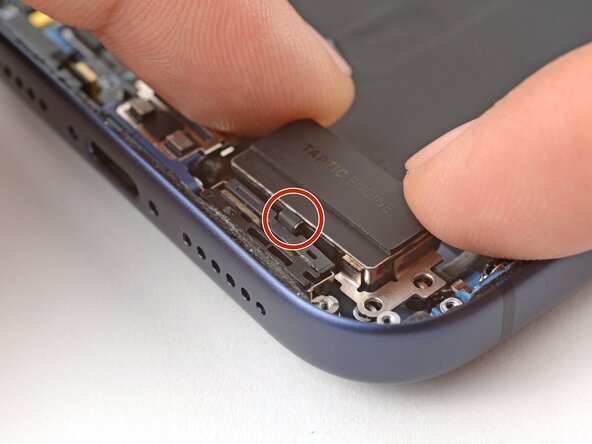
    1. iPhone 17 Pro Max Taptic Engine Installation, Install the Taptic Engine: step 1, image 1 of 1
      • Place the Taptic Engine upside down on the edge of the iPhone frame.

      • While holding the Taptic Engine with one hand, use your finger to press and connect the Taptic Engine press connector.

      Ask FixBot

      Add Comment

    2. iPhone 17 Pro Max Taptic Engine Installation: step 2, image 1 of 3 iPhone 17 Pro Max Taptic Engine Installation: step 2, image 2 of 3 iPhone 17 Pro Max Taptic Engine Installation: step 2, image 3 of 3
      • Flip the Taptic Engine over the frame and align it using its screw holes.

      • The Taptic Engine flex cable should fold neatly between the Taptic Engine and the frame.

      Ask FixBot

      Add Comment

    3. iPhone 17 Pro Max Taptic Engine Installation: step 3, image 1 of 1
      • Use a standoff screwdriver to install the two 4.0 mm‑long Taptic Engine screws.

      Ask FixBot

      Add Comment

    4. iPhone 17 Pro Max Taptic Engine Installation, Attach the flex antenna: step 4, image 1 of 2 iPhone 17 Pro Max Taptic Engine Installation, Attach the flex antenna: step 4, image 2 of 2
      • Use your fingers or a spudger to fold the flex antenna down in place.

      Ask FixBot

      Add Comment

    5. iPhone 17 Pro Max Taptic Engine Installation: step 5, image 1 of 1
      • Use a JIS 00 screwdriver to install the three flex antenna screws:

      • One 1.7 mm‑long screw

      • Two 1.9 mm‑long screws

      Ask FixBot

      Add Comment

    6. iPhone 17 Pro Max Taptic Engine Installation, Install the ground clip: step 6, image 1 of 2 iPhone 17 Pro Max Taptic Engine Installation, Install the ground clip: step 6, image 2 of 2
      • Use tweezers to carefully place the ground clip in place.

      • Be sure to orient this clip correctly as shown in the images.

      Ask FixBot

      Add Comment

    7. iPhone 17 Pro Max Taptic Engine Installation, Install the ground clip: step 7, image 1 of 1
      • Use a JIS 00 screwdriver to install the two 1.9 mm‑long ground clip screws.

      Ask FixBot

      Add Comment

Conclusion

To reassemble your device, follow these instructions in reverse order.

Cancel: I did not complete this guide.

Arthur Shi

Member since: 01/03/18

350,744 Reputation

938 Guides authored

0 Guide Comments

Add Comment

View Statistics:

Past 24 Hours: 0

Past 7 Days: 1

Past 30 Days: 7

All Time: 93