Free Shipping on Domestic Orders $75+

iPhone 17 Pro Max Loudspeaker Installation

Prerequisite Only
This is a prerequisite-only guide! This guide is part of another procedure and isn’t meant to be used alone.

What you need

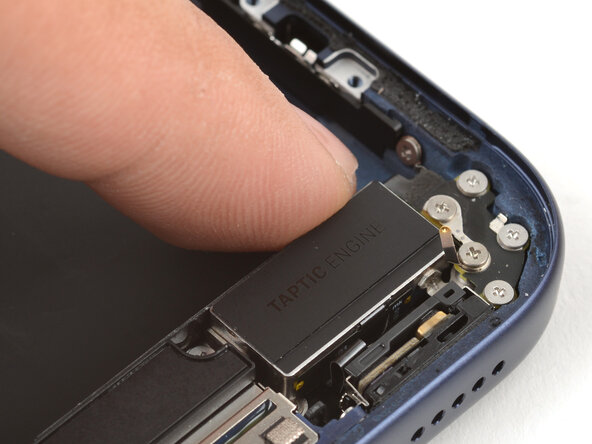
    1. iPhone 17 Pro Max Loudspeaker Installation, Install the loudspeaker: step 1, image 1 of 3 iPhone 17 Pro Max Loudspeaker Installation, Install the loudspeaker: step 1, image 2 of 3 iPhone 17 Pro Max Loudspeaker Installation, Install the loudspeaker: step 1, image 3 of 3
      • Align the bottom edge of the loudspeaker with the frame and lay it in its recess..

      • Make sure the bottom-right screw tab seats properly against the frame. Gently bend it if it's out of place.

      • Use your finger to press down on the loudspeaker until it clicks in place.

      Ask FixBot

      Add Comment

    2. iPhone 17 Pro Max Loudspeaker Installation: step 2, image 1 of 2 iPhone 17 Pro Max Loudspeaker Installation: step 2, image 2 of 2
      • Use a JIS 00 screwdriver to install the six loudspeaker screws:

      • Two 2.7 mm‑long screws

      • Two 2.0 mm‑long screws

      • One 1.5 mm‑long screw

      • One 1.5 mm‑long screw attached to the bottom edge of the iPhone frame

      Ask FixBot

      Add Comment

    3. iPhone 17 Pro Max Loudspeaker Installation, Install the buffer strip: step 3, image 1 of 3 iPhone 17 Pro Max Loudspeaker Installation, Install the buffer strip: step 3, image 2 of 3 iPhone 17 Pro Max Loudspeaker Installation, Install the buffer strip: step 3, image 3 of 3
      • Use your fingers or a spudger to press the buffer strip back onto the top edge of the Taptic Engine.

      Ask FixBot

      Add Comment

Conclusion

To reassemble your device, follow these instructions in reverse order.

Cancel: I did not complete this guide.

Arthur Shi

Member since: 01/03/18

350,850 Reputation

938 Guides authored

0 Guide Comments

Add Comment

View Statistics:

Past 24 Hours: 0

Past 7 Days: 2

Past 30 Days: 7

All Time: 88