Free Shipping on Domestic Orders $75+

iPhone 16e Front Sensor Installation

Prerequisite Only
This is a prerequisite-only guide! This guide is part of another procedure and isn’t meant to be used alone.
    1. iPhone 16e Front Sensor Installation, Install the front sensors: step 1, image 1 of 2 iPhone 16e Front Sensor Installation, Install the front sensors: step 1, image 2 of 2
      • Align the ambient light sensor with its recess in the back of the screen.

      • Use a spudger or your finger to press the ambient light sensor into its recess.

      Ask FixBot

      Add Comment

    2. iPhone 16e Front Sensor Installation: step 2, image 1 of 3 iPhone 16e Front Sensor Installation: step 2, image 2 of 3 iPhone 16e Front Sensor Installation: step 2, image 3 of 3
      • Press the proximity sensor into its recess in the back of the screen.

      • Press the microphone into place next to the proximity sensor.

      Ask FixBot

      Add Comment

    3. iPhone 16e Front Sensor Installation, Press the front sensor cable: step 3, image 1 of 3 iPhone 16e Front Sensor Installation, Press the front sensor cable: step 3, image 2 of 3 iPhone 16e Front Sensor Installation, Press the front sensor cable: step 3, image 3 of 3
      Tool used on this step:
      Tesa 61395 Tape
      $2.95
      Buy
      • Use a hair dryer, heat gun, or heated iOpener to soften the adhesive under the front sensor assembly cable. It only needs to be warm—not hot.

      • Use your finger to press down the front sensor cable.

      • If the cable isn't sticking, apply a few small pieces of double‑sided tape, like Tesa tape, to the back of it.

      Ask FixBot

      Add Comment

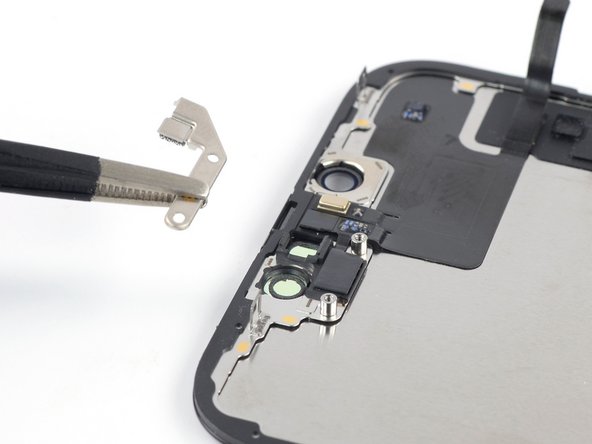
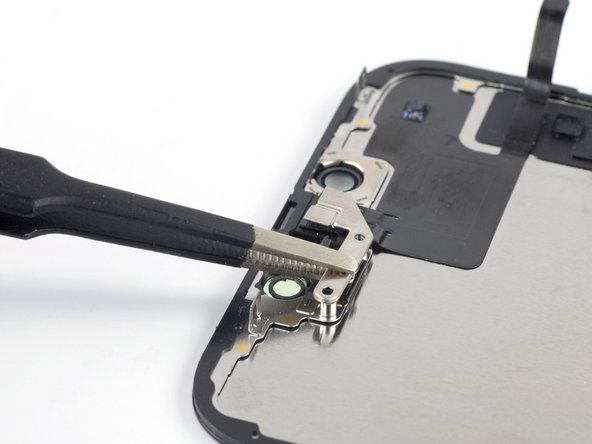
    4. iPhone 16e Front Sensor Installation, Install the front sensor assembly bracket: step 4, image 1 of 2 iPhone 16e Front Sensor Installation, Install the front sensor assembly bracket: step 4, image 2 of 2
      • Use tweezers or your fingers to install the front sensor assembly bracket.

      Ask FixBot

      Add Comment

    5. iPhone 16e Front Sensor Installation: step 5, image 1 of 1
      • Use a Y000 screwdriver to install the two 1.4 mm-long screws securing the front sensor assembly bracket.

      Ask FixBot

      Add Comment

Finish Line

Cancel: I did not complete this guide.

Nick Schultz

Member since: 03/24/24

65,246 Reputation

343 Guides authored

0 Guide Comments

Add Comment

View Statistics:

Past 24 Hours: 0

Past 7 Days: 0

Past 30 Days: 0

All Time: 10