Free Shipping on Domestic Orders $75+

iPhone 16 Pro Max Front Camera Installation

Prerequisite Only
This is a prerequisite-only guide! This guide is part of another procedure and isn’t meant to be used alone.

What you need

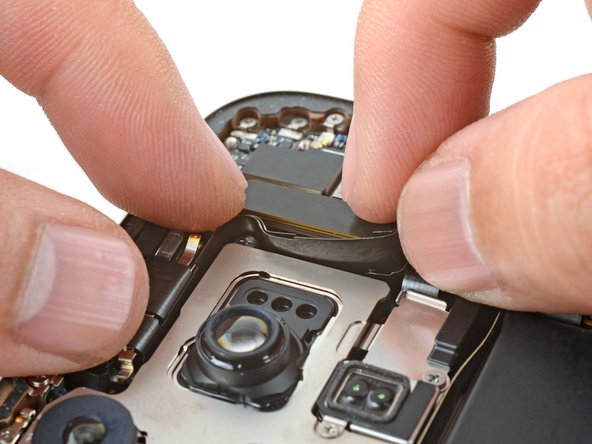
    1. iPhone 16 Pro Max Front Camera Installation, Install the front camera assembly: step 1, image 1 of 2 iPhone 16 Pro Max Front Camera Installation, Install the front camera assembly: step 1, image 2 of 2
      • Lay the front camera assembly in its recess.

      • Gently tuck the camera flex cables into the gap between the rear camera assembly and the earpiece speaker assembly.

      Ask FixBot

      Add Comment

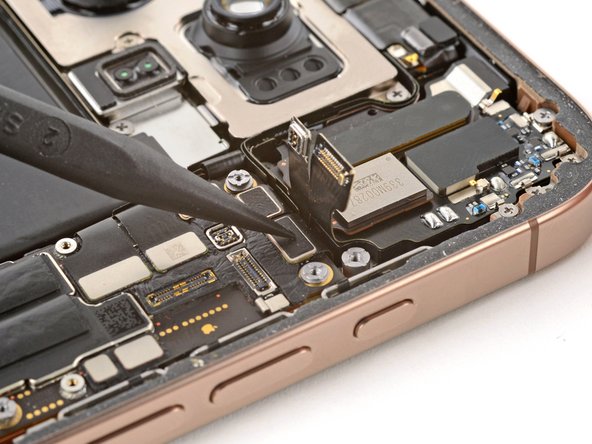
    2. iPhone 16 Pro Max Front Camera Installation: step 2, image 1 of 2 iPhone 16 Pro Max Front Camera Installation: step 2, image 2 of 2
      • Use your finger or a spudger to press and connect the two camera connectors onto the logic board.

      • To re-attach press connectors like this one, carefully align and press down on one side until it clicks into place, then repeat on the other side. Don't press down in the middle. If the connector is misaligned, the pins can bend, causing permanent damage.

      Ask FixBot

      Add Comment

    3. iPhone 16 Pro Max Front Camera Installation: step 3, image 1 of 1
      • Use your finger or a spudger to press and connect the earpiece speaker and the mmWave antenna connectors onto the logic board.

      Ask FixBot

      Add Comment

Finish Line

Cancel: I did not complete this guide.

Arthur Shi

Member since: 01/03/18

350,741 Reputation

938 Guides authored

Team

iFixit Member of iFixit

Staff

122 Members

72,401 Guides authored

0 Guide Comments

Add Comment

View Statistics:

Past 24 Hours: 0

Past 7 Days: 2

Past 30 Days: 14

All Time: 131