
Xiaomi Redmi Note Battery Replacement

Slater Stewart and 3 other contributors
Last updated on Aug 15, 2017
Views: 17K
View statistics:
- Past 24 Hours:
- 11
- Past 7 Days:
- 50
- Past 30 Days:
- 206
- All Time:
- 16,967
Comments: 3
3 guide comments.
Go to guide commentsCompleted: 6 7
6 people have marked this guide "completed." Will you be next?
7 people have marked this guide "completed." Including you — great job!
Favorites: 0 1
No one has favorited (and subscribed to) this guide. Will you be the first?
1 person has favorited (and subscribed to) this guide — and that's you!
Introduction
Go to step 1 ↓This guide will show you how to replace the battery in your phone if it is old, damaged, or losing its charge too quickly. The replacement process is simple and only requires three steps.
What you need
Tools

-
-
-
Insert the plastic opening tool between the charging port and the rear case.
-
Pry the end of the rear case up from the charging port.
 Ask FixBot
-
-
-
-
Run the plastic opening tool along the seam on the side of the phone to remove the rear casing.
-
-
-
Locate the indentation at the bottom of the battery.
-
Place a finger in the indentation and lift up to remove the battery.
-
-


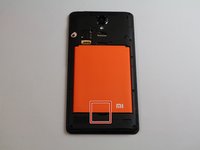

To reassemble your device, follow these instructions in reverse order.
Cancel: I did not complete this guide.
6 other people completed this guide.

Team

Cal Poly, Team S22-G4, Livingston Spring 2017 Member of Cal Poly, Team S22-G4, Livingston Spring 2017
CPSU-LIVINGSTON-S17S22G4
4 Members
96 Guides authored
3 Guide Comments
Wie sieht es beim Redmi Note 11 S aus?
