
Motorola Moto G7 Play Screen Replacement

curt caudle and 3 other contributors
Last updated on May 15, 2023
Views: 5.7K
View statistics:
- Past 24 Hours:
- 2
- Past 7 Days:
- 16
- Past 30 Days:
- 95
- All Time:
- 5,748
Comments: 3
1 comment on steps, 2 guide comments.
Go to guide commentsCompleted: 10 11
10 people have marked this guide "completed." Will you be next?
11 people have marked this guide "completed." Including you — great job!
Favorites: 0 1
No one has favorited (and subscribed to) this guide. Will you be the first?
1 person has favorited (and subscribed to) this guide — and that's you!
Action Shots
Be an action hero! This guide needs images that better demonstrate how to perform specific actions.
Needs Better Images
Better photos will improve this guide. Help out by taking, editing, or uploading new ones!
Better Introduction
Improve this guide by completing or revising its introduction.
Introduction
Go to step 1 ↓This guide will show each detailed step to removing and replacing the front display screen in the Motorola G7 Play, model number XT1952-3 or XT1952-2. If the phones touch functionality is faulty, the screen is cracked, or not displaying correctly the screen can be replaced. This guide requires a heat gun or heating application on the screen.
Before you begin, download the Rescue and Smart Assistant app to backup your device and diagnose whether your problem is software or hardware related.
What you need
Tools


-
-
-
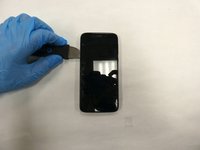
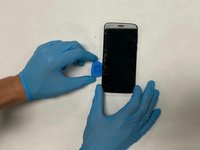
Use the plastic opening tools or picks to create an gap between the screen and the rest of the device.
 Ask FixBot
-
-
-
Use the suction cup tool to lift the screen without damaging or scratching screen.
-
-
-
-
Disconnect the ribbon cable to fully detach the screen from the device.
-
Remove the display assembly from the device.
-
-




To reassemble your device, follow these instructions in reverse order.
Cancel: I did not complete this guide.
10 other people completed this guide.

Team

The Citadel Military College of South Carolina, Team S1-G1, Eggleston Spring 2021 Member of The Citadel Military College of South Carolina, Team S1-G1, Eggleston Spring 2021
CMCSC-EGGLESTON-S21S1G1
3 Members
36 Guides authored
2 Guide Comments
I agree with Ender, this is the farthest thing from instructions on how to replace the screen. It’s just photos of how someone pulled the display off the frame. I can’t think of a reason anyone would do this. What’s the point?
Can we take away 30 points?
