Introduction
If your Summer LookOut Duo baby monitor has been beeping or squealing, check out this troubleshooting guide. If your device still has these problems and is refusing to hold a charge, it may need a new battery. If you have deduced that a new battery is needed, but you're unsure how to go about it, here is a step-by-step guide to replacing the Rechargeable Ni-MH AAA size 4.8V 800mAh battery.
Before proceeding with changing the battery, make sure the device is powered off to avoid internal damage to the device or potential shock hazards. Only change the battery in a dry environment free of moisture that could potentially damage the device if trapped inside the battery compartment.
CHOKING HAZARD: This device contains small screws. If possible, use a magnetic mat or small container within eyesight to keep track of the screws to prevent possible ingestion or misplacement.
What you need
-
-
-
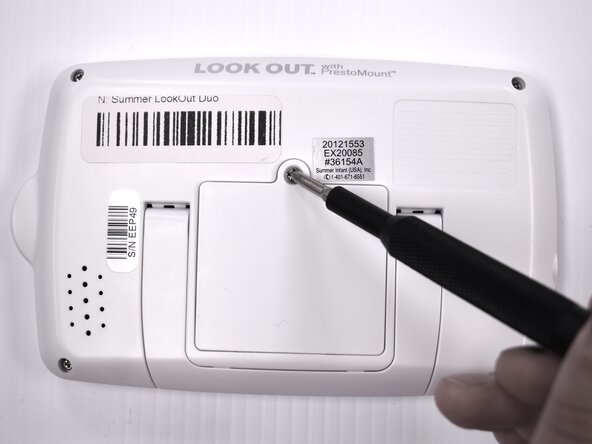
Flip the device over so the back is facing up.
-
Remove the 9 mm screw using a Phillips #1 screwdriver.
-
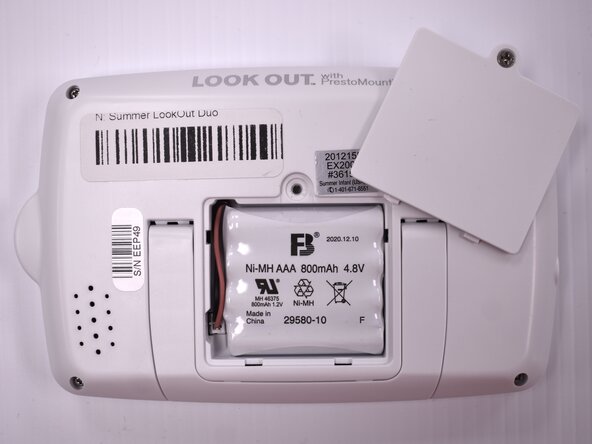
Lift the battery panel away from the device.
 Ask FixBot
-
-
-
-
Flip the handheld monitor over and let the battery fall out into your hand.
-
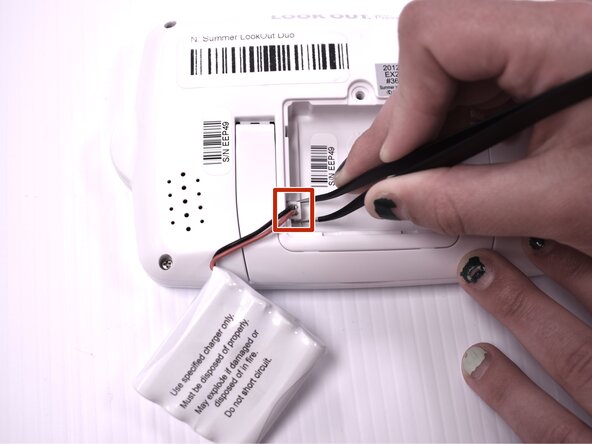
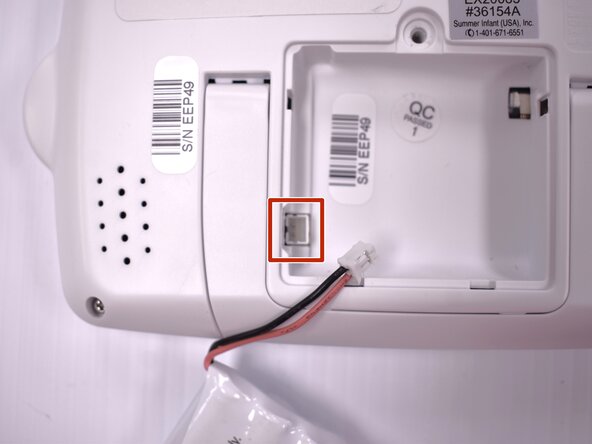
Using angled tweezers, gently remove the plastic wire coupling from the side of the open battery compartment.
-
Remove the battery from the device.
-
-





To reassemble your device, follow these instructions in reverse order.

Team

Idaho State University, Team 1-4, Watkins Spring 2025 Member of Idaho State University, Team 1-4, Watkins Spring 2025
ISU-WATKINS-S25S1G4
4 Members
20 Guides authored
