Introduction
The following guide is for an iron with a separate tank. The manufacturer is Philips and the model is PerfectCare Viva Centrale vapeur - GC7015/20
At first glance, it looks like a normal steam iron, but I can assure that it is much more than a traditional steam iron. It has a separate XL water tank that increases the autonomy of the appliance and allows you to add water during ironing. In addition, this steam iron lacks one feature that most other steam irons have. Indeed, the “iron with XL tank” does not produce high pressure steam. We will see why in the Step 2 tutorial “how does it work?”
-
-
-
The name iron comes from the actual metal that the appliance is made from. The shape of the iron, pointed at its tip, allows you to iron all the corners of the clothes, while its weight smoothes the fabric.
-
The part of the iron that makes direct contact with the fabric is called the "sole (plate)". In order for the iron to be effective, the device needs to be heated. This iron also makes use of a steam system, which makes it possible to moisten the fabric while ironing.
-
Ironing helps loosen the bonds between the long chains of molecules that make up polymer fiber materials. The heat and weight of the iron stretches the fibers while the fabric retains its new shape once it's cooled. Some materials, like cotton, require the use of water to loosen intermolecular bonds.
 Ask FixBot
-
-
-
-
The iron rests on a reservoir with a heat-resistant base.
-
At the front of the water tank is a removable spout that serves as a funnel to allow for filling (1.7 l).
-
There is a button on the top of the device, which locks the iron to the reservoir base.
-
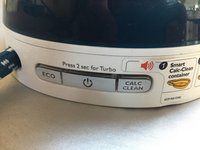
At the rear is a control panel made up of three buttons.
-
-
-
The control panel has three buttons. Middle button = On/Off - Left button = Eco Mode - Right button = Anti-limescale function
-
Middle button: allows the iron to operate with a short press. A steady blue light turns on. After approximately 2 minutes, the appliance beeps to signal that the temperature has been reached and the iron is ready for use.
-
A long press on this button while ironing switches to "Turbo" mode. The iron generates more steam. The blue light turns white.
-
Left button: pressing this button while ironing decreases the volume of steam and the temperature of the iron.
-
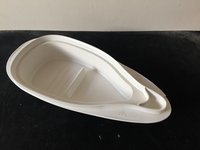
Right button: this functions to help prevent lime deposits. By pressing this button and placing the iron on an appropriate container, you can generate steam continuously for 2 minutes in Turbo mode.
-
The button to send steam to the iron is located on the handle. This button is equipped with a light which flashes on start-up until the temperature is reached. It then glows steadily.
-
-



We now know what an XL reservoir steam iron is and what these different features are. We can move on to studying how it works in the following tutorial: "How does it work?"
Cancel: I did not complete this guide.
4 other people completed this guide.
Special thanks to these translators:
100%


These translators are helping us fix the world! Want to contribute?
Start translating ›

Team

3 Guide Comments
All botton is making flasher and dont work
All botton is making flasher and dont work
All botton is making flasher and dont work
Why doesn't the iron produce steam?
