Free Shipping on Domestic Orders $75+

Steam Machine (2026) microSD Card Reader Replacement

What you need

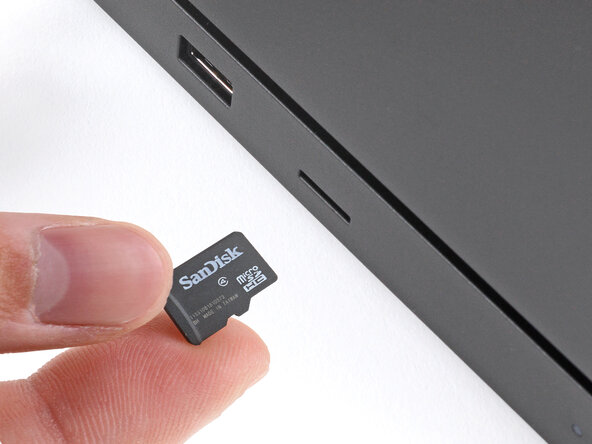
    1. Steam Machine (2026) microSD Card Reader Replacement, Before you begin: step 1, image 1 of 3 Steam Machine (2026) microSD Card Reader Replacement, Before you begin: step 1, image 2 of 3 Steam Machine (2026) microSD Card Reader Replacement, Before you begin: step 1, image 3 of 3
      • Before you begin this repair:

      • Power down your Steam Machine and disconnect the power cable.

      • Unplug any remaining cables or accessories from all ports.

      • If you have a microSD card installed, remove it. Otherwise, it may break during this procedure.

      Ask FixBot

      Add Comment

    1. Steam Machine (2026) microSD Card Reader Replacement, Reposition the Steam Machine: step 2, image 1 of 1
      • Reposition the Steam Machine so the bottom is facing up.

      Ask FixBot

      Add Comment

    2. Steam Machine (2026) microSD Card Reader Replacement, Remove the feet: step 3, image 1 of 3 Steam Machine (2026) microSD Card Reader Replacement, Remove the feet: step 3, image 2 of 3 Steam Machine (2026) microSD Card Reader Replacement, Remove the feet: step 3, image 3 of 3
      • Use a T8 Torx screwdriver to remove the four rubber feet.

      Ask FixBot

      Add Comment

    1. Steam Machine (2026) microSD Card Reader Replacement, Reposition the Steam Machine: step 4, image 1 of 1
      • Reposition the Steam Machine so the back panel is facing up.

      Ask FixBot

      Add Comment

    2. Steam Machine (2026) microSD Card Reader Replacement, Loosen the back panel screws: step 5, image 1 of 2 Steam Machine (2026) microSD Card Reader Replacement, Loosen the back panel screws: step 5, image 2 of 2
      • Use a T8 Torx screwdriver to fully loosen the two captive screws securing the back panel.

      Ask FixBot

      Add Comment

    3. Steam Machine (2026) microSD Card Reader Replacement, Remove the back panel: step 6, image 1 of 3 Steam Machine (2026) microSD Card Reader Replacement, Remove the back panel: step 6, image 2 of 3 Steam Machine (2026) microSD Card Reader Replacement, Remove the back panel: step 6, image 3 of 3
      • The back panel is secured by two hinge clips near the bottom corners and two locking clips on the sides.

      • Lift the top edge of the panel (near the screws) until the two locking clips release.

      • If you're having trouble getting an initial grip on the panel, use a spudger to lift it enough to grab with your fingers.

      • Slide the panel towards the top edge and lift to remove it.

      Ask FixBot

      Add Comment

    4. Steam Machine (2026) microSD Card Reader Replacement, Remove the inner assembly screws: step 7, image 1 of 2 Steam Machine (2026) microSD Card Reader Replacement, Remove the inner assembly screws: step 7, image 2 of 2
      • Use a T8 Torx screwdriver to remove the two 7.3 mm‑long screws securing the inner assembly.

      Ask FixBot

      Add Comment

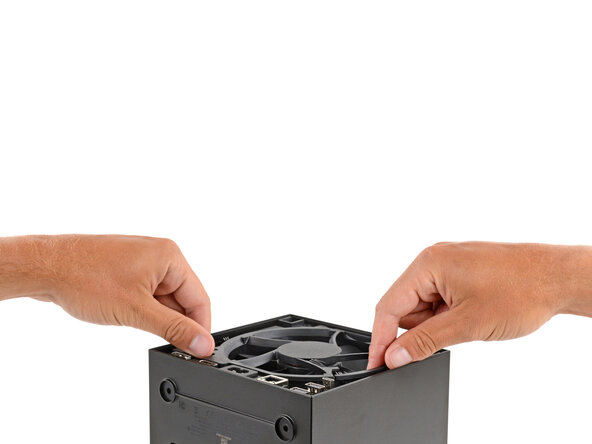
    5. Steam Machine (2026) microSD Card Reader Replacement, Remove the inner assembly: step 8, image 1 of 3 Steam Machine (2026) microSD Card Reader Replacement, Remove the inner assembly: step 8, image 2 of 3 Steam Machine (2026) microSD Card Reader Replacement, Remove the inner assembly: step 8, image 3 of 3
      • After removal, don't lay the inner assembly down on the microSD and USB ports. These ports are fragile and shouldn't have the weight of the assembly resting on them.

      • Grip the inner assembly under the fan and lift it straight up and out of the shell.

      • Set the inner assembly down so the SSD is on top.

      Ask FixBot

      Add Comment

    1. Steam Machine (2026) microSD Card Reader Replacement, Remove the microSD card reader screws: step 9, image 1 of 2 Steam Machine (2026) microSD Card Reader Replacement, Remove the microSD card reader screws: step 9, image 2 of 2
      • Use a T8 Torx screwdriver to remove the two 5.1 mm‑long screws securing the microSD card reader.

      Ask FixBot

      Add Comment

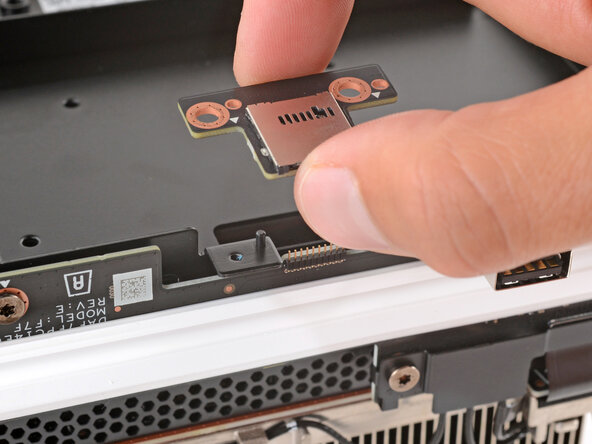
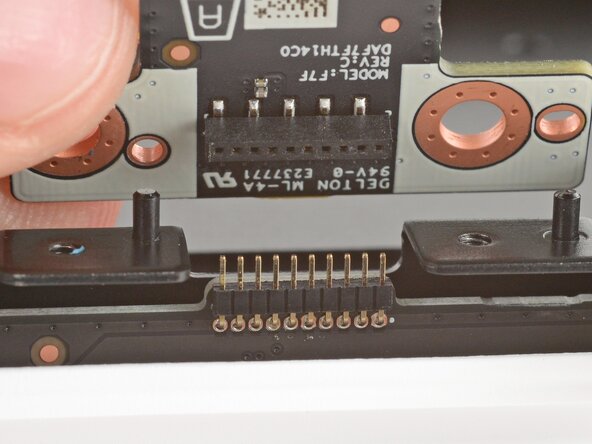
    2. Steam Machine (2026) microSD Card Reader Replacement, Remove the microSD card reader: step 10, image 1 of 3 Steam Machine (2026) microSD Card Reader Replacement, Remove the microSD card reader: step 10, image 2 of 3 Steam Machine (2026) microSD Card Reader Replacement, Remove the microSD card reader: step 10, image 3 of 3
      • After the screws are removed, the microSD card reader is held in place by a socket on its underside that plugs into pins on the board below it.

      • Pull the microSD card reader straight up to disconnect and remove it.

      Ask FixBot

      Add Comment

Conclusion

To reassemble your device, follow these instructions in reverse order.

Take your e-waste to an R2 or e-Stewards certified recycler.

Repair didn’t go as planned? Try some basic troubleshooting, or ask our Answers community for help.

Cancel: I did not complete this guide.

Spencer Day

Member since: 09/14/22

205,121 Reputation

1,266 Guides authored

0 Guide Comments

Add Comment

View Statistics:

Past 24 Hours: 43

Past 7 Days: 48

Past 30 Days: 55

All Time: 62