Free Shipping on Domestic Orders $75+

Steam Controller (2nd Gen, 2026) Left Trigger Replacement

What you need

  1. Steam Controller (2nd Gen, 2026) Left Trigger Replacement, Before you begin: step 1, image 1 of 3 Steam Controller (2nd Gen, 2026) Left Trigger Replacement, Before you begin: step 1, image 2 of 3 Steam Controller (2nd Gen, 2026) Left Trigger Replacement, Before you begin: step 1, image 3 of 3
    • Let your controller's battery drain below 25% before starting this repair.

    • Unplug all cables and accessories from the controller, including the Steam Controller Puck.

    • During your repair, it can be helpful to lay the Steam Controller on a clean, soft cloth for stabilization and to prevent scratches.

  2. Steam Controller (2nd Gen, 2026) Left Trigger Replacement, Remove the back cover screws: step 2, image 1 of 2 Steam Controller (2nd Gen, 2026) Left Trigger Replacement, Remove the back cover screws: step 2, image 2 of 2
    Tool used on this step:
    TR6 Torx Security Screwdriver
    $5.99
    Buy
  3. Steam Controller (2nd Gen, 2026) Left Trigger Replacement, Remove the back cover: step 3, image 1 of 2 Steam Controller (2nd Gen, 2026) Left Trigger Replacement, Remove the back cover: step 3, image 2 of 2
    • Remove the back cover.

  4. Steam Controller (2nd Gen, 2026) Left Trigger Replacement, Remove the battery: step 4, image 1 of 3 Steam Controller (2nd Gen, 2026) Left Trigger Replacement, Remove the battery: step 4, image 2 of 3 Steam Controller (2nd Gen, 2026) Left Trigger Replacement, Remove the battery: step 4, image 3 of 3
    • If your battery is swollen, take appropriate precautions. Never reinstall a swollen battery—replace it with a new one.

    • Lift the right edge of the battery to remove it.

    • During reassembly, first slide the left side of the battery into place so its connector is fully seated. Then, press the right side into place to secure it.

  5. Steam Controller (2nd Gen, 2026) Left Trigger Replacement, Remove the mounting bracket screws: step 5, image 1 of 2 Steam Controller (2nd Gen, 2026) Left Trigger Replacement, Remove the mounting bracket screws: step 5, image 2 of 2
    • During the rest of your repair, don't forcefully push the controller down onto your work surface—you may damage the joysticks and touchpads.

    • Use a T6 Torx screwdriver to remove the four 7.4 mm‑long screws securing the battery mounting bracket.

  6. Steam Controller (2nd Gen, 2026) Left Trigger Replacement, Remove the mounting bracket: step 6, image 1 of 2 Steam Controller (2nd Gen, 2026) Left Trigger Replacement, Remove the mounting bracket: step 6, image 2 of 2
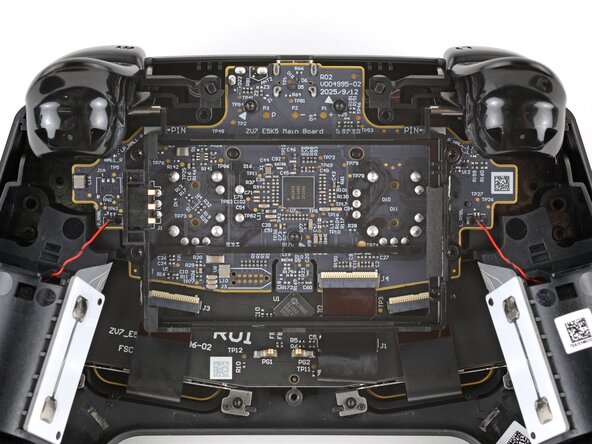
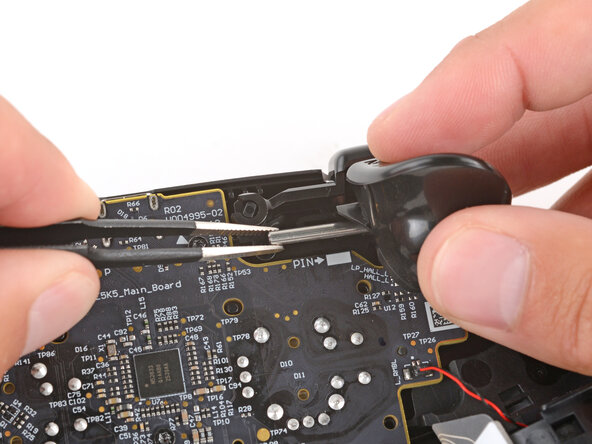
  7. Steam Controller (2nd Gen, 2026) Left Trigger Replacement, Remove the hinge pin: step 7, image 1 of 3 Steam Controller (2nd Gen, 2026) Left Trigger Replacement, Remove the hinge pin: step 7, image 2 of 3 Steam Controller (2nd Gen, 2026) Left Trigger Replacement, Remove the hinge pin: step 7, image 3 of 3
    • The left trigger will be on your right-hand side since the controller is laying upside down.

    • With one hand, fully depress the left trigger.

    • Don't let go of the trigger, or it will eject and you may lose its spring.

    • With your free hand, use tweezers to pull the hinge pin straight out and remove it.

    • During reassembly, hold the trigger down and slide the pin through both hinge holes—the pin will stop sliding once it's fully inserted. Test the trigger to ensure the pin was properly installed.

    • When correctly inserted, the pin's end will be alinged with the white rectangle on the board (labeled PIN)—there should be no wobble.

  8. Steam Controller (2nd Gen, 2026) Left Trigger Replacement, Remove the left trigger: step 8, image 1 of 3 Steam Controller (2nd Gen, 2026) Left Trigger Replacement, Remove the left trigger: step 8, image 2 of 3 Steam Controller (2nd Gen, 2026) Left Trigger Replacement, Remove the left trigger: step 8, image 3 of 3
    • Remove the left trigger.

    • The spring will likely stick to the trigger's magnet.

    • If the spring stayed on its post, leave it in place.

    • During reassembly, make sure the spring goes over both of its posts (one on the controller and one on the trigger) and that the hinge holes are all aligned.

Conclusion

To reassemble your device, follow these instructions in reverse order.

Repair didn’t go as planned? Try some basic troubleshooting, or ask our Answers community for help.

Spencer Day

Member since: 09/14/22

182,696 Reputation

1,165 Guides authored

0 Guide Comments

Add Comment

View Statistics:

Past 24 Hours: 23

Past 7 Days: 51

Past 30 Days: 71

All Time: 71