Free Shipping on Domestic Orders $75+

Samsung Series 5 Ultrabook RAM Replacement

What you need

    1. Samsung Series 5 Ultrabook RAM Replacement, Remove the Screws on the Back Cover: step 1, image 1 of 2 Samsung Series 5 Ultrabook RAM Replacement, Remove the Screws on the Back Cover: step 1, image 2 of 2
      • Power off the device. Remove the remaining screws holding the back cover in place:

      • Six 4.0 mm Phillips #00 screws.

      • Seven 6.7 mm Phillips #00 screws.

      Ask FixBot

      Add Comment

    2. Samsung Series 5 Ultrabook RAM Replacement, Remove the Rubber Pads: step 2, image 1 of 2 Samsung Series 5 Ultrabook RAM Replacement, Remove the Rubber Pads: step 2, image 2 of 2
      • Remove the two rubber pads concealing the final bottom case screws.

      • Remove the two 4 mm Phillips #00 screws found under these pads.

      Ask FixBot

      Add Comment

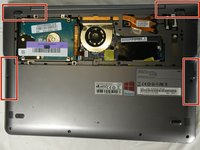
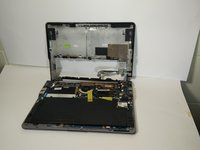
    3. Samsung Series 5 Ultrabook RAM Replacement, Remove the Back Cover: step 3, image 1 of 2 Samsung Series 5 Ultrabook RAM Replacement, Remove the Back Cover: step 3, image 2 of 2
      • There are clips along the edges of the back cover that hold it in place. Be careful not to break these.

      • Remove the entire rest of the back cover.

      Ask FixBot

      Add Comment

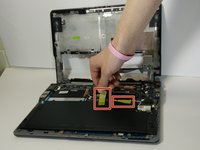
    4. Samsung Series 5 Ultrabook RAM Replacement: step 4, image 1 of 2 Samsung Series 5 Ultrabook RAM Replacement: step 4, image 2 of 2
      • Remove the tape holding the wires in place.

      Ask FixBot

      Add Comment

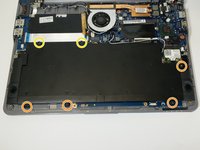
    5. Samsung Series 5 Ultrabook RAM Replacement: step 5, image 1 of 1
      • Remove the following Phillips 00 screws securing the battery:

      • Four 4.5 mm screws

      • Two 6.7 mm Phillips screws

      Ask FixBot

      Add Comment

    6. Samsung Series 5 Ultrabook RAM Replacement, Remove the Battery: step 6, image 1 of 1
      • Pull the battery connector towards the battery to disconnect it.

      Ask FixBot

      Add Comment

    7. Samsung Series 5 Ultrabook RAM Replacement: step 7, image 1 of 1
      • Remove the battery from the laptop.

      Ask FixBot

      Add Comment

    1. Samsung Series 5 Ultrabook RAM Replacement, RAM: step 8, image 1 of 3 Samsung Series 5 Ultrabook RAM Replacement, RAM: step 8, image 2 of 3 Samsung Series 5 Ultrabook RAM Replacement, RAM: step 8, image 3 of 3
      • Use a spudger (or your fingers) to unhinge the left and right clips holding the RAM in place.

      Ask FixBot

      Add Comment

    2. Samsung Series 5 Ultrabook RAM Replacement: step 9, image 1 of 1
      • Carefully remove the RAM when both tabs have been fully disengaged.

      Ask FixBot

      Add Comment

Conclusion

To reassemble your device, follow these instructions in reverse order.

Cancel: I did not complete this guide.

3 other people completed this guide.

Javier Jimenez

Member since: 11/04/19

223 Reputation

2 Guides authored

Team

IUPUI, Team S1-G6, Harley Fall 2019 Member of IUPUI, Team S1-G6, Harley Fall 2019

IUPUI-HARLEY-F19S1G6

3 Members

17 Guides authored

0 Guide Comments

Add Comment

View Statistics:

Past 24 Hours: 0

Past 7 Days: 9

Past 30 Days: 35

All Time: 2,087