Shop the Holiday Gift Guide
Free Shipping on Domestic Orders $75+

Samsung Galaxy Tab A 10.1 Speaker Replacement

Views: 5.9K

View statistics:

Past 24 Hours:
2
Past 7 Days:
19
Past 30 Days:
112
All Time:
5,860
Comments: 20

18 comments on steps, 2 guide comments.

Go to guide comments
Completed: 2

2 people have marked this guide "completed." Will you be next?

Favorites: 0

No one has favorited (and subscribed to) this guide. Will you be the first?

Time Required: 2 minutes
Difficulty: Easy
Samsung Galaxy Tab A 10.1 Speaker Replacement

Introduction

Go to step 1 ↓

If there is no sound coming from your speakers, this guide will instruct you on how to replace the speakers.

What you need

Parts

Tools

    1. Samsung Galaxy Tab A 10.1 Speaker Replacement, Back Panel: step 1, image 1 of 2 Samsung Galaxy Tab A 10.1 Speaker Replacement, Back Panel: step 1, image 2 of 2
      • Have the front of the device facing you.

      • Begin near one of the curved edges of the device (see photo two for visual example).

      • Place a plastic opening tool between the front and back panels.

      • If a plastic opening tool doesn’t work, using a metal spudger may work, but it may damage the plastic on the device.

      • Remember to remove the micro SD card (if present) before you begin.

      Ask FixBot

      Add Comment

    2. Samsung Galaxy Tab A 10.1 Speaker Replacement: step 2, image 1 of 2 Samsung Galaxy Tab A 10.1 Speaker Replacement: step 2, image 2 of 2
      • Once the plastic opening tool is fully inserted, wedge it around the device’s edges to separate the panels.

      • Lift the back panel off of the device.

      • The back panel will make a clicking noise while being lifted off of the device.

      Ask FixBot

      Add Comment

    1. Samsung Galaxy Tab A 10.1 Speaker Replacement, Disconnecting the battery: step 3, image 1 of 1
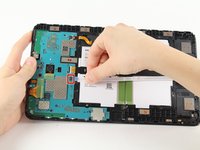
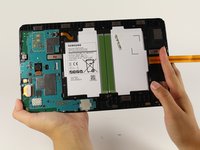
      • Remove the adhesive film and flip up the retaining flap on the ZIF battery connector.

      • Slide the orange battery ribbon cable out of the ZIF connector.

      Ask FixBot

      Add Comment

    2. Samsung Galaxy Tab A 10.1 Speaker Replacement: step 4, image 1 of 2 Samsung Galaxy Tab A 10.1 Speaker Replacement: step 4, image 2 of 2
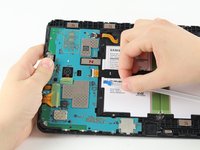
      • Remove the adhesive film, lift the retaining tab and withdraw the white speaker ribbon.

      Ask FixBot

      Add Comment

    3. Samsung Galaxy Tab A 10.1 Speaker Replacement: step 5, image 1 of 3 Samsung Galaxy Tab A 10.1 Speaker Replacement: step 5, image 2 of 3 Samsung Galaxy Tab A 10.1 Speaker Replacement: step 5, image 3 of 3
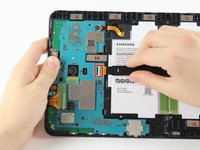
      • Lift the retaining tab and withdraw the black LCD ribbon.

      Ask FixBot

      Add Comment

    4. Samsung Galaxy Tab A 10.1 Speaker Replacement, Battery removal: step 6, image 1 of 2 Samsung Galaxy Tab A 10.1 Speaker Replacement, Battery removal: step 6, image 2 of 2
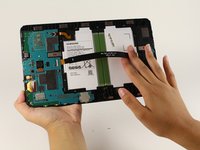
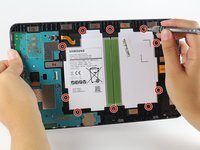
      • Using a Phillips #000 screwdriver, remove the ten 4 mm screws around the battery.

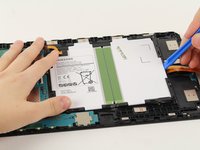
      • Slide a plastic opening tool under the bottom of the battery close to the speakers and lift up.

      • The large rectangular white and black piece is the entire battery. Be careful not to puncture it.

      Ask FixBot

      Add Comment

    1. Samsung Galaxy Tab A 10.1 Speaker Replacement, Speaker: step 7, image 1 of 1
      • Use Phillips # 000 to remove the 4 mm .3 cm screw on each speaker.

      • If you encounter a stripped screw, see iFixit’s guide on how to remove it here.

      Ask FixBot

      Add Comment

    2. Samsung Galaxy Tab A 10.1 Speaker Replacement: step 8, image 1 of 1
      • Place the plastic opening tool on the edge of the speaker.

      • Lodge the plastic opening tool under each speaker and lift them up and out of the device.

      Ask FixBot

      Add Comment

Conclusion

To reassemble your device, follow these instructions in reverse order.

Cancel: I did not complete this guide.

2 other people completed this guide.

Author

with

Isabella Li

Member since: 10/02/17

2,496 Reputation

7 Guides authored

Team

Cal Poly, Team S15-G6, Livingston Fall 2017 Member of Cal Poly, Team S15-G6, Livingston Fall 2017

CPSU-LIVINGSTON-F17S15G6

4 Members

84 Guides authored

2 Guide Comments

Where is a good place to buy the replacement speaker?

Max Alberts - Reply Share

Where is a good place to buy a speaker?

Max Alberts - Reply Share

Add Comment

View Statistics:

Past 24 Hours: 2

Past 7 Days: 19

Past 30 Days: 112

All Time: 5,860