Introduction
If your Samsung Galaxy Note Pro 12.2 tablet is damaged you might need to replace the front-facing camera. Symptoms of a damaged camera are blurry and unclear images, a black screen for the front view, or error messages.
This guide explains how to replace the front-facing camera on your Samsung Galaxy Note Pro 12.2 tablet. The front facing camera is used for taking pictures and handling videos and video calls.
Make sure to power off the device completely and unplug any connections before starting this guide.
What you need
-
-
-
Tool used on this step:Tweezers$4.99
-
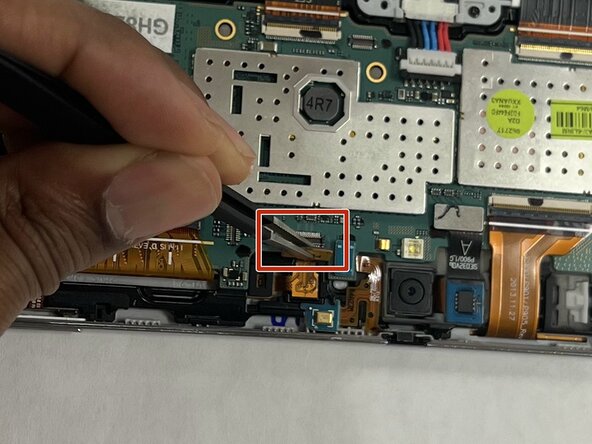
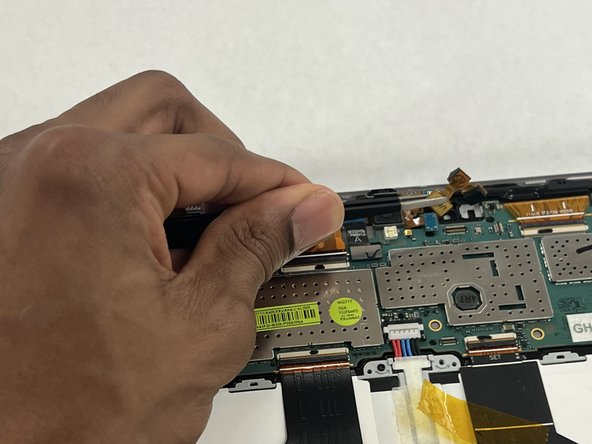
Place a spudger or an opening tool under the edge of the camera and pry straight up to disconnect it.
-
Remove the front facing camera using the tweezers.
-


 Ask FixBot



To reassemble your device, follow these instructions in reverse order. Take your e-waste to an R2 or e-Stewards certified recycler.

Team

IUPUI, Team 2-2, Harley Spring 2023 Member of IUPUI, Team 2-2, Harley Spring 2023
IUPUI-HARLEY-S23S2G2
3 Members
36 Guides authored
