Shop the Holiday Gift Guide
Free Shipping on Domestic Orders $75+

Philips Sonicare DiamondClean Metal Brush Connector Replacement

Views: 28K

View statistics:

Past 24 Hours:
9
Past 7 Days:
137
Past 30 Days:
580
All Time:
28,300
Comments: 19

10 comments on steps, 9 guide comments.

Go to guide comments
Completed: 11

11 people have marked this guide "completed." Will you be next?

Favorites: 5

5 people have favorited (and subscribed to) this guide. Will you be next?

Time Required: 1 hour
Difficulty: Moderate
Incorrect Tools

Help make this guide better by using the correct tools in images and/or text.

Better Introduction

Improve this guide by completing or revising its introduction.

Philips Sonicare DiamondClean Metal Brush Connector Replacement

What you need

Parts

Tools

    1. Philips Sonicare DiamondClean Metal Brush Connector Replacement, Case Replacement: step 1, image 1 of 2 Philips Sonicare DiamondClean Metal Brush Connector Replacement, Case Replacement: step 1, image 2 of 2
      • Pull the head from toothbrush.

      Ask FixBot

      Add Comment

    2. Philips Sonicare DiamondClean Metal Brush Connector Replacement: step 2, image 1 of 2 Philips Sonicare DiamondClean Metal Brush Connector Replacement: step 2, image 2 of 2
      • Use a nylon spudger to pry the chrome cap at the bottom off.

      Ask FixBot

      Add Comment

    3. Philips Sonicare DiamondClean Metal Brush Connector Replacement: step 3, image 1 of 1
      • Use a nylon spudger to release the black tabs on either side of internals.

      Ask FixBot

      Add Comment

    4. Philips Sonicare DiamondClean Metal Brush Connector Replacement: step 4, image 1 of 2 Philips Sonicare DiamondClean Metal Brush Connector Replacement: step 4, image 2 of 2
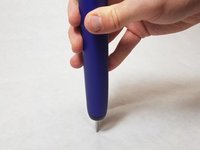
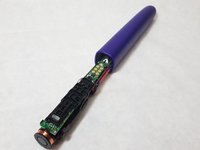
      • Put the metal head on a solid surface with handle perpendicular to the surface. Firmly, yet gently, push down until the internals start to slide out.

      Ask FixBot

      Add Comment

    1. Philips Sonicare DiamondClean Metal Brush Connector Replacement, Metal Brush Connector Replacement: step 5, image 1 of 1
      • Use a Phillips screwdriver to remove the screw at the base of the metal head.

      Ask FixBot

      Add Comment

    2. Philips Sonicare DiamondClean Metal Brush Connector Replacement: step 6, image 1 of 1
      Tool used on this step:
      Tweezers
      $4.99
      Buy
      • Use fine tip tweezers to push the white plastic tabs in to release the head from the innards.

      Ask FixBot

      Add Comment

    3. Philips Sonicare DiamondClean Metal Brush Connector Replacement: step 7, image 1 of 1
      • Gently pull the metal head from the innards.

      Ask FixBot

      Add Comment

Conclusion

To reassemble your device, follow these instructions in reverse order.

Cancel: I did not complete this guide.

11 other people completed this guide.

Author

with

Zachary Bertrand

Member since: 11/20/17

1,143 Reputation

3 Guides authored

Team

IUPUI, Team S22-G1, Bayer Fall 2017 Member of IUPUI, Team S22-G1, Bayer Fall 2017

IUPUI-BAYER-F17S22G1

4 Members

36 Guides authored

9 Guide Comments

Great guide - but where is a good source for replacement parts?

Christian Zischek - Reply Share

Ordered replacement part, came within 3 days at ebay. Didn’t have to replace the soft rubber inlet parts, only the connector.

Piece of cake, exchange of battery seems more labourous, but the brush still works for two weeks, so we postpone this job.

Emilio - Reply Share

Gut beschrieben, aber wo bekomme ich eine neue Antriebsachse?

Beste Grüße - pechi606

Walter P - Reply Share

Z.B. direkt aus China : ebay

VauWeh - Reply Share

Great post, thank-you. One question: My toothbrush has a wire loop around the head. The loop is soldered to the circuit board. Do you know what that wire is for? Cheers!

tim belina - Reply Share

Add Comment

View Statistics:

Past 24 Hours: 9

Past 7 Days: 137

Past 30 Days: 580

All Time: 28,300