Introduction
I will be showing you how to remove, and replace the WiFi card in your Dell latitude E6400. The entire process shouldn't take more than 10 minutes, as only 2 screws need to be removed to remove the card.
What you need
-
-
-
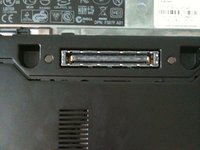
Simultaneously slide the battery latches (outlined by the red box) to the dock connector in the middle.
-
This will release the battery. Just slide the battery away from the computer.
-
Open up the computer and press and hold the power button for 5 seconds. This drains any power left inside the computer.
-
This is important, as if electricity remains in the notebook, it can shock you and damage the logic board.
 Ask FixBot
-
-
-
Loosen the center screw with a philips screw driver. This is the only screw that needs to be loosened.
-
It can't be removed as it is captive the the bottom plate.
-
Now slide the plate away from the dock connector.
-
-
-
Use a plastic opening tool or a spudger to remove the antennas.
-
I use my fingers, but the picture shows and iPod opening tool because most adults have bigger fingers.
-
I'm 14, so my fingers are small enough.
-
-
-
-
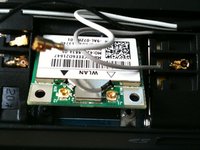
The card should instantly pop to an angle less than 45 degrees once the screw is removed.
-
Now simply pull the card strait away from the slot.
-
Install a new card by sliding it in the direction of the arrow and pressing firmly down until it clicks.
-
-
-
Slide the bottom plate on.
-
Slide it to the rear of the notebook. (battery compartment)
-
Tighten the screw.
-
Do not over-tighten. Doing so will strip the screw.
-
-






To reassemble your device, follow these instructions in reverse order.
Cancel: I did not complete this guide.
12 other people completed this guide.
1 Guide Comment
Why is your soundcloud linked as the wifi card site. It is really not appropriate considering how great of a job you did with the instructions for this repair.
