Introduction
For the official iFixit guide, follow this link.
This guide takes some time to complete and will not void your OnePlus 5's warranty. It is recommended to store the screws and parts together with their corresponding step in the guide to lower the chance of lost parts. No special skills are required for this guide.
What you need
-
-
-
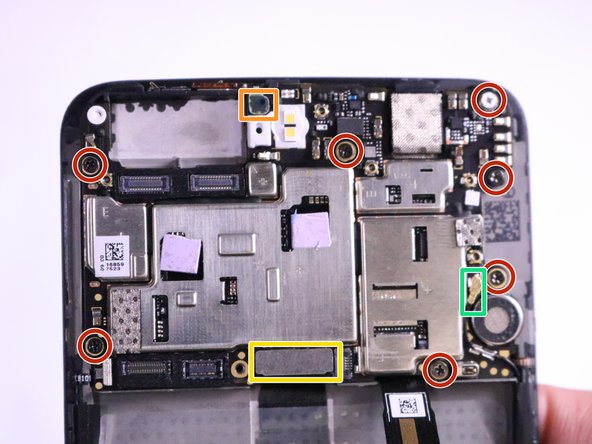
Remove the seven 1mm Phillips #0 screws by rotating screwdriver counter clockwise.
-
Remove the earpiece speaker connector located on the top of the motherboard using a nylon spudger by prying underneath it.
-
Remove the LCD screen connector located on the bottom of the motherboard using a nylon spudger by prying underneath it.
-
Disconnect the antenna wire located on the right side of the motherboard using a nylon spudger by prying underneath it.
 Ask FixBot
-
-
-
-
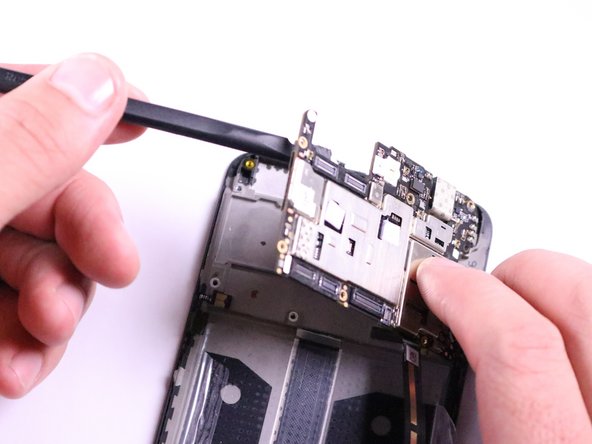
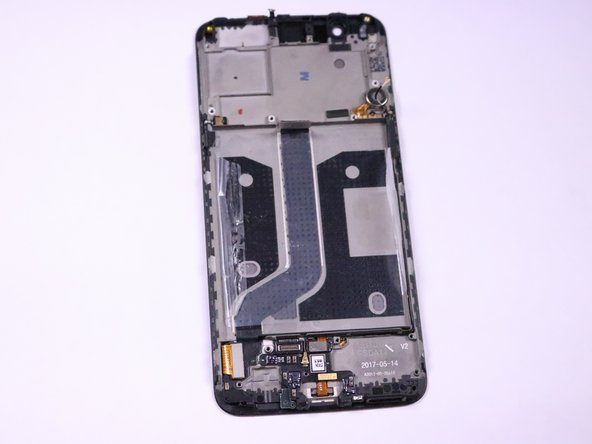
Remove the motherboard by gently pushing the spudger underneath upper right hand corner of the motherboard and prying it out.
-
-






To reassemble your device, follow these instructions in reverse order.

Team

Cal Poly, Team S19-G1, Livingston Winter 2018 Member of Cal Poly, Team S19-G1, Livingston Winter 2018
CPSU-LIVINGSTON-W18S19G1
4 Members
60 Guides authored
