Shop the Holiday Gift Guide
Free Shipping on Domestic Orders $75+

OVNS Firework e-Liquid Level Indicator Reset

Views: 68

View statistics:

Past 24 Hours:
4
Past 7 Days:
34
Past 30 Days:
68
All Time:
68
Comments: 2

2 comments on steps.

Completed: 0

No one has marked this guide "completed." Will you be the first?

Favorites: 0

No one has favorited (and subscribed to) this guide. Will you be the first?

Time Required: 10 minutes
Difficulty: Moderate
Community-Contributed Guide

An awesome member of our community made this guide. It was not created by iFixit staff.

OVNS Firework e-Liquid Level Indicator Reset

Introduction

Go to step 1 ↓

One annoyance of refilling one-time-use vapes is that the e-liquid level indicator remains at zero even when you've refilled it.

Fortunately, with the OVNS Firework it is relatively easy to reset the counter to 100% so you can again judge how much e-liquid remains.

This technique requires a small amount of soldering, so if that's out of your comfort zone, you'll have to settle for continuing to see the counter reading zero.

Note that even though the refill and coil rebuild procedures for the Geek Bar Pulse X are virtually identical to the OVNS Firework, this reset procedure does not work on the Pulse X.

What you need

Tools

    1. OVNS Firework e-Liquid Level Indicator Reset, Remove the Mouthpiece: step 1, image 1 of 2 OVNS Firework e-Liquid Level Indicator Reset, Remove the Mouthpiece: step 1, image 2 of 2
      • Grasp the mouthpiece with a pair of pliers.

      • Give it a good, solid twist, left or right doesn't matter.

      • The pliers won't damage the silicone coating on the mouthpiece, but faint marks may be visible.

      Ask FixBot

      Add Comment

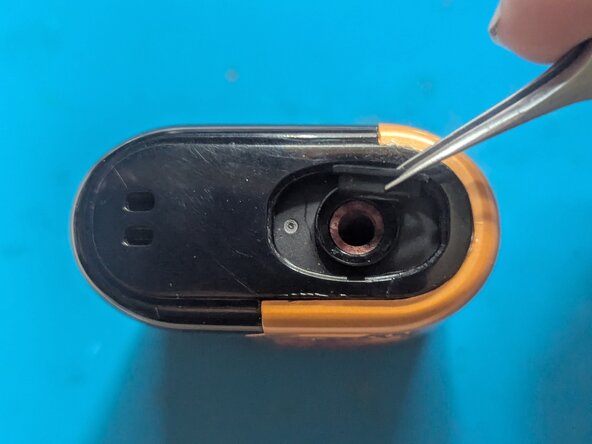
    2. OVNS Firework e-Liquid Level Indicator Reset, The Mouthpiece Seal: step 2, image 1 of 3 OVNS Firework e-Liquid Level Indicator Reset, The Mouthpiece Seal: step 2, image 2 of 3 OVNS Firework e-Liquid Level Indicator Reset, The Mouthpiece Seal: step 2, image 3 of 3
      • If the mouthpiece seal came off with the mouthpiece, good, because you'll need to take it off anyway.

      • Use your tweezers to take out the seal and set it aside.

      • The rim around the top goes toward the mouthpiece.

      Ask FixBot

      Add Comment

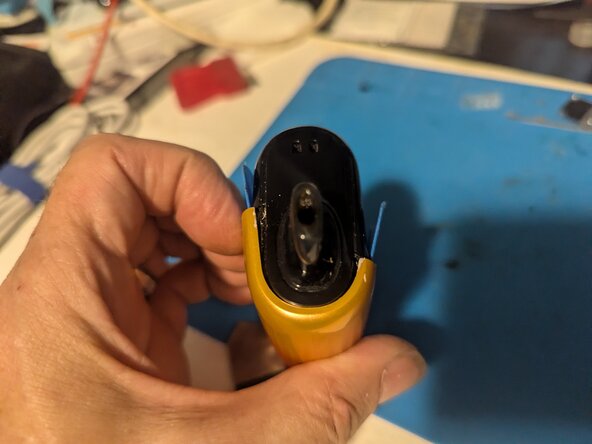
    3. OVNS Firework e-Liquid Level Indicator Reset, Replacing the Mouthpiece: step 3, image 1 of 2 OVNS Firework e-Liquid Level Indicator Reset, Replacing the Mouthpiece: step 3, image 2 of 2
      • Note that the mouthpiece has a tab that only allows it to be mounted in one orientation. The arrow here points to the one you'll need to match up with on the case.

      • Here you can see inside the case where the tab on the mouthpiece lines up.

      Ask FixBot

      Add Comment

    4. OVNS Firework e-Liquid Level Indicator Reset, Remove the Power Button: step 4, image 1 of 3 OVNS Firework e-Liquid Level Indicator Reset, Remove the Power Button: step 4, image 2 of 3 OVNS Firework e-Liquid Level Indicator Reset, Remove the Power Button: step 4, image 3 of 3
      • Turn the power switch to the Off position; no air holes should be visible.

      • Use your opening tool to lever the power button up. It is only pressed on; there are no adhesives or clips to deal with.

      • Remove the power button.

      Ask FixBot

      Add Comment

    5. OVNS Firework e-Liquid Level Indicator Reset, Remove the rear cover: step 5, image 1 of 2 OVNS Firework e-Liquid Level Indicator Reset, Remove the rear cover: step 5, image 2 of 2
      • The rear cover (the colored part) is clipped on, but the clips are tricky to undo. Start with the top edge and pry it up with your metal opening tool.

      • In the gap you can now see on the side, slip in an opening pick to keep it open.

      Ask FixBot

      Add Comment

    6. OVNS Firework e-Liquid Level Indicator Reset: step 6, image 1 of 2 OVNS Firework e-Liquid Level Indicator Reset: step 6, image 2 of 2
      • Now repeat the previous step on the bottom corner of the cover.

      Ask FixBot

      Add Comment

    7. OVNS Firework e-Liquid Level Indicator Reset: step 7, image 1 of 2 OVNS Firework e-Liquid Level Indicator Reset: step 7, image 2 of 2
      • Flip the vape over and pry up the bottom corner of the cover.

      • Add an opening pick.

      Ask FixBot

      Add Comment

    8. OVNS Firework e-Liquid Level Indicator Reset: step 8, image 1 of 2 OVNS Firework e-Liquid Level Indicator Reset: step 8, image 2 of 2
      • Finally, the upper corner gets the same treatment.

      • Aaand, one final pick.

      Ask FixBot

      Add Comment

    9. OVNS Firework e-Liquid Level Indicator Reset: step 9, image 1 of 2 OVNS Firework e-Liquid Level Indicator Reset: step 9, image 2 of 2
      • There are also internal clips along the rear side that are still holding the cover in place. It just takes a bit of force to pop it off. Grasp the long edge of the cover and pull hard.

      • With that, the cover is off.

      Ask FixBot

      Add Comment

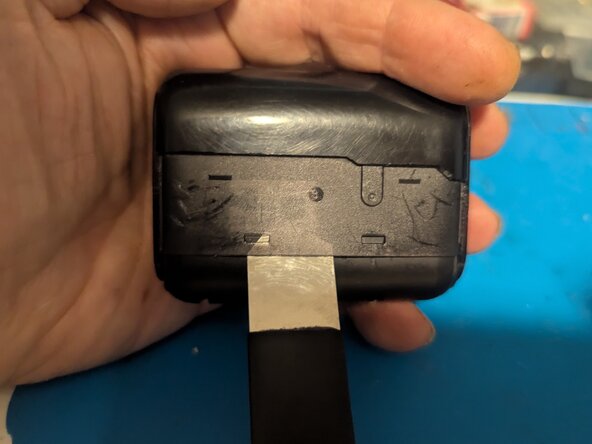
    10. OVNS Firework e-Liquid Level Indicator Reset, Remove the front cover: step 10, image 1 of 2 OVNS Firework e-Liquid Level Indicator Reset, Remove the front cover: step 10, image 2 of 2
      • Insert an opening pick in one side of the front cover to disengage the two latching tabs on that side.

      • Insert it far enough to be seen through the rectangular cutouts for the tabs.

      Ask FixBot

      Add Comment

    11. OVNS Firework e-Liquid Level Indicator Reset: step 11, image 1 of 3 OVNS Firework e-Liquid Level Indicator Reset: step 11, image 2 of 3 OVNS Firework e-Liquid Level Indicator Reset: step 11, image 3 of 3
      • On the other side, insert your pry tool.

      • Lever the tool up to both free the tabs and slide the vape out of the front cover.

      Ask FixBot

      Add Comment

    12. OVNS Firework e-Liquid Level Indicator Reset: step 12, image 1 of 1
      • The front cover has been removed.

      Ask FixBot

      Add Comment

    13. OVNS Firework e-Liquid Level Indicator Reset, Disconnect the display ribbon cable: step 13, image 1 of 2 OVNS Firework e-Liquid Level Indicator Reset, Disconnect the display ribbon cable: step 13, image 2 of 2
      • Use the point of a spudger to flip up the retaining latch on the display's circuit board.

      Ask FixBot

      Add Comment

    14. OVNS Firework e-Liquid Level Indicator Reset: step 14, image 1 of 2 OVNS Firework e-Liquid Level Indicator Reset: step 14, image 2 of 2
      • Unplug the ribbon cable with a pair of tweezers.

      Ask FixBot

      Add Comment

    15. OVNS Firework e-Liquid Level Indicator Reset, Remove the housing: step 15, image 1 of 2 OVNS Firework e-Liquid Level Indicator Reset, Remove the housing: step 15, image 2 of 2
      • Start by inserting your pry tool in the bottom seam on one side. Separate the housing slightly.

      • Flip the vape over and pop the other side loose.

      • Do not attempt to pull the vape out of the top housing; the tank is only secured by the battery wires and you may damage them if you try. The next page will show you how to remove it.

      Ask FixBot

      Add Comment

    16. OVNS Firework e-Liquid Level Indicator Reset: step 16, image 1 of 3 OVNS Firework e-Liquid Level Indicator Reset: step 16, image 2 of 3 OVNS Firework e-Liquid Level Indicator Reset: step 16, image 3 of 3
      • Holding the vape upright, push the tank out of the cover. Locate the white absorbent pad visible in the air passage.

      • Press down on the pad.

      • Once enough of the tank is exposed, you can grasp that and pull the tank/battery/electronics assembly out.

      Ask FixBot

      Add Comment

    17. OVNS Firework e-Liquid Level Indicator Reset: step 17, image 1 of 1
      • The tank cover has been removed.

      Ask FixBot

      Add Comment

    1. OVNS Firework e-Liquid Level Indicator Reset, Separate the battery from the tank: step 18, image 1 of 2 OVNS Firework e-Liquid Level Indicator Reset, Separate the battery from the tank: step 18, image 2 of 2
      • Peel off the Kapton tape securing the battery to the fluid tank.

      Ask FixBot

      Add Comment

    2. OVNS Firework e-Liquid Level Indicator Reset, Separate the tank: step 19, image 1 of 2 OVNS Firework e-Liquid Level Indicator Reset, Separate the tank: step 19, image 2 of 2
      • With the battery freed, the tank can now be separated from the battery and circuit board.

      • Locate the seam between the tank seal and the lower case seal.

      • Separate the two seals.

      Ask FixBot

      Add Comment

    1. OVNS Firework e-Liquid Level Indicator Reset, Disconnect the battery: step 20, image 1 of 3 OVNS Firework e-Liquid Level Indicator Reset, Disconnect the battery: step 20, image 2 of 3 OVNS Firework e-Liquid Level Indicator Reset, Disconnect the battery: step 20, image 3 of 3
      • Apply a drop of flux to the negative battery connection.

      • Use your soldering iron to disconnect the wire.

      Ask FixBot

      Add Comment

    2. OVNS Firework e-Liquid Level Indicator Reset, Short the terminals: step 21, image 1 of 1
      • Use your metal tweezers to short the connection between the negative and positive battery connections on the circuit board. This will drain any residual current and clear the liquid level indicator.

      Ask FixBot

      Add Comment

    3. OVNS Firework e-Liquid Level Indicator Reset, Reconnect the battery: step 22, image 1 of 2 OVNS Firework e-Liquid Level Indicator Reset, Reconnect the battery: step 22, image 2 of 2
      • Solder the negative battery wire back onto the circuit board.

      • The e-liquid level indicator has been reset to 100%.

      Ask FixBot

      Add Comment

Conclusion

To reassemble your device, follow these instructions in reverse order.

Of course, the whole point to this is that you're refilling your OVNS Firework vape, so now it's time to use the refill guide and top up the tank.

OVNS Firework Refill Technique - iFixit Repair Guide

Cancel: I did not complete this guide.

Jerry Wheeler

Member since: 03/21/22

103,304 Reputation

97 Guides authored

0 Guide Comments

Add Comment

View Statistics:

Past 24 Hours: 4

Past 7 Days: 34

Past 30 Days: 68

All Time: 68